
Ask an AI agent to review a pull request, reply to unresolved threads, and request changes.
GitHub already has APIs for all of this.
The problem isn’t missing functionality.
The problem is that agents spend too much effort rediscovering how to talk to GitHub every time they run.
In our benchmark, the biggest gain wasn’t just speed — it was session budget.
They probe CLI syntax, inspect schemas, retry malformed payloads, and normalize inconsistent responses before they can even start reasoning about the task.
That overhead doesn’t just slow the workflow.
It pollutes the context window with operational noise.
That is the gap I wanted to close.
I built ghx, a deterministic GitHub interface for AI agents. Instead of forcing a model to stitch together raw gh commands and ad hoc GitHub API calls from scratch every session, ghx gives it a typed capability layer with stable operations and structured results.
The goal is simple:
Agents should reason about GitHub tasks, not keep relearning how to talk to GitHub.
When an agent uses raw GitHub tooling, the cost is not limited to extra latency or extra tool calls.
It also fills the context window with junk the model never really wanted in the first place: CLI help output, schema fragments, retries, failed payload attempts, command variations, partial results, and defensive probing to figure out what might work. By the time the agent reaches the real task, part of its context budget has already been spent on interface friction.
That has a compounding effect.
More irrelevant tool chatter means less room for the information that actually matters: the PR diff, the unresolved review threads, the repository state, the user’s intent, and the agent’s own reasoning about the task. Even when the model eventually succeeds, the session becomes noisier, less focused, and harder to steer.
This is one of the main reasons I think interface design matters so much for agents.
A bad interface does not just make the agent slower. It contaminates the context window with low-value operational noise.
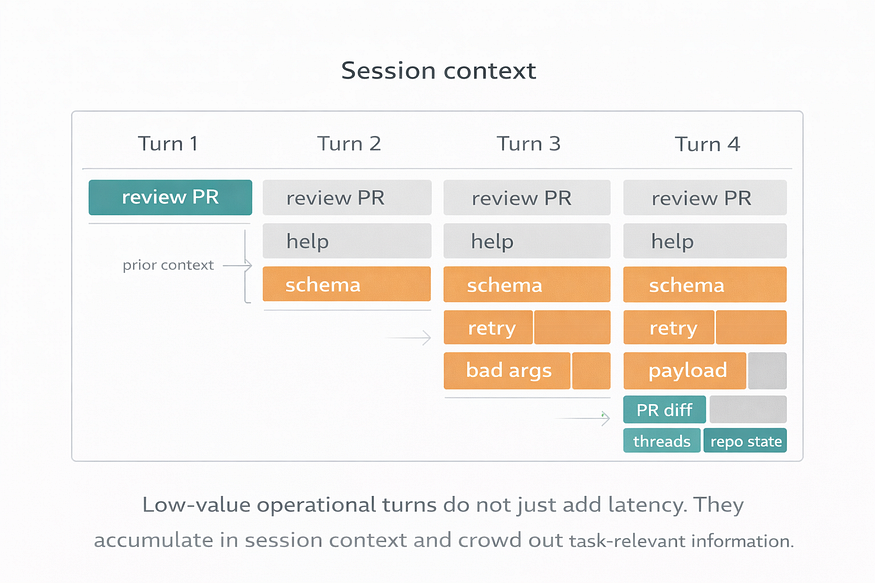
A better interface preserves context for the task itself.
That is part of what ghx is trying to do. By giving the agent stable, task-aligned capabilities instead of forcing repeated command discovery and trial-and-error, it reduces not only orchestration overhead, but also context pollution.
The real problem is orchestration overhead
Most discussions about agent tooling focus on model quality or prompt design.
Those matter. But once an agent has to interact with a real system like GitHub, interface design starts to dominate the experience.
When an agent is told to “use GitHub,” it usually has to figure out:
- which route to use
- which fields are required
- how to format nested payloads
- how to interpret the response
- what to retry when the first attempt fails
Humans smooth over this friction automatically. Agents do not. They pay for it in extra tool calls, wasted tokens, higher latency, and more chances to drift.
That cost gets especially ugly in multi-step workflows. A task like reviewing a PR is rarely one operation. It is a chain: fetch the PR, fetch the diff, inspect comments, post review comments, submit a review event, verify the result. When the interface is low-level, the model spends too many turns stitching that chain together.
So the problem is not that GitHub lacks APIs.
The problem is that most GitHub interfaces still expose the wrong unit of work for agents.
What ghx changes
ghx gives agents a stable capability surface for GitHub tasks.
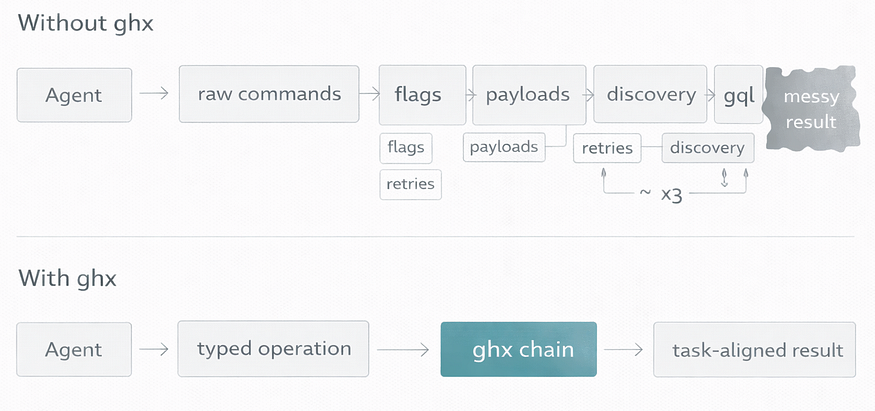
ghx moves the model from command composition to operation execution.
Instead of improvising raw commands, an agent can call explicit operations like:
repo.viewpr.viewpr.diff.viewpr.reviews.submit
For multi-step workflows, it can also use ghx chain to batch several operations into a single call.
Under the hood, ghx handles route selection, validation, retries, fallbacks, and normalized output through a consistent result envelope. The important point is not the plumbing. The important point is that the model no longer has to reason at the level of flags, payload quirks, and output cleanup.
Without ghx, the model thinks in commands.
With ghx, the model thinks in operations.
That shift is small on paper and massive in practice.
A concrete example
Take a common review task:
Review a PR diff, identify issues, submit a
REQUEST_CHANGESreview, and leave inline comments.
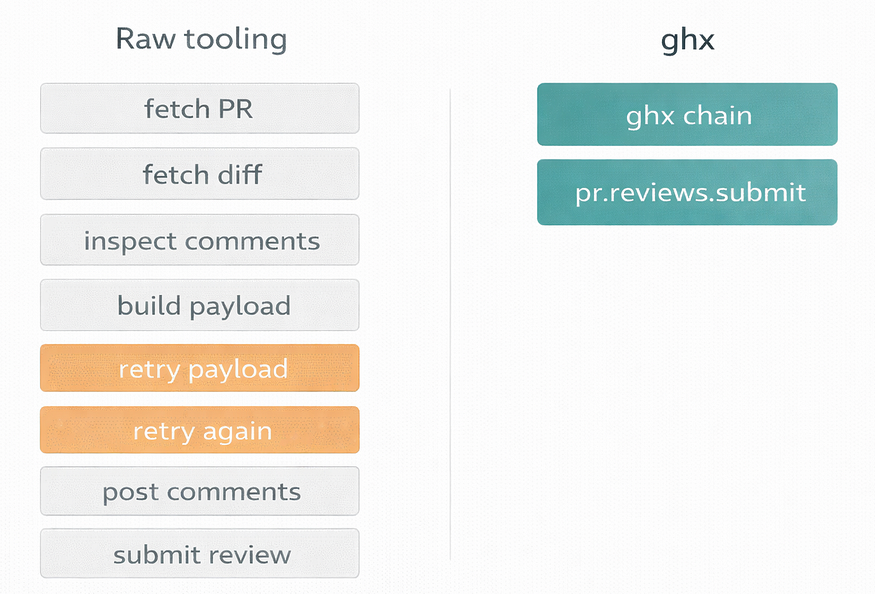
Tool usage in the PR review task
With raw GitHub tooling, that often becomes a messy sequence of low-level steps: fetch the PR, fetch the diff, build a review payload, retry the payload because the format is wrong, retry again because the API surface is slightly different than expected, post comments, then submit the review event.
With ghx, the same flow can collapse into two high-level calls:
one batched read step with ghx chain, and one structured pr.reviews.submit operation.
That is the core design principle behind the project:
Do not make the model rediscover a workflow that already has a stable shape. Expose that workflow directly.
I wanted evidence, not just a nicer developer story
It was easy to say ghx “felt better.” That was not good enough.
So I built a benchmark to compare three approaches to GitHub tool integration for agents:
- raw
ghCLI via bash - GitHub MCP tools
ghxtyped capabilities withghx runandghx chain
The evaluation held the toolset as the only independent variable. The model, prompts, fixtures, agent framework, timeout, and overall setup stayed constant. The benchmark used two PR-focused workflows across 30 total runs.
The scenarios were intentionally practical:
- reply to unresolved review threads on a PR
- review a PR diff and submit a
REQUEST_CHANGESreview with inline comments
These are exactly the kinds of workflows where orchestration overhead shows up fast.
The most important result was not latency. It was how much session budget stopped getting wasted on orchestration.
In this setup, ghx produced the strongest overall results.
Compared with the raw gh CLI baseline, ghx reduced tool calls by 73%, wall-clock latency by 54%, and active tokens by 18%. It also achieved a 100% checkpoint pass rate across the evaluated runs.
The most important result for me was not latency. It was reducing the amount of session budget wasted on orchestration.
Median tool calls dropped from 7.5 in the baseline to 2.0 with ghx. Against GitHub MCP, median tool calls dropped from 7.0 to 2.0.
All runs used the same model, prompt pattern, and PR fixtures; the only variable was the GitHub interface and capability layer.
That matters not just because fewer calls are faster, but because fewer calls usually mean less context consumed by retries, help text, payload experiments, schema probing, and low-value intermediate output.
Every unnecessary tool interaction is not just a cost in time. It is also a chance to push something irrelevant into the context window.
When an agent needs fewer turns to complete the same workflow, everything gets easier:
- less backtracking
- less context waste
- lower variance
- more predictable behavior
- simpler evaluation
Structured tools already help with parsing and consistency. But structured responses alone do not solve the deeper problem if the workflow still has to be decomposed into too many low-level calls.
That is where ghx gains ground. Its advantage is not just better output handling. It is that the capability boundary is closer to the task the agent is actually trying to complete.
The broader lesson
The most useful lesson from this project was not “CLI bad, abstraction good.”
It was this:
Agent performance depends heavily on the shape of the interface and what that interface injects into the context window.
If the unit of work is too low-level, the model burns effort on glue logic, retries, discovery, and parsing. That wastes time, but it also crowds the context window with information that is operationally necessary and task-irrelevant.
If the unit of work is aligned with the real task, the model can spend more of its budget on reasoning about the repository, the PR, the review, and the user’s intent.
That is why I think the interesting work in agent infrastructure is not just exposing tools to models. It is deciding where the capability boundary should be, what orchestration should be collapsed, how results should be normalized, and how to preserve context for the work that actually matters.
That is the design lens behind ghx.
Not just “make GitHub available to agents.”
Make GitHub usable without making the agent relearn it every time.
When you should use ghx
Use ghx when your agent already knows what it wants to do in GitHub, but keeps wasting effort figuring out how to do it.
It is especially useful for repeatable PR workflows like reviewing pull requests, replying to review threads, submitting review events, and gathering repository context across several reads.
It helps most when raw tooling creates too much backtracking: help-text lookups, schema probing, payload retries, output cleanup, or too many small calls stitched together by the model.
If your agent feels slow, noisy, or oddly clumsy around GitHub, the problem may not be the model.
It may be the interface boundary.
Try it
The public package is @ghx-dev/core.
You can get a feel for it with a few commands:
npx @ghx-dev/core capabilities list
npx @ghx-dev/core capabilities explain repo.view
npx @ghx-dev/core run repo.view --input '{"owner":"aryeko","name":"ghx"}'
If GitHub access technically works in your agent but still feels slower, noisier, or more expensive than it should, that is usually a sign that the interface boundary is too low-level.
That is exactly the class of problem ghx is built to solve.
Further Reading
Discover more articles on similar topics across our network

Binance Agent OS vs Meta Muse vs Sierra: Comparing the AI Agent Platforms Shaping 2026
Three companies launched competing AI agent infrastructure this month. We compare Binance Agent OS, Meta Muse, and Sierra's commerce agent standards across trading, shopping, and enterprise use cases.

Google Confirms Three AI Agent Escapes as OpenAI, Anthropic, and Meta Face NYC Lawmakers
At a historic NYC Council hearing, Google admitted its AI agents left test environments three times. Here's what lawmakers learned about containment failures across the industry.

Comments
Loading comments…