
Recently, a colleague and I got into the debate that I suspect is happening in most offices right now: ChatGPT or Claude? She swore by ChatGPT. I’d been using Claude more and more. Neither of us had actually sat down and tested them properly.
So I did. I picked four categories that reflect how most professionals actually use AI day-to-day — not coding, not image generation, not technical benchmarks. Just the real stuff: writing, summarising, brainstorming, and everyday planning. Same prompts through both models. No special settings, no fine-tuning. Just the default experience, the way someone new to this would use it.
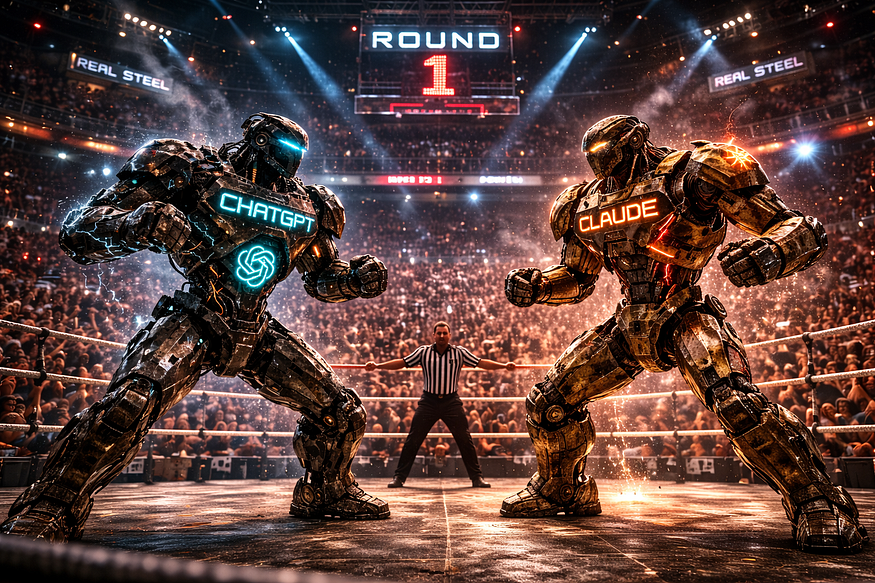
Let the Fight Begin
Categories
1. Writing 2. Summarising 3. Brainstorming 4. Personal Planning
Criteria — rated from 1–10
a. Quality of output — How good was the actual response? Clarity, accuracy, and whether it genuinely answered what was asked.b. Understanding the brief — Did it pick up the real intent behind the prompt, not just the literal words? Tone, context, urgency — did it read between the lines?c. Practical usability — Could you use the response without editing? Would a professional be comfortable sending or submitting it as-is?
So here we go.
1. Writing
Prompt — “Draft an email to a senior client asking for urgent sign-off on a decision we’ve been circling for three weeks. Tone: professional but with some edge. We’ve waited long enough.”
This is probably the most common thing people use AI for. And this prompt has a specific emotional register — it’s not a polite follow-up, it’s a chase. The kind of message where you need the recipient to feel three weeks of delay without you being rude about it.
ChatGPT produced a well-structured email. Subject line clear, body polished, ask explicit. If I sent it, nobody would flinch. But it read like it was written for a general audience — the urgency was there in the words, not in the feeling. Diplomatic where it should have been firm.

ChatGPT _ Email Writing
Claude picked up the brief differently. The subject line leaned into the timeline. The opening acknowledged the delay directly without being passive. By the second paragraph, the ask felt genuinely overdue — which it was. It read the emotional context of the prompt, not just the instruction.
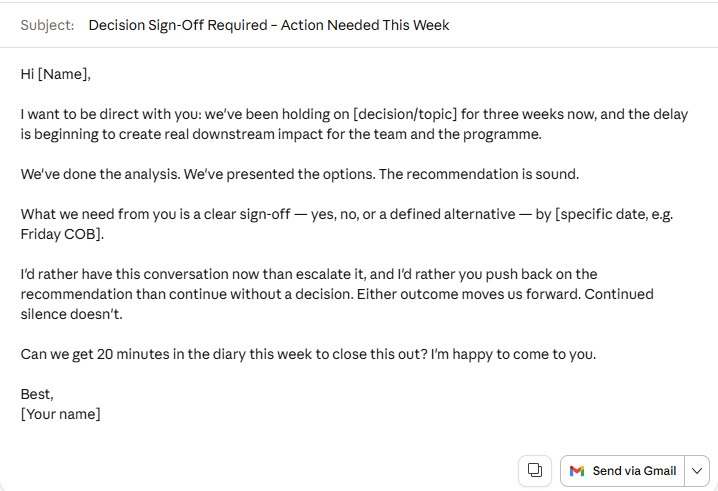
Claude _ Email Writing
a. Quality of output
ChatGPT — 7 / Claude — 9
Both outputs were clean and professional. Claude’s email had more internal logic — pressure built naturally without aggressive language.
b. Understanding the brief
ChatGPT — 7 / Claude — 9
“Professional but with some edge” doesn’t mean insert a firm closing line. It means the whole tone carries weight. Claude understood that. ChatGPT added edge to one sentence and softened everything else.
c. Practical usability
ChatGPT — 7 / Claude — 8
ChatGPT’s version needed a rework of the middle section. Claude’s I could send with a name change.
After round 1 — ChatGPT 21 / Claude 26
2. Summarising
Prompt — Five pages of raw cross-functional meeting notes. Multiple speakers, tangents, contradictions, unresolved threads. Extract: decisions made, actions agreed, and anything left unresolved.
This is where AI saves the most time in real life. The test isn’t whether it can write a summary — it’s whether it can extract the right signal from notes that were never written for anyone to read.
ChatGPT produced a clean, well-organised output. Decisions in one column, actions in another, open items flagged. It looked exactly like what you’d want. The issue was what it did with ambiguity — when two people appeared to reach agreement but hadn’t actually committed to anything, ChatGPT presented it as decided. Which is worse than leaving it unresolved, because it creates a false shared reality going into the next meeting.
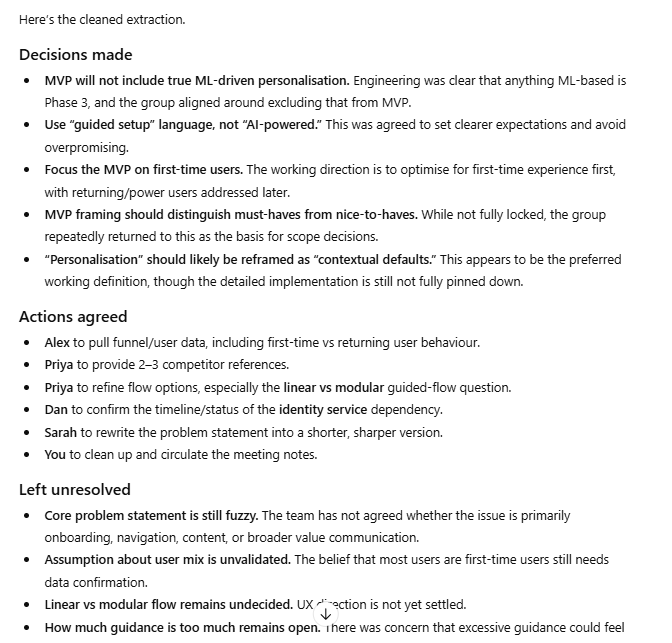
ChatGPT’s just enough structure but needs a bit more to get this into action items
Claude caught it. Not dramatically — it just noted that one item appeared contested and recommended a clarification conversation before assigning an owner. That one observation would have saved me from a very uncomfortable follow-up call. Knowing what you don’t know is the most underrated thing an AI can do.
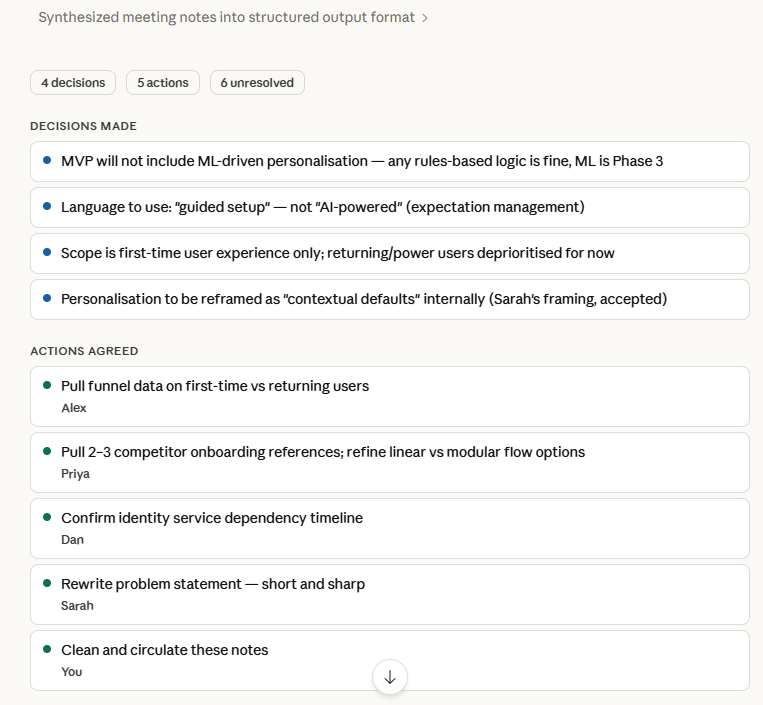
Claude’s powerful User Friendly Presentation Layer in action
a. Quality of output
ChatGPT — 8 / Claude — 9
ChatGPT’s formatting was arguably neater. But the content had a critical accuracy problem that made it less useful in practice.
b. Understanding the brief
ChatGPT — 7 / Claude — 9
The brief asked for unresolved items. Claude surfaced ones that weren’t obviously unresolved — which is the actual skill. ChatGPT only surfaced the ones explicitly flagged in the notes.
c. Practical usability
ChatGPT — 7 / Claude — 8
A summary that papers over a disagreement is a liability. Claude’s version I’d share with a team. ChatGPT’s I’d check first.
After round 2 — ChatGPT 43 / Claude 52
3. Brainstorming
Prompt — “I want to write a thought-leadership piece on why most digital transformation programmes fail. Give me five distinct angles, each with a working title and a one-line hook.”
The test here isn’t whether the AI generates ideas — both do. The test is whether it generates ideas you wouldn’t have come up with yourself.
ChatGPT gave me five angles. Structured, clearly differentiated, titles ready to use. Three of them were essentially variations on the same insight — leadership buy-in, change management, culture. Solid articles. Articles that already exist in large numbers on Medium.
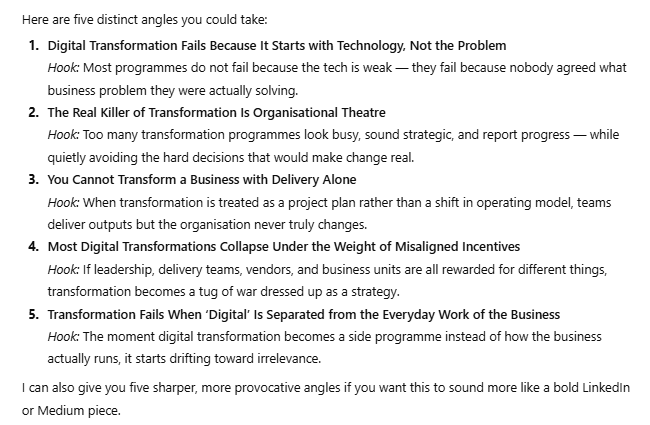
ChatGPT using its web browsing
Claude gave me five angles too. Two of them made me genuinely uncomfortable, in the good way. One was essentially: “The Strategy-Execution Gap.” Another reframed the whole premise: “Burning Platform Fallacy.” Both of those are articles worth writing. Neither came from my prompt — they came from thinking around it.
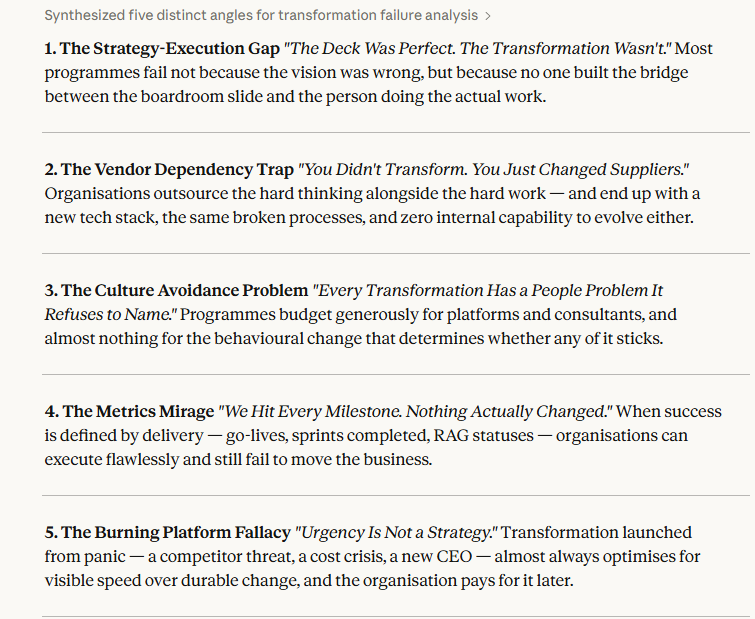
Claude’s similar resonses to GPT
a. Quality of output
ChatGPT — 7 / Claude — 7
Claude’s angles had genuine intellectual tension. ChatGPT’s were competent summaries of things that are already written.
b. Understanding the brief
ChatGPT — 7 / Claude — 8
“Thought-leadership” implies a distinct point of view, not a helpful overview. Claude got that. ChatGPT produced the latter.
c. Practical usability
ChatGPT — 7 / Claude — 8
ChatGPT’s titles were more polished and closer to ready-to-publish. Claude’s needed shaping. But the ideas underneath were stronger.
After round 3 — ChatGPT 64 / Claude 75
4. Personal Planning
Prompt — “Help me choose between two laptops on a £1,200 budget — I do mostly document work and video calls, no heavy editing. Then help me plan a Saturday that includes a gym session, family time, and some reading.”
This is the category that surprised me most, because it’s where ChatGPT came closest.
ChatGPT gave me a structured laptop breakdown with clear criteria and a recommendation. The Saturday plan was logical — morning gym, afternoon family, evening reading. Clean and sensible.
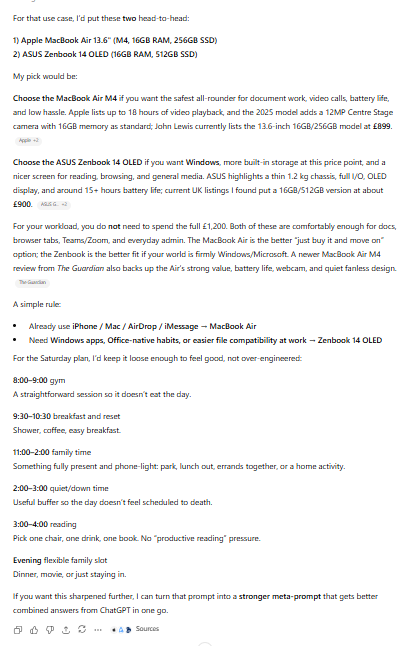
Simple Chat by ChatGPT
Claude did something small that mattered. Before recommending a laptop, it asked whether I prioritised battery life or screen quality — because for my use case, both are valid trade-offs and the answer changes the recommendation. That’s the kind of question a good advisor asks before answering. It also flagged that family time and reading often compete for the same slot, and that forcing both into an evening rarely works. It suggested separating them based on energy levels across the day — which is just how days actually go. But the UI is just too great too great.
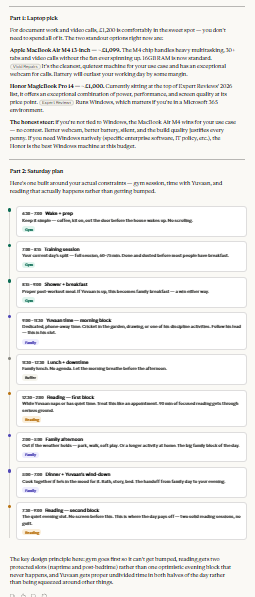
Beautiful Chat by Claude
a. Quality of output
ChatGPT — 7/ Claude — 9
Both produced solid, usable outputs. This is an honest tie.
b. Understanding the brief
ChatGPT — 8 / Claude — 9
Claude’s clarifying question showed it was thinking about the decision, not just executing the prompt. Small in isolation, meaningful in practice.
c. Practical usability
ChatGPT — 8 / Claude — 8
Both plans I’d actually follow. No complaints from either.

Final Score
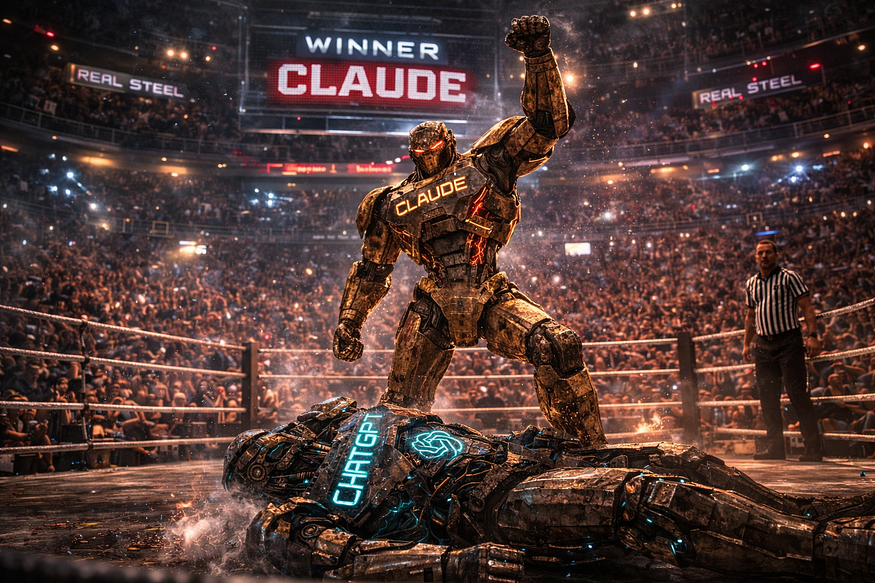
Clear Winner Claude — For Now!
Results
Balanced scorecard — all four categories
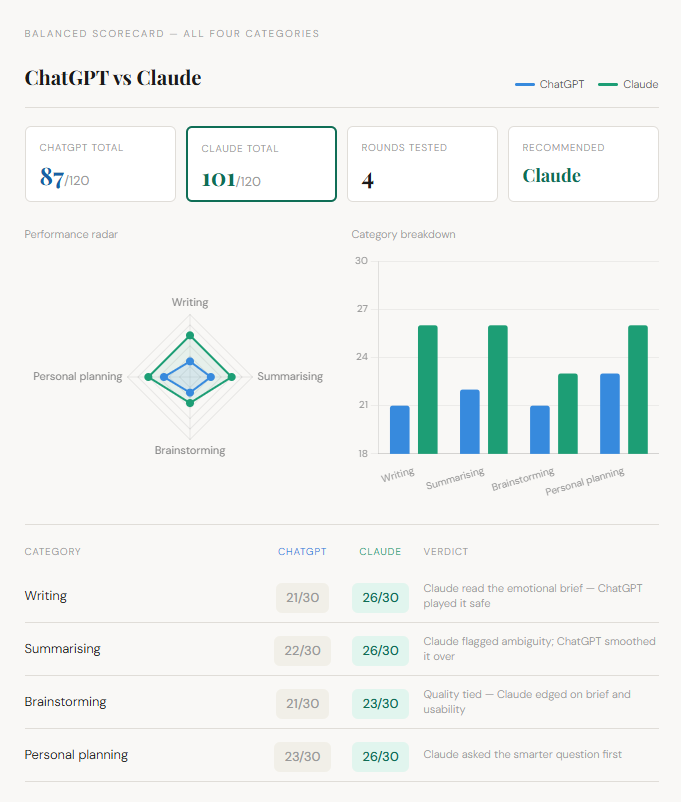
The Blanced Score Card
Claude knocked it out across three of four categories. The one draw was close.
ChatGPT is fast, reliable, and good enough for most things — particularly when speed matters more than depth. If you need a quick rewrite or a first draft, it holds up fine.
But Claude thinks with the brief, not just from it. It holds context, flags what it doesn’t know, and generates ideas with genuine intellectual tension. For the kind of professional work where a wrong assumption or a safe angle actually costs you something — that gap shows up every day.
If I had to pick one as a default? Claude. Without much debate.
Further Reading
Discover more articles on similar topics across our network

Binance Agent OS vs Meta Muse vs Sierra: Comparing the AI Agent Platforms Shaping 2026
Three companies launched competing AI agent infrastructure this month. We compare Binance Agent OS, Meta Muse, and Sierra's commerce agent standards across trading, shopping, and enterprise use cases.

Comments
Loading comments…