
A New Problem
This semester, in my machine learning course, I ran into a new problem.
Judging from the submitted work, students are more diligent than in previous years: their assignments are neatly formatted, the code runs, and the conclusions are presented logically. The problem is that more and more of what they submit no longer looks like work they did themselves.
After all, under my guidance, students have already learned how to use AI Agent tools. Trae, Cursor, Claude Code — any of them will do. Drop in a dataset, say, “Help me run through a machine learning workflow,” and a few minutes later everything from data cleaning to model evaluation is ready. The code is correct, the charts look good, and the conclusions are passable.
But at each step, some students choose to stop thinking.
Fortunately, my course has a detection mechanism: every class includes an offline defense. After the previous exercise or lab is completed, the students selected for commendation and spot checks, usually four of them, have to stand at the front of the room and explain their work. No laptop, no phone, no PPT. Just a marker in front of the whiteboard. Explain what problems you encountered, how you collaborated with AI, how you evaluated AI’s suggestions, and what the reasoning was for each step. Judging from last year’s actual results, this stage can block most cases of simply copying AI answers. If you did not understand something, you cannot explain it.
But this year, a new situation emerged. After students got AI’s output, they did not copy it directly. Instead, they spent time “digesting” it a little, rationalizing AI’s logic and turning it into a version they could explain. Standing in front of the whiteboard, they could describe the workflow quite convincingly. If you only watched the presentation, it was hard to spot the problem.
Luckily, I had prepared for this. The defense also includes a teacher follow-up question stage. For students who have not really thought it through, once you ask one level deeper, they start getting vague. This stage serves as the final safety net: it catches most cases of “memorizing enough to fake understanding.”
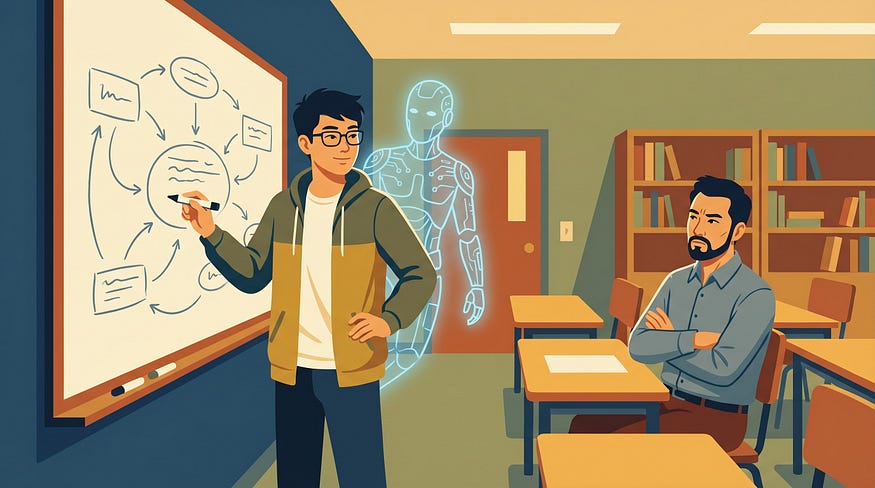
The problem is that the defense is an after-the-fact check. By the time follow-up questions reveal that a student did not truly understand, the learning opportunity in that exercise has already passed.
So I started wondering: could we move the thinking process forward into the moment when students are using AI? Not by banning AI, but by forcing the thinking process to be embedded inside AI’s workflow.
The Idea
Instead of repeatedly reminding students, “You cannot let AI do the work for you; you have to think for yourself,” we can take a different approach: make AI itself into a tool that guides thinking.
I built a Skill called ml-teaching-assistant. What is a Skill? In simple terms, it is a set of behavioral rules written for AI: what you should do in this task, what you must not do, and what you must do after each step. Once AI reads these rules, it is no longer an assistant that "does everything for you." It becomes a classroom teaching assistant with instructional awareness.
This Skill differs from ordinary AI programming assistants in three fundamental ways.
The first difference is that it strictly separates the technology stacks for classical machine learning and deep learning. Classical ML uses sklearn, deep learning uses fastai, topic modeling uses gensim, and deployment uses streamlit. They cannot be mixed. Why be so fussy? Because when students use AI without specifying tools, AI often grabs tools at random. For a tabular classification task where a decision tree would be enough, it may jump straight to a handwritten neural network in PyTorch. For transfer learning that fastai can handle in three lines, it may write a hundred lines of torchvision boilerplate. Students end up even more confused. It is not that they simply do not know how to proceed; AI has actively led them into a ditch. Only when the technology stack is specified clearly can AI’s demonstrations have structure, and only then can students see what the standard approach is for this type of task.
The second difference is that every step ends with a Checkpoint. After AI runs a piece of code, it does not immediately continue. It stops and asks the student a question. Sometimes it is a review question: “Why did I just do this?” Sometimes it is a prediction question: “If I used a different method, what do you think would happen?” Sometimes it even asks the student to take a position: “Do you agree with this judgment? If not, what would change?”
For example, after AI performs the data split, it stops and asks: “I just used stratify=y. Can you explain what I was trying to prevent?"
For example, after AI runs the baseline model, it asks: “DummyClassifier got 50.2%, while LogisticRegression reached 73.4% using only three RGB averages. If ResNet18 later gets 99%, where does the improvement from 73% to 99% mainly come from?”
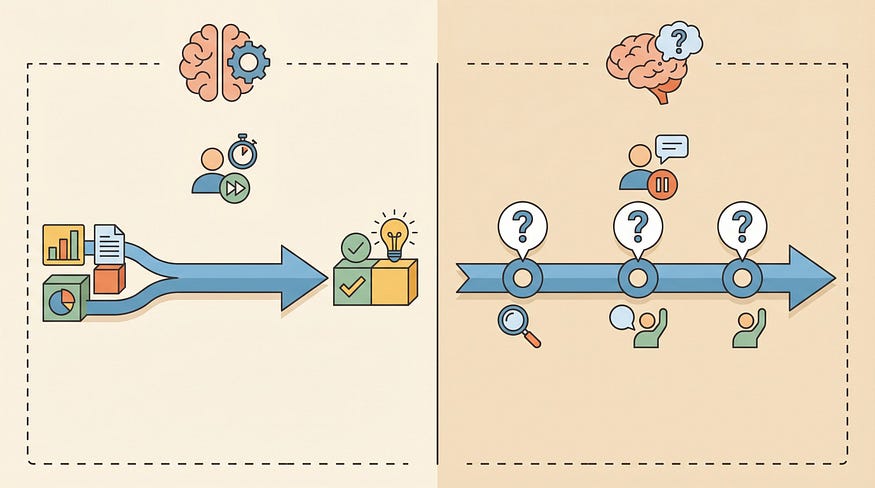
These questions are not testing whether students can type code. AI wrote the code; students do not need to type a single line. Some people may think this makes learning less solid. But you first have to establish a clear comparison standard. In the past, students typed code along with the teacher. But if they were not thinking, what was the point of typing the code once? By contrast, if they understand the rigorous steps and how special cases are handled, then in future work environments, where AI assistants will be everywhere anyway, how often will they really need to type all the code themselves? It is like learning to drive an automatic transmission. At worst, you can drive only automatic cars in the future. Who says a license earned on an automatic does not allow you on the road?
What this Skill tests is whether students truly understand the decision logic behind each step, and whether they can make their own predictions and evaluations about later steps. The most meaningful thing is to have students state their judgments in natural language: Why do it this way? Where are the boundary conditions? What would happen if we used another approach? Which parts require human decision-making?
After the student answers, AI diagnoses the response. If the answer is correct, it records “mastered.” If the answer is incomplete, it gives another round of explanation and asks again. If the student still cannot answer, it marks the point as “not mastered” or “teacher intervention needed.” The full Q&A is recorded verbatim in the checkpoint-log and finally incorporated into the learning feedback report.
The third difference is in the final deliverables. An ordinary AI programming tool finishes the workflow and gives you a pile of code files; whether you read them is up to you. This Skill is different. After it completes the full workflow, it generates three things.
First, a learning feedback report. It marks each knowledge point in three levels: “mastered,” “partially mastered,” and “not mastered,” with the student’s original answer and AI’s basis for judgment. When the teacher reads this report, they can see exactly where the student got stuck. It is not a vague score, but a diagnosis precise to the knowledge point.
Second, a complete rerunnable Jupyter Notebook that runs from the first cell to the last cell without errors. Each Checkpoint Q&A is also embedded in the corresponding place in the Notebook. When students look back, they can see what AI asked at that step and how they answered at the time.
Third, a personalized tutorial. This is not a generic textbook; it is written only for that student. If you passed six out of seven knowledge points and only failed to answer “confidence intervals in small-sample evaluation,” then the tutorial explains only that one point. It starts from the question where you got stuck, explains the concept in plain language, includes a minimal code example that can run independently, and ends with an exercise. It does not explain things you already know or waste your time.
The three items also cross-reference one another: each sticking point in the report points to the corresponding tutorial section and Notebook cell; the tutorial header lists the related report items and Notebook entry points. What students receive is not three scattered files, but a complete reading path.
How about that? Quite a bit of design, right?
A Case
After all this theory, it is better to actually run it once.
On April 27, I had the teaching assistant act as a student and use this Skill to run a classroom demo for image classification: asking AI to distinguish Doraemon from WALL-E. The dataset had 319 images, using fastai + ResNet18 transfer learning.
Screenshot note: the original Chinese run log shows the classroom demo’s Context Card, including the Doraemon vs. WALL-E image classification task, dataset size, and task constraints.
AI started from problem definition and moved through the standard workflow: Context Card to clarify task constraints, data audit to check duplicates and corrupted files, mechanism hypotheses such as whether color might be a shortcut, baseline models with DummyClassifier and LogisticRegression, data splitting and training, error analysis, and summary reflection. After each step, it stopped and opened a Checkpoint to ask the student a question.
The full workflow opened 7 Checkpoints. I will pick a few interesting ones so you can get a feel for how deep AI’s questions went and how the student interacted with it.
In the task mode judgment step, AI asked: “This dataset has only 319 images. If we do not use deep learning and instead flatten the images into pixel vectors and run LogisticRegression directly, what problems might we encounter?”
The student answered: “Image features are localized, and flattening loses spatial information. Pixel shifts would cause the model to fail. What it learns is not just features, but features coupled with position, which hurts generalization.”
This answer was right on target. The student was not reciting a definition; they genuinely understood why CNNs need translation invariance. AI’s judgment: mastered.
In the mechanism hypothesis step, AI asked a question with a trap: “Are there any factors that might cause the model to cheat when distinguishing the two characters, learning a shortcut rather than the characters’ own features?”
The student answered: “Color. Doraemon is blue, and WALL-E is yellow-brown.”
Correct. Then AI followed up with a deeper question: “What are the pros and cons of not converting to grayscale versus converting to grayscale at the beginning? Is color necessarily a bad shortcut?”
The student said: “There is no need to remove color. It is a clearly distinguishing feature. The problem is not that color is a shortcut, but that the two characters themselves have overly obvious distinguishing features. If the model can learn color, that is also a capability.”
This answer landed exactly on the boundary between “shortcut” and “reasonable feature.” Many students hear shortcut learning and reflexively want to remove that feature. But in this task, color is both a shortcut and a reasonable signal. The key is whether you are aware of it. AI’s judgment: mastered. Then, in AI’s own words, it gave “encouragement and feedback,” telling the student that this judgment showed they had developed data intuition and could distinguish between “signals that need caution” and “signals that need removal.”
In the evaluation protocol step, the student gave the first and only incomplete answer. AI asked: “The validation set has only 63 images. How trustworthy is 100% accuracy? What additional things would you do to feel more confident?”
The student answered: “We could collect more images, or transform the existing images to test generalization ability.”
The direction was completely right. Increasing the sample size or doing perturbation tests are both reasonable ideas. But the answer missed a key statistical perspective: if all 63 images are classified correctly, the 95% confidence interval is roughly 94.3% to 100%. How wide is that interval? Why is k-fold cross-validation more reliable than a single hold-out split for small samples? AI’s judgment: partially mastered.
The reflection step closed the whole workflow. AI asked: “Looking back at the entire workflow, which step, if skipped, would most likely make the final conclusion look correct while actually being problematic?”
The student answered: “Step 3, mechanism hypotheses. Manually observing features lets us be aware of shortcuts, so we can correctly interpret high accuracy. It does not change the data, but it changes how humans understand the result.”
Among the 7 Checkpoints, this is the answer I most wanted to see. The student articulated the core value of data intuition. It is not about changing code; it is about changing the cognitive frame. Once you know color might be a shortcut, seeing 100% accuracy gives you an extra question mark rather than immediate celebration. AI’s judgment: mastered.
Finally, AI generated the three-piece package. The learning feedback report showed: 7 Checkpoints, 6 mastered, 1 partially mastered, 0 not mastered. The partially mastered point was “statistical traps in small-sample evaluation.”
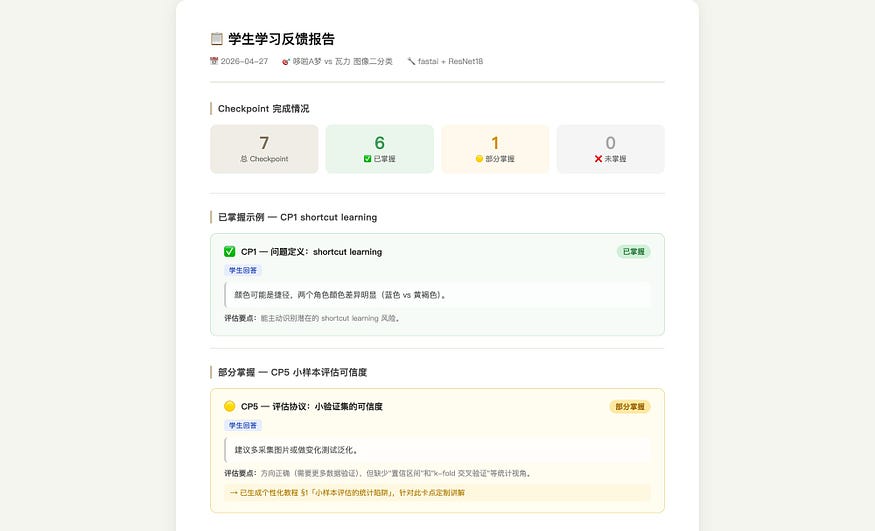
Screenshot note: the Chinese learning feedback report summarizes 7 Checkpoints: 6 mastered, 1 partially mastered, and 0 not mastered.
The personalized tutorial therefore had only one section. It started from “what you were asked in Step 5,” then explained confidence interval calculation and the principle of k-fold cross-validation, included a code example that could run independently, and ended with an exercise. It did not explain color shortcuts, data leakage, or transfer learning, because those were already passed. The tutorial covered only the one point the student had not yet mastered.
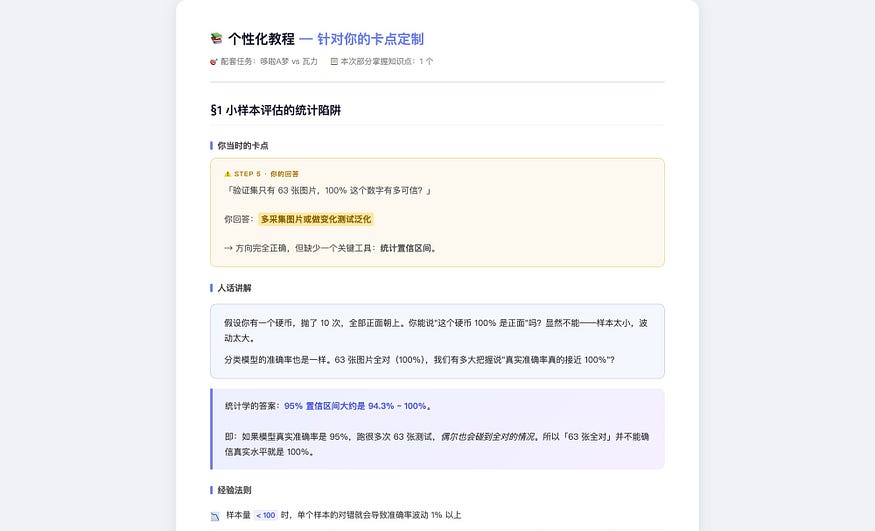
Screenshot note: the Chinese personalized tutorial opens from the student’s Step 5 sticking point and focuses on small-sample evaluation, confidence intervals, and k-fold cross-validation.
The Notebook fully recorded the entire process from DummyClassifier at 50.2%, to LogisticRegression using only RGB means at 73.4%, to ResNet18 at 100%. Each step ended with the embedded Q&A record.
You might ask: what if students delete the Checkpoint part themselves and simply tell AI to run the whole workflow? Technically, of course they can. A Skill is just a set of rules, not a physical lock. It is not hard for students to bypass it. But judging from teaching results, the actual situation differed from what I expected.
Students’ feedback was that they especially liked the gradual unfolding and the question-and-answer dialogue. It was obvious that they were not just being polite; they really liked it. In the past, when they used ordinary AI tools for assignments, it was not that they wanted to copy. It was that doing the task themselves felt too difficult, and when they got stuck, they had no way forward, so they let AI do everything. Now there is a scaffold: AI first demonstrates one step, stops and asks why, then continues after you answer. The difficulty has come down, but thinking has not been skipped. Students said going through this process gave them “a sense of gain.” It did not feel like being tested; it felt like actually learning.
This exceeded my expectations. My starting point for building this Skill was “how do I stop students from outsourcing their thinking to AI?” But students’ reactions told me they did not lack the desire to think. They previously lacked a suitable scaffold to step onto. As the saying goes, teaching and learning help each other grow. How true.
Next, let me introduce the specific structure of this Skill and how it was built. At the end of the article, I will also share the full contents of the Skill with you.
Structure
The core skeleton of this Skill is actually not complicated.
Open the ml-teaching-assistant folder and you will see one main file, SKILL.md, plus two subdirectories: references/ and templates/. The main file contains AI's behavioral rules: when to use this Skill, what hard constraints apply, and what the minimal workflow is.
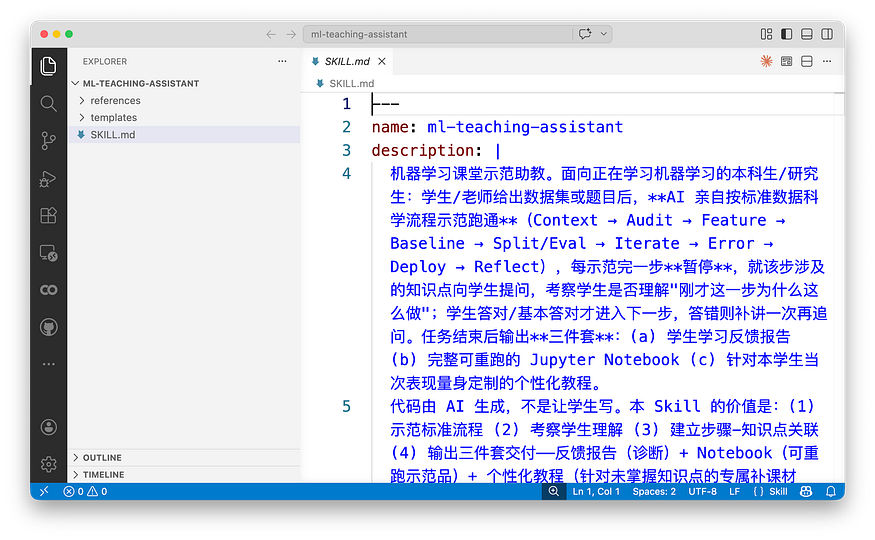
Screenshot note: the original Chinese SKILL.md screenshot shows the Skill's usage boundary, hard constraints, and minimal workflow.
The references directory stores various manuals: the detailed workflow, technology stack rules, sklearn cookbook, fastai cookbook, visualization cookbook, and analysis guardrails.
Screenshot note: this shows the references/ folder in the Skill, with supporting manuals for workflow, teaching checkpoints, technology stacks, and model-specific recipes.
The templates directory stores templates for deliverables: Context Card, checkpoint-log, learning feedback report, personalized tutorial, and Notebook outline.
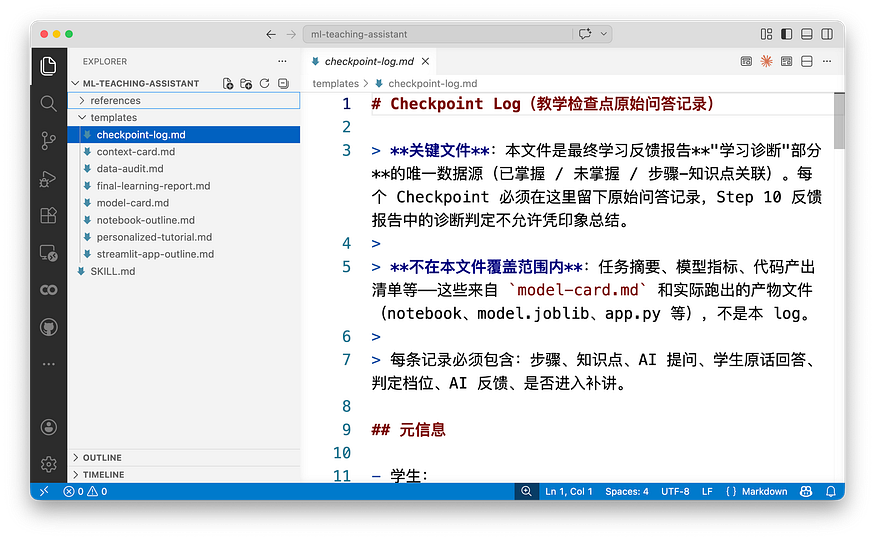
Screenshot note: this shows the templates/ folder, including templates for the Context Card, checkpoint log, feedback report, personalized tutorial, and Notebook outline.
AI does not need to read every file from the start. At the top of SKILL.md there is a Load Map, which tells AI to load the corresponding reference files only when needed. For example, load sklearn-cookbook for classical ML tasks, fastai-cookbook for image classification, and visualization-cookbook when creating visualizations. This keeps AI’s context window from being overloaded.
Screenshot note: the Chinese Load Map tells AI which reference file to open only when a specific task requires it, instead of loading the entire Skill package up front.
The hard constraints are written in SKILL.md. There are five in total. The most important one is: AI may produce only one work step plus one Checkpoint at a time, and it must wait for the student’s answer before continuing. This rule locks down AI’s default behavior. Without it, AI would run all ten steps in one breath, and the student would not participate at all.
Another key constraint is: after completion, it must produce three deliverables: a learning feedback report, a complete rerunnable Notebook, and a personalized tutorial. These are not optional; they are hard requirements. Missing any one of them means the task is not complete.
Each template in the templates directory specifies both format and generation discipline. For example, the learning feedback report template says: “Every judgment must have a corresponding original Q&A in checkpoint-log; do not summarize from memory.” “Do not attach emotional labels. Use four neutral labels: mastered, partially mastered, not mastered, teacher intervention needed.” “Do not give numerical scores. That is the teacher’s job, not AI’s.” The personalized tutorial template says: “Do not write a generic tutorial. If a section reads like sklearn’s official documentation, it is wrong; it must start from the student’s actual sticking point.” “Do not directly give answers to after-class exercises. You may give hints, but leave room for the student to think.”
These disciplines may look trivial, but they solve a very real problem: AI has its own default tendencies. Without constraints, it follows its habits. The report it writes looks like a textbook, and the tutorial it generates looks like official documentation, with no connection to the student’s actual sticking points. Every discipline in the templates is there to pull AI’s default behavior back onto the track of serving this specific student.
Guidance
The Skill’s skeleton only solves the question of where AI should stop. The more central question is: after it stops, what should it ask?
That is what the file references/teaching-checkpoints.md is for. It is a list of knowledge points plus example questions, organized by workflow step: what can be asked in Step 0 task mode judgment, Step 2 data audit, Step 5 splitting and evaluation, Step 7 error analysis, and so on.
Under each step, it lists several knowledge points. Each knowledge point has one or two example questions and a passing threshold. But these questions are not a question bank shown directly to students; they are references for AI.
Screenshot note: the original Chinese file lists possible teaching checkpoints by workflow step, with knowledge points, sample prompts, and passing thresholds.
AI chooses one to three truly relevant items based on the specific task, then replaces placeholders with actual data. For example, an example question might say, “I just used stratify=y. Can you explain what I was trying to prevent?" In the Doraemon task, AI would not ask this question, because image classification was not using a stratified split. It would instead ask, "The validation set has only 63 images. How trustworthy is the 100% figure?"
Screenshot note: the Chinese example shows how a generic checkpoint prompt is adapted into a task-specific question using the actual validation set size and result.
The tone of the questions matters too. It is not an exam-style “What should you use?” Instead, two tones alternate. One is review: “Can you explain why I just did this?” Another is prediction: “If I switched to ordinary KFold, what do you think would happen?” A third asks the student to take a position: “I marked misclassifying a default as the most costly error. Do you agree?” This tone defines the student’s role as “a thinker having an equal conversation with AI,” not “a test taker being examined.” The difference is subtle but important. The former makes students feel as if they are talking with an experienced senior colleague; the latter makes them feel judged.
When a student cannot answer, the Skill has a remediation protocol.
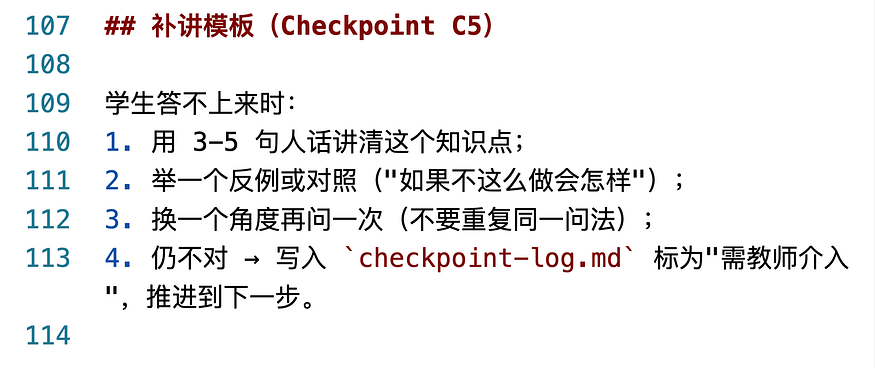
Screenshot note: the Chinese remediation protocol says that when a student cannot answer, AI should give a short plain-language explanation, provide a counterexample, ask once more from another angle, and then mark the point in checkpoint-log.md if needed.
First, explain the knowledge point clearly in three to five plain-language sentences, give a counterexample showing what would happen if it were not handled this way, and then ask again from another angle. If the student still cannot answer after two attempts, mark it as “teacher intervention needed,” but do not get stuck there. Move on to the next step. Getting stuck only makes students anxious; moving forward still gives them other knowledge points where they can demonstrate mastery.
The design logic behind this guidance can be summarized in one sentence: do not test operations; test judgment. Writing code is not the student’s job. That is AI’s job. The student’s job is to understand the reasoning behind each step and make their own predictions and evaluations about what comes next.
Iteration
ml-teaching-assistant was not written from scratch. It grew out of another Skill: domain-aware-data-analyst.
That Skill does something completely different. It is a data analysis assistant for domain experts, such as historians studying the Titanic. The expert gives AI a dataset; AI first fills out a Context Card to pin down the business context, then runs the analysis workflow. The final deliverable is an analysis report that an expert would be willing to sign.
The core of the two Skills is the same: do not let AI rush straight to the conclusion. The difference is that one addresses “the expert’s domain knowledge is not being used,” while the other addresses “the student’s cognitive process has not been built.”
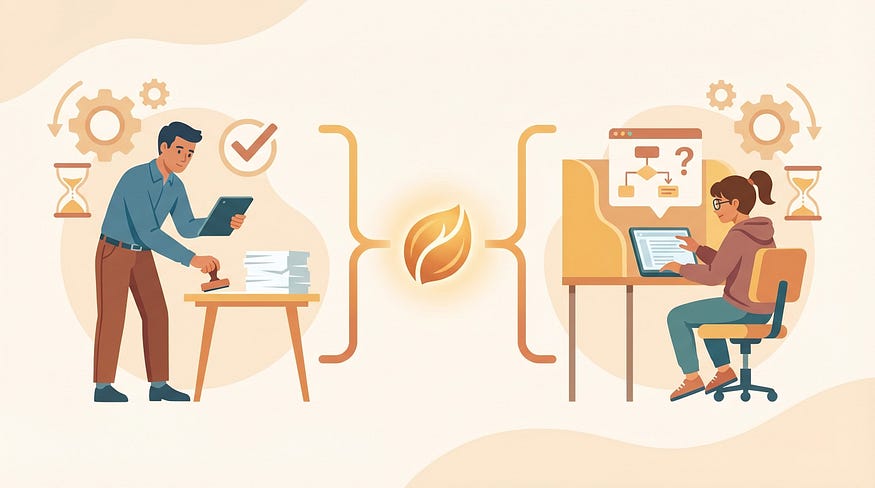
In moving from the data analysis version to the teaching version, the biggest change was not adding Checkpoints. That was only a mechanism change. The biggest change was redefining the student’s role.
In the data analysis version, the user is a domain expert who participates in decisions throughout the process. AI asks, “What is the most costly type of error?” and the expert answers based on domain experience. In the teaching version, AI is responsible for executing code, but the student is not a bystander. After each step, AI stops and asks the student to review the decision just made, predict the consequences of later steps, and even agree or disagree with AI’s choices. The student participates not in operational execution, but in cognitive decision-making.
This difference led to a chain of adjustments. The data analysis version’s deliverables are an analysis report and model files; the teaching version’s deliverables are the three-piece learning diagnosis package. The data analysis version’s Context Card focuses on business context and domain mechanisms; the teaching version’s Context Card adds “risk features” and “instructional emphasis points.” The data analysis version has no checkpoint-log; in the teaching version, checkpoint-log is the sole data source for the final report.
If you later plan to use my Skill as a foundation and adapt it creatively for specific domains, these are experiences worth learning from.
There were also problems discovered during actual trial runs. The first teaching Skill was built in a “walk the student through writing code line by line” mode. When Claude Code saw the word “teaching,” it defaulted toward pair programming. I stopped it on the spot: “AI generates the code; students do not write code.” In AI’s training corpus, “teaching programming” is almost always framed as “let the student type along.” But what I wanted was AI demonstration plus thinking questions, not hand-holding students through typing. This correction later became the soul of the entire Skill.
Another problem exposed during trial runs was that the three deliverables did not reference one another. In the first version, the report, Notebook, and tutorial were independent. Students saw “not mastered: credibility of small-sample evaluation” in the report, and then what? They had to search across three files to figure out which tutorial section explained it and which Notebook step corresponded to it. Later I added a cross-reference mechanism: each sticking point in the report points to the corresponding tutorial section and Notebook cell; the tutorial header lists the related report items; the Notebook ends with a checklist of the three deliverables. This is not hard to implement, but without it, students have to assemble the pieces themselves.
There was also a more hidden problem: a Skill that looks perfect on paper will still fail during a real run. After writing v1.2.0, I ran it from beginning to end on real data and immediately found several holes. Some missing-value handling functions had default behaviors inconsistent with the documentation; one network architecture overfit badly on a small sample; even the real range of validation accuracy did not match the numbers many tutorials casually mention. These problems cannot be seen in SKILL.md. You have to actually run it once to expose them.
Getting Started
If you want to try this Skill yourself, here are the concrete steps. I will demonstrate using the Trae Solo CN client.
Screenshot note: the Trae Solo CN interface is shown in Chinese; the highlighted area is where the user enters the Skills section.
First, prepare the Skill files. The complete file structure of ml-teaching-assistant is a folder containing the main file SKILL.md, a references/ directory for various manuals, and a templates/ directory for deliverable templates. I put the compressed package in a Notion document. Here is the link.
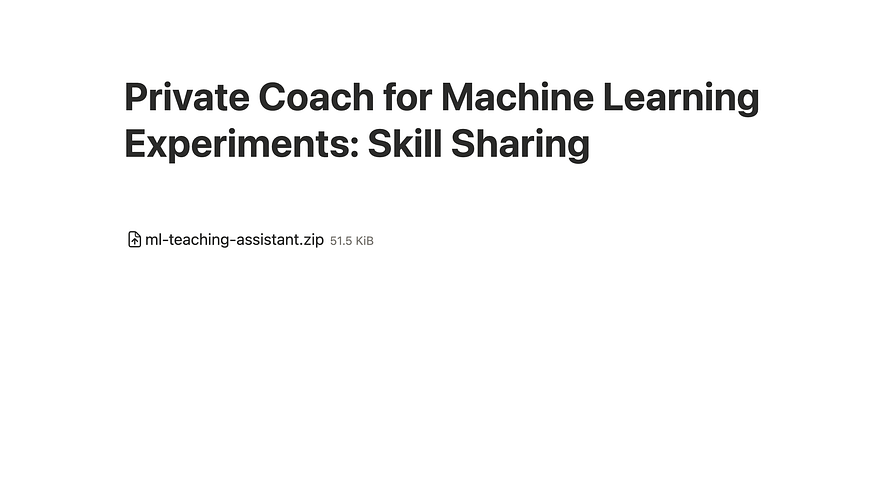
Download this Skill and add it in Your Agent. Here I use the Trae as an example. Open Trae and select “Skills” in the upper left.
Screenshot note: the highlighted Chinese menu item is “Skills.”
On the next page, click “Upload Skill” in the upper right.
Screenshot note: the highlighted Chinese button says “Upload Skill.”
Then the following screen appears.
Screenshot note: the Chinese upload dialog asks the user to drag or click to upload a .zip or .skill file that contains SKILL.md.
Drag the compressed package in, confirm, and you are done.
Activating it is simple. When talking with AI, mention keywords such as “machine learning teaching,” “ML classroom demo,” or “use ml-teaching-assistant,” and the Skill will be automatically loaded. Or, more directly, start the conversation by saying: “Please use the ml-teaching-assistant Skill to help me process the XX dataset.”
After activation, all you need to do is prepare the dataset and sit there answering questions.
Screenshot note: the Chinese run screen shows AI proceeding step by step and pausing for a checkpoint question before continuing.
AI will proceed step by step according to the standard workflow. After each step, it stops and asks you one question. You answer, AI diagnoses, and then it continues to the next step. After the whole process is complete, the three-piece package is automatically generated in the working directory.
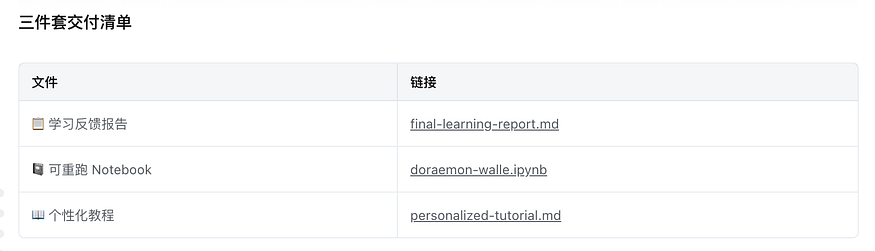
Screenshot note: the Chinese file list shows the three generated deliverables: the learning feedback report, rerunnable Notebook, and personalized tutorial.
One small tip: if your dataset is large or the task is complex, the whole workflow may take twenty to forty minutes. Do not urge AI to skip steps. Checkpoints are there to slow you down and make you think. If you skip them, the point is lost.
Summary
Let’s review.
In today’s classroom teaching, AI’s impact is like the elephant in the room. The traditional approach of “ban AI” obviously does not work. You cannot stop it. Letting students “use AI however they want” probably does not work either. Students may outsource all their thinking. This Skill takes a third path: go ahead and use AI, but during execution, AI will turn around and question you.
This idea is not limited to machine learning courses. Any scenario where “a human needs to demonstrate their own intelligence with AI assistance” faces the same problem: writing papers, doing data analysis, designing engineering plans. AI runs so smoothly that it can completely skip the process humans should understand.
The solution is the same: make AI slow down. At each step, have it turn back and ask the human, “Do you know why I did this?” “What do you think the next step should be?” “Between these two paths, which do you think is better, and why?” The answer is not to forbid AI from doing things. It is to embed human thinking back into AI’s process of doing things.
If you teach, or if you do anything that requires “AI assistance but real human understanding,” you can try this approach. You do not have to use my Skill. Once you understand the core mechanism, you can write one for your own scenario. The key is three steps: define the technology stack so AI’s demonstration has structure, add a “why” Checkpoint after every step, and finally generate feedback targeted at each person’s sticking points.
I wish you a good experience with AI-assisted teaching and learning.
If you find this article useful, please hit the Applaud button.
If you think this article might be helpful to your friends, please share it with them.
Feel free to follow my column to receive timely updates.
Welcome to subscribe to my Patreon column to access exclusive articles for paid users.
To watch video content, please subscribe to my Youtube channel.
My Twitter: @wshuyi
Further Reading
- • Major improvements to AI workflow long-form writing: come try it out
- • Claude Skill snapshots: adding an “undo button” to your AI skill iteration
- • From dry theory to vivid practice: how AI agents can explain complex concepts with interactive tutorials
- • Getting started with Claude Skills: how AI upgrades from “mouthpiece” to “worker” in one article
- • One prompt that turns AI into a personalized tutor for children
Further Reading
Discover more articles on similar topics across our network

Binance Agent OS vs Meta Muse vs Sierra: Comparing the AI Agent Platforms Shaping 2026
Three companies launched competing AI agent infrastructure this month. We compare Binance Agent OS, Meta Muse, and Sierra's commerce agent standards across trading, shopping, and enterprise use cases.

Comments
Loading comments…