Every developer, at some point, opens their AWS Cost Explorer and feels their stomach drop. You spun up a t3.medium, threw on an RDS instance, added a NAT Gateway for good measure and suddenly the month ends with a $90 bill for an app that serves forty users. I’ve been there. Most people who’ve touched AWS have been there.
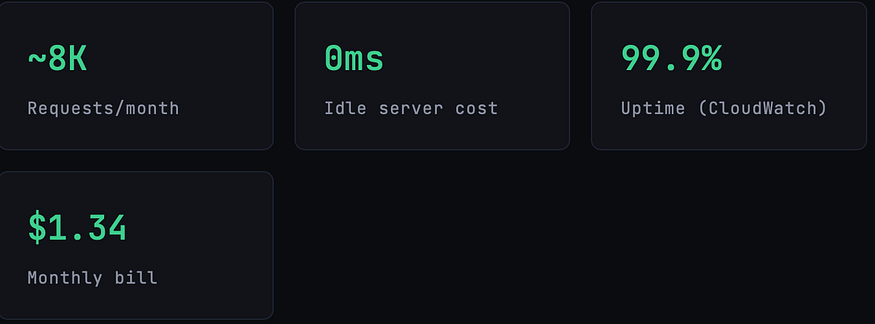
So when I rebuilt my side project a lightweight SaaS tool for formatting and analyzing developer logs I made a deliberate bet: I would go fully serverless, exploit every free tier I could, and not touch a single always-on resource. The final monthly bill after three months of live traffic? $1.34.And that’s not a free-tier fluke it’s by architecture.
This isn’t a tutorial about going cheap at the expense of reliability. The app handles auth, file uploads, async job processing, email notifications, and a REST API. It scales automatically to zero when idle and back to thousands of concurrent requests within milliseconds. What follows is an honest breakdown of how it’s built, what each service costs in practice, and the tradeoffs you actually need to know before you try to replicate this.
The most expensive AWS resource is the one that runs when nobody’s watching. Serverless doesn’t just save money it changes your relationship with idle time entirely.
The Full Stack, Laid Out
Before we look at cost, let’s understand what we’re actually building. This is a multi-tenant SaaS with user accounts, file uploads, async processing jobs, and transactional email. A six-service architecture none of which are EC2.
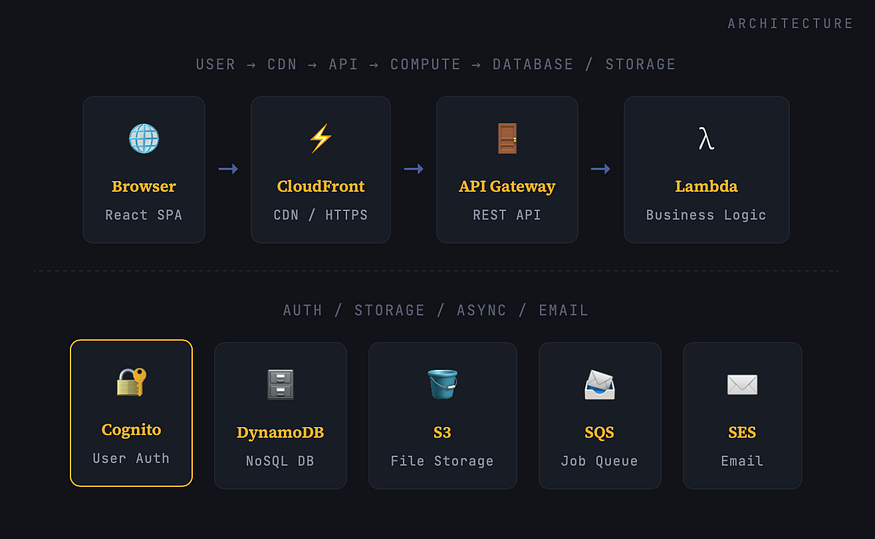
The frontend is a React app, bundled and served statically from S3 + CloudFront. No web server needed. CloudFront handles HTTPS, caching, and global edge delivery. The API layer is API Gateway (HTTP API) cheaper than REST API, lower latency, and sufficient for most use cases. Behind every route sits a Lambda function that only runs when called. The database is DynamoDB on pay-per-request mode. Auth is handled by Cognito. Async jobs (log processing) flow through SQS into a separate Lambda worker. Email goes through SES.
That’s it. No containers. No Kubernetes YAML. No bastion hosts. No NAT Gateway sucking $30/month out of your wallet just for existing.
Service-by-Service: What Each One Does

The Actual Cost Breakdown
Here’s my real AWS billing breakdown for a month with approximately 8,000 API requests, 150 file uploads, 200 processed jobs, and 300 transactional emails sent. The app has 47 active users.
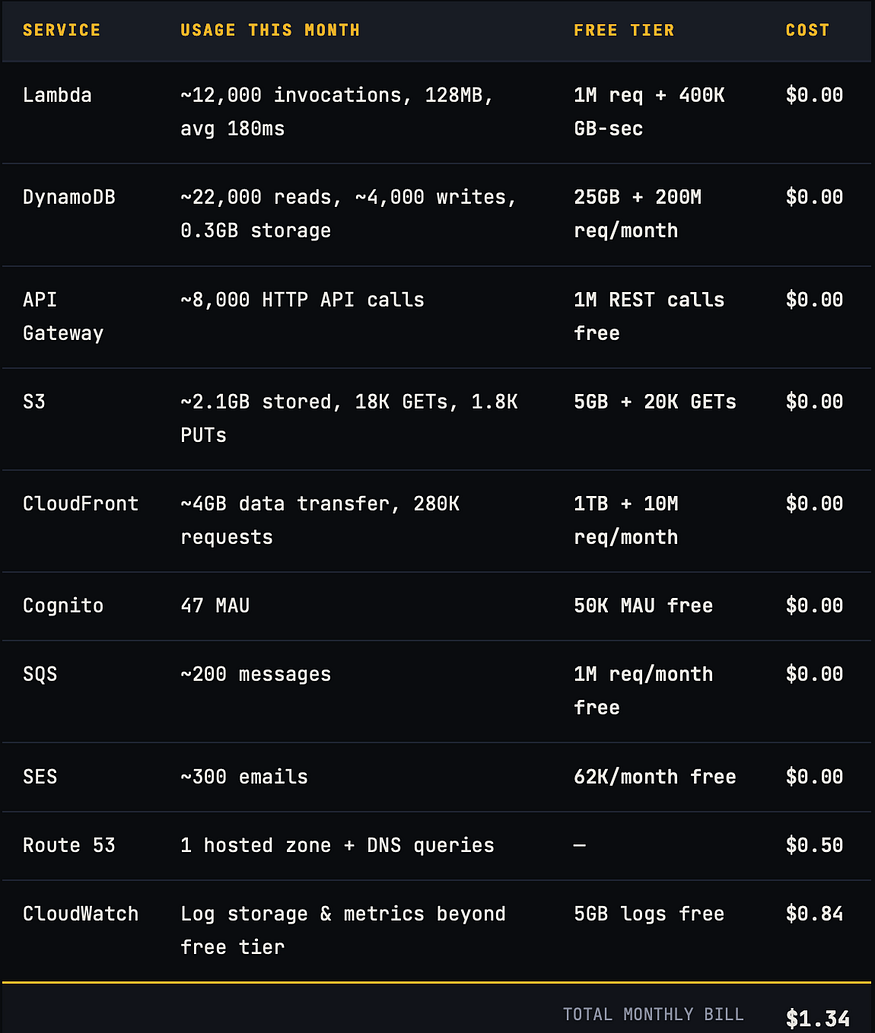
The only non-zero line items are Route 53 (the flat $0.50/month hosted zone fee is unavoidable unless you use an external DNS) and CloudWatch(logs beyond the 5GB free tier and a few custom metrics). Everything else lands in the always-free tier at this traffic level.
⚠
These numbers scale. At 10x the traffic (~80K requests/month), Lambda, DynamoDB, and API Gateway remain essentially free. The first real cost spike you’d hit is CloudWatch logs which is why configuring log retention policies before launch is critical. A forgotten Lambda function dumping verbose JSON can generate $20+/month in log costs alone.
How the Infrastructure Is Defined
The entire stack is provisioned with AWS SAM (Serverless Application Model). One YAML file, version-controlled, reproducible in any account in under three minutes. Here’s a condensed version of the core template.yaml:
AWSTemplateFormatVersion: '2010-09-09'
Transform: AWS::Serverless-2016-10-31

Globals:
  Function:
    Runtime: nodejs20.x
    Architectures: [arm64]  # Graviton2 — 34% cheaper
    MemorySize: 256
    Timeout: 10
    Environment:
      Variables:
        TABLE_NAME: !Ref MainTable
        BUCKET_NAME: !Ref UploadsBucket

Resources:
  # ── API + Lambda ──
  ApiFunction:
    Type: AWS::Serverless::Function
    Properties:
      Handler: src/api.handler
      Events:
        Api:
          Type: HttpApi
          Properties:
            Auth:
              Authorizer: CognitoAuthorizer

  # ── DynamoDB (pay-per-request = zero idle cost) ──
  MainTable:
    Type: AWS::DynamoDB::Table
    Properties:
      BillingMode: PAY_PER_REQUEST
      TableName: main-table
      AttributeDefinitions:
        - AttributeName: PK
          AttributeType: S
        - AttributeName: SK
          AttributeType: S
      KeySchema:
        - AttributeName: PK
          KeyType: HASH
        - AttributeName: SK
          KeyType: RANGE

  # ── Async Worker via SQS ──
  ProcessingQueue:
    Type: AWS::SQS::Queue
    Properties:
      MessageRetentionPeriod: 1209600

  WorkerFunction:
    Type: AWS::Serverless::Function
    Properties:
      Handler: src/worker.handler
      MemorySize: 512
      Timeout: 60
      Events:
        SQSEvent:
          Type: SQS
          Properties:
            Queue: !GetAtt ProcessingQueue.Arn
            BatchSize: 5
Notice BillingMode: PAY_PER_REQUEST on DynamoDB — this is the single most important line in the file for cost optimization. Provisioned capacity is cheaper at consistent high traffic, but at early-stage volumes it's a flat charge whether you use it or not. Pay-per-request means your database bill is exactly zero when nobody's using the app.
Also notice Architectures: [arm64]. Running Lambda on Graviton2 (ARM) instead of x86 gives you roughly 34% better price-performancewith no code changes for most Node.js and Python workloads.
The Part Nobody Puts in the Blog Post
Every “I built this for pennies” article glosses over the tradeoffs. Here they are, honestly:
Cold Starts Are Real
Lambda functions that haven’t been invoked recently take 200–800ms to initialize. For a logged-in dashboard request after 15 minutes of inactivity, that’s a noticeable lag. My mitigations: using HTTP API instead of REST API (lower cold start overhead), keeping functions small (don’t bundle your entire app into one Lambda), and using Node.js on ARM which initializes faster than most other runtimes.
For my specific use case developer tooling that nobody expects sub-100ms from — this is acceptable. For a real-time collaborative app, you’d want Provisioned Concurrency, which costs money and defeats the purpose here.
DynamoDB Requires Up-Front Data Modeling
Relational databases let you write queries and add indexes later. DynamoDB punishes you for not thinking about access patterns before you write the first item. The single-table design pattern (one table, composite keys, GSIs for secondary access) is powerful but has a steep mental model. Get this wrong and you’ll either overpay on reads or end up with queries that require full table scans.
Single-table design tip: Use PK = USER#userId and SK = JOB#timestamp#jobIdfor time-ordered per-user job history. You get all jobs for a user with one Query, sorted by time, with zero GSIs needed. Think in access patterns, not tables.
CloudWatch Logs Will Eat You Alive
This is where my $0.84 came from and where most serverless newcomers get surprised. Every Lambda invocation logs to CloudWatch by default. Verbose logging request bodies, full stack traces, debug output accumulates fast. Set a log retention policy on every Lambda log group. I use 7 days for dev and 30 days for prod. Without this, logs are kept forever, and you pay for every GB stored.
 Add to every Lambda in template.yaml
ApiFunction:
  Type: AWS::Serverless::Function
  Metadata:
    LogGroup:
      RetentionInDays: 30
No Persistent Connections — CORS and Auth Headers Require Planning
Lambda is stateless. No database connection pooling in the traditional sense (though DynamoDB doesn’t need it), no in-memory caches that persist across invocations. Each cold-started Lambda initializes fresh. DynamoDB connections are created and reused within the execution environment if the Lambda is warm, but you can’t depend on this. Plan for statelessness from day one.
What Happens When Traffic Grows?
The honest answer: this architecture stays cheap well into meaningful scale. Here’s the math at different traffic levels for a Lambda-heavy workload (128MB, average 300ms execution):
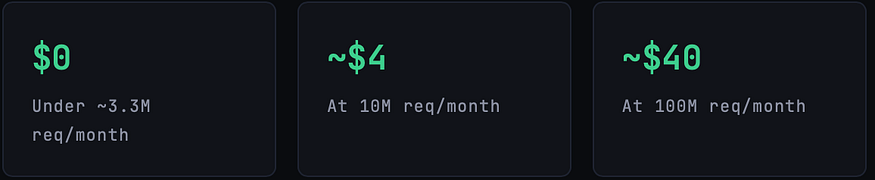
The always-free tier for Lambda covers 1 million requests and 400,000 GB-seconds of compute per month permanently, not just in the first year. At my current 128MB / 180ms average, I’d need over 17 million monthly invocations before paying a single dollar in Lambda costs. The first real bill will be CloudWatch and Route 53, not compute.
DynamoDB on PAY_PER_REQUEST charges $1.25 per million write request units and $0.25 per million read request units in us-east-1. At 1 million writes per month, that's $1.25. At 10 million reads, that's $2.50. These numbers don't cause existential crises.
Serverless SaaS on AWS doesn’t just minimize your bill at launch — it changes how cost scales with growth. You pay for what you use, not what you fear you’ll need.
What Will Actually Surprise You
Route 53 Is Unavoidable at $0.50/Hosted Zone
If you want a custom domain (and you do), Route 53 charges a flat $0.50/month per hosted zone. You can’t avoid this with free tier magic. It’s the one fixed cost in the entire stack. Use an external registrar if you want to cut corners on domain registration fees, but the hosted zone cost is real.
Data Transfer Between Regions Isn’t Free
Lambda-to-DynamoDB, Lambda-to-S3, Lambda-to-SQS — these are all free within the same AWS region. The moment you cross regions (Lambda in us-east-1 calling DynamoDB in eu-west-1), you pay data transfer charges. Keep everything in one region unless you have a specific multi-region architecture reason.
API Gateway HTTP API vs REST API
HTTP API is 71% cheaper than REST API ($1.00 per million vs $3.50 per million after free tier). For most SaaS use cases, HTTP API is sufficient. The main things REST API has that HTTP API doesn’t: usage plans, API keys for rate limiting, and request/response transformation. If you don’t need those, use HTTP API and save money.
Cognito’s Free Tier Cliff
Cognito is free up to 50,000 monthly active users. Beyond that, it gets expensive fast: $0.0055/MAU up to 100K, then tiered down from there. For 99% of SaaS apps at launch, this is irrelevant. For apps that define “active user” broadly (anyone who was logged in during the month), watch this number.
One sneaky cost to watch: NAT Gateways. If you ever put your Lambda functions inside a VPC (for RDS access, internal services, etc.), you’ll likely need a NAT Gateway for outbound internet access. NAT Gateways cost ~$45/month just for existing, plus $0.045/GB of data processed. This single decision can turn a $1/month bill into a $50/month bill. Avoid VPC if at all possible.
The Reusable Pattern
If you want to replicate this architecture for your own SaaS, here’s the generalized recipe that consistently produces bills under $5/month for early-stage applications:
- Frontend: React/Vue/Svelte SPA → S3 bucket (static hosting) → CloudFront distribution (HTTPS + caching). Zero server, ~$0 cost until gigabytes of egress.
- API: API Gateway HTTP API → Lambda functions (ARM/Graviton, 128MB start, tune up). Use Cognito JWT authorizer, not a custom one.
- Database: DynamoDB on PAY_PER_REQUEST. Model your access patterns first. Never use provisioned capacity at launch.
- File Storage: S3 with pre-signed URLs for direct browser-to-S3 uploads. Don’t route file uploads through Lambda.
- Async Jobs: SQS → Lambda with a Dead Letter Queue. Decouples writes from processing and handles burst traffic gracefully.
- Email: SES. $0.10 per thousand emails after 62K free. Don’t set up SMTP for transactional email in 2026.
- IaC: AWS SAM or CDK. Define everything as code. Never manually click through the console for production resources.
The Log Retention Rule
Non-negotiable: set RetentionInDays on every Lambda log group before you deploy to prod. I recommend 7 days for dev stages, 30 days for production. This alone can be the difference between a $1 bill and a $15 bill.
Use ARM Everywhere
Switch Architectures: [arm64] on all Lambda functions. Node.js, Python, and Go all work flawlessly on Graviton2. The price-performance improvement is real — up to 34% better than x86 and it's a one-line change in SAM.
Is $1.34/month Sustainable?
Yes — and that’s the point. This architecture doesn’t just produce a cheap bill at low traffic. It produces a bill that scales proportionally with real usage. When you get your first 1,000 paying users, your AWS bill won’t have jumped from $1 to $200 because you provisioned for eventual scale in advance. It will have climbed from $1 to maybe $8, because your actual requests, storage, and compute grew.
The standard objection: “But you’ll eventually have to migrate to EC2/containers when you scale.” Maybe. But consider: Lambda runs at up to 10,000 concurrent executions per region by default (adjustable via support ticket). DynamoDB can handle millions of requests per second. S3 has no meaningful throughput limit for most applications. You’d need serious enterprise traffic before the economics tip toward a container fleet.
For most SaaS products launched in 2026, the bottleneck won’t be Lambda’s scalability. It’ll be customer acquisition. Spend the engineering energy there. Keep the infrastructure bill the cheapest line on the expense sheet until revenue justifies making it a real conversation.
The $1.34 isn’t a hack. It’s the architecture working as designed.
Quick Reference
For those who scrolled straight here:
- Use Lambda (ARM/Graviton2) for all backend compute — free up to 1M invocations/month, always
- Use DynamoDB PAY_PER_REQUEST — free up to 200M requests + 25GB, always
- Serve frontend from S3 + CloudFront — 1TB egress free, always
- Auth with Cognito — free up to 50K MAU, always
- Use HTTP API Gateway, not REST — 71% cheaper
- Async work via SQS → Lambda — 1M messages free, always
- Set log retention policies — this is where most surprise bills live
- Never put Lambda in a VPC unless absolutely necessary — NAT Gateway costs $45+/month just to exist
- Route 53 is $0.50/hosted zone — unavoidable, budget for it
- Define everything with AWS SAM or CDK — never click through the console for prod
Further Reading
Discover more articles on similar topics across our network

Ventilator Vanguard: AI-Powered MultiOrganFailure Survival Engine Using AWS
Cubed
Comments
Loading comments…