Many real-world processes require executing multiple tasks in parallel, retrying failures, and combining results into a final output. Implementing this orchestration logic manually can introduce unnecessary complexity.
Argo Workflows, built for Kubernetes, enables you to model these processes declaratively as workflows. In this article, we use a simple example to highlight how it handles parallel execution, retries, and result aggregation.
Why Not Just Use Native Kubernetes Resources?
Kubernetes provides solid primitives for running workloads, Pods, Jobs, and CronJobs. They work well for executing individual tasks, but they don’t provide a built-in way to orchestrate multiple steps.
At a high level:
- Pods run a single unit of work, with no awareness of sequencing or dependencies
- Jobs ensure completion and support retries, but still operate in isolation
- CronJobs add scheduling, yet each run remains independent
This model works for simple tasks. However, once you need to:
- Run steps in parallel
- Retry only failed parts of a process
- Pass data between steps
- Aggregate results at the end
- Seamless integrations with cloud services.
you’re no longer dealing with isolated workloads , you’re dealing with a workflow.
At that point, using only native Kubernetes resources often means introducing custom scripts or external logic to coordinate execution, which increases complexity and reduces clarity.
Why Argo Workflows?
Argo Workflows extends Kubernetes by adding a native way to orchestrate multi-step processes. Instead of managing execution logic manually, you define the workflow declaratively and let Argo handle the coordination.
Key capabilities include:
- Declarative workflows Define the entire process in YAML, making it easy to version and maintain
- Parallel execution Run independent tasks concurrently without additional logic
- Step-level retries Configure retry behavior per task without modifying application code
- Dependency management (DAGs) Control execution order by defining relationships between steps
- Result aggregation Collect outputs from parallel tasks and pass them to subsequent steps
- Artifact storage and integrations Persist outputs in systems like Amazon S3 and integrate with services such as Amazon SNS, Amazon SQS, or AWS Lambda for downstream processing
Because it runs on Kubernetes, Argo integrates seamlessly with existing cluster capabilities like scheduling and scaling, while also fitting naturally into cloud environments such as AWS.
Together, these features provide a clear and maintainable way to move from running individual tasks to orchestrating complete processes.
A Practical Workflow Example
To demonstrate these capabilities in practice, we’ll build a simple workflow that models a multi-step process with parallel execution, retry handling, and result aggregation.
The goal is not the complexity of the use case itself, but to highlight how Argo Workflows manages coordination between tasks in a clear and declarative way.
What the Workflow Does
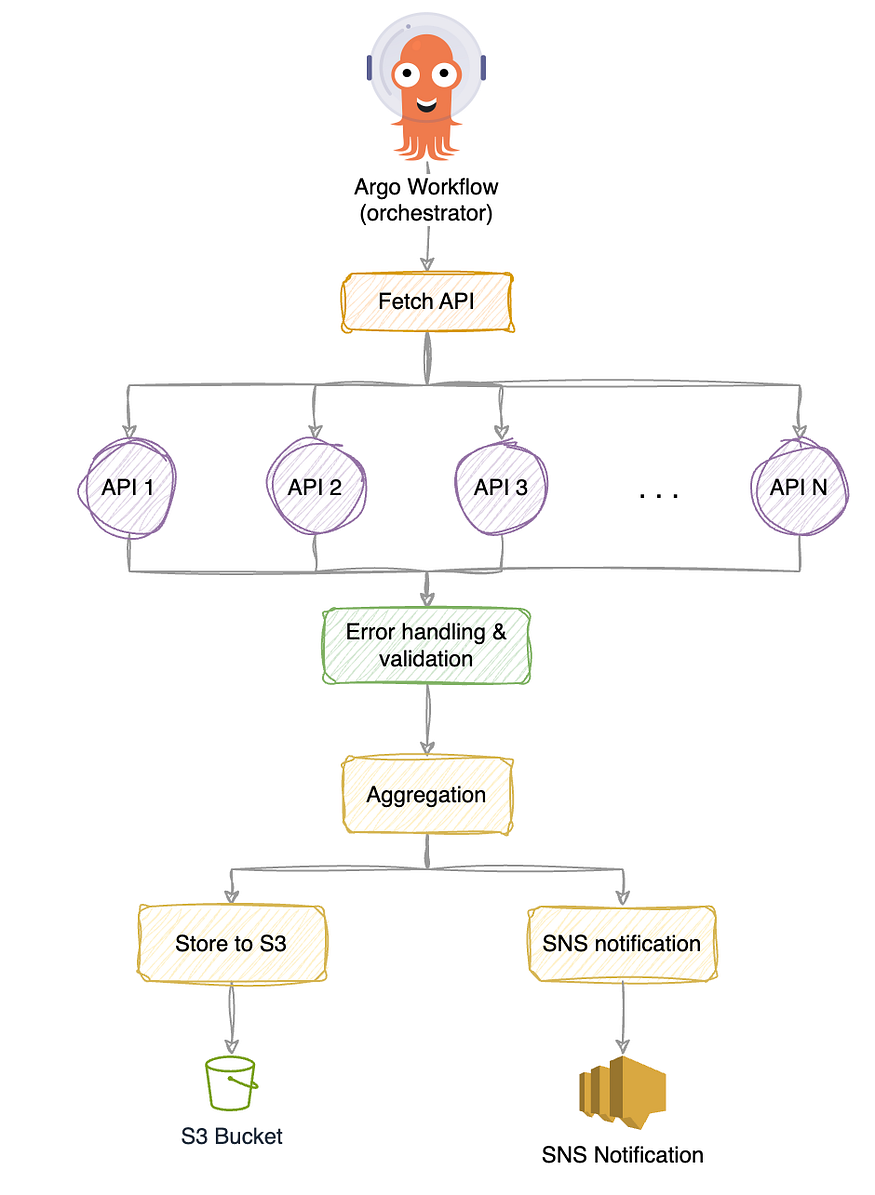
This exercise is designed to highlight a few key patterns that are common in real-world workflows:
- Generates a list of inputs to process
- Fetches data from multiple external sources in parallel
- Applies basic validation and retries failed requests
- Aggregates all responses into a single result
- Stores the final output in Amazon S3
- Notifies admins with Amazon SNS
While the individual steps are simple, together they demonstrate how Argo Workflows can coordinate multiple tasks in a structured and declarative way.
Workflow Breakdown
Dynamic Input Generation
Instead of hardcoding inputs, the workflow generates them dynamically using withSequence. This allows the number of tasks to scale based on a parameter.
- name: fetch-all
  template: call-api
  withSequence:
    count: "{{workflow.parameters.count}}"
    start: 1
This creates a sequence from 1 → count, where each value becomes an independent unit of work.
Parallel Execution (Fan-Out)
Each generated item is processed in parallel by the same template. Argo automatically expands this into multiple concurrent tasks.
arguments:
  parameters:
    - name: url
      value: "https://jsonplaceholder.typicode.com/posts/{{item}}"
Each {{item}} represents one execution, allowing all requests to run simultaneously.
Error Handling and Retries
Each task includes a retry strategy to handle transient failures without affecting the rest of the workflow.
retryStrategy:
  limit: 3
  retryPolicy: OnTransientError
  backoff:
    duration: "5s"
    factor: 2
Retries are applied at the task level, ensuring resilience while keeping the workflow logic simple.
Validation
Validation is enforced directly within the task using a success condition. A response is only considered valid if it meets specific criteria.
successCondition: "response.statusCode == 200 && response.body contains \"userId\" && response.body contains \"id\""
This ensures that only well-formed responses are passed forward in the workflow.
Result Aggregation (Fan-In)
Once all parallel tasks complete, their outputs are automatically aggregated and passed to the next step.
- name: save-results
  dependencies: [fetch-all]
  template: save-api-results-artifact
  arguments:
    parameters:
      - name: results
        value: "{{tasks.fetch-all.outputs.result}}"
Argo collects all parallel outputs into a single JSON array, enabling downstream processing.
Artifacts and Amazon S3 Integration
The aggregated result is validated, normalized, and stored as an artifact in Amazon S3.
outputs:
  artifacts:
    - name: api-aggregated-responses
      path: /tmp/api-responses.json
      s3:
        bucket: argo-workflow-data
        key: "{{workflow.name}}/api-responses.json"
Notifications and Amazon SNS Integration
After successfully storing the results, the workflow sends a notification using Amazon SNS.
- name: notify-sns
  dependencies: [save-results]
  template: notify-sns
Full Workflow
The following is the complete workflow that brings together all the concepts discussed — dynamic execution, parallel processing, retries, validation, aggregation, and integration with Amazon S3 and SNS.
apiVersion: argoproj.io/v1alpha1
kind: Workflow
metadata:
  generateName: dynamic-deal-aggregator-
spec:
  entrypoint: main
  serviceAccountName: argo-workflow-sa
  arguments:
    parameters:
      - name: count
        value: "5"
      - name: snsTopicArn
        value: "arn:aws:sns:AWS_REGION:ACCOUNT_ID:TOPIC_NAME"

  templates:
    - name: main
      dag:
        tasks:

          - name: fetch-all
            template: call-api
            withSequence:
              count: "{{workflow.parameters.count}}"
              start: 1
            arguments:
              parameters:
                - name: url
                  value: "https://jsonplaceholder.typicode.com/posts/{{item}}"

          - name: save-results
            dependencies: [fetch-all]
            template: save-api-results-artifact
            arguments:
              parameters:
                - name: results
                  value: "{{tasks.fetch-all.outputs.result}}"
                - name: expectedCount
                  value: "{{workflow.parameters.count}}"

          - name: notify-sns
            dependencies: [save-results]
            template: notify-sns
            arguments:
              parameters:
                - name: topicArn
                  value: "{{workflow.parameters.snsTopicArn}}"
                - name: workflowName
                  value: "{{workflow.name}}"

    - name: call-api
      retryStrategy:
        limit: 3
        retryPolicy: OnTransientError
        backoff:
          duration: "5s"
          factor: 2
      inputs:
        parameters:
          - name: url
      http:
        url: "{{inputs.parameters.url}}"
        method: GET
        timeoutSeconds: 60
        successCondition: "response.statusCode == 200 && response.body contains \"userId\" && response.body contains \"id\""

    - name: save-api-results-artifact
      inputs:
        parameters:
          - name: results
          - name: expectedCount
      outputs:
        artifacts:
          - name: api-aggregated-responses
            path: /tmp/api-responses.json
            archive:
              none: {}
            s3:
              bucket: S3_BUCKET_NAME
              endpoint: s3.amazonaws.com
              region: AWS_REGION
              key: "{{workflow.name}}/api-responses.json"
              accessKeySecret:
                name: argo-s3-credentials
                key: accessKey
              secretKeySecret:
                name: argo-s3-credentials
                key: secretKey
      script:
        image: python:3.9
        command: [python]
        env:
          - name: RESULTS
            value: "{{inputs.parameters.results}}"
          - name: EXPECTED_COUNT
            value: "{{inputs.parameters.expectedCount}}"
        source: |
          import json
          import os
          import sys

          raw = os.environ["RESULTS"]
          expected = int(os.environ["EXPECTED_COUNT"])
          path = "/tmp/api-responses.json"

          try:
              data = json.loads(raw)
          except json.JSONDecodeError as e:
              print(f"validation: aggregated results are not valid JSON: {e}", file=sys.stderr)
              sys.exit(1)

          if not isinstance(data, list):
              print("validation: aggregated results must be a JSON array", file=sys.stderr)
              sys.exit(1)
          if len(data) != expected:
              print(f"validation: expected {expected} responses, got {len(data)}", file=sys.stderr)
              sys.exit(1)

          normalized = []
          for i, item in enumerate(data):
              if isinstance(item, dict):
                  obj = item
              else:
                  try:
                      obj = json.loads(item) if isinstance(item, str) else item
                  except (TypeError, json.JSONDecodeError) as e:
                      print(f"validation: item {i} is not a JSON object: {e}", file=sys.stderr)
                      sys.exit(1)
              if not isinstance(obj, dict):
                  print(f"validation: item {i} must be a JSON object", file=sys.stderr)
                  sys.exit(1)
              if "id" not in obj or "userId" not in obj:
                  print(f"validation: item {i} missing required keys id or userId", file=sys.stderr)
                  sys.exit(1)
              normalized.append(obj)

          with open(path, "w", encoding="utf-8") as f:
              json.dump(normalized, f, indent=2, ensure_ascii=False)
          print(f"Wrote artifact to {path}")

    - name: notify-sns
      inputs:
        parameters:
          - name: topicArn
          - name: workflowName
      retryStrategy:
        limit: 3
        retryPolicy: OnTransientError
        backoff:
          duration: "5s"
          factor: 2
      container:
        image: amazon/aws-cli:2.17.59
        env:
          - name: AWS_ACCESS_KEY_ID
            valueFrom:
              secretKeyRef:
                name: argo-s3-credentials
                key: accessKey
          - name: AWS_SECRET_ACCESS_KEY
            valueFrom:
              secretKeyRef:
                name: argo-s3-credentials
                key: secretKey
          - name: AWS_DEFAULT_REGION
            value: "AWS_REGION"
          - name: SNS_TOPIC_ARN
            value: "{{inputs.parameters.topicArn}}"
          - name: WORKFLOW_NAME
            value: "{{inputs.parameters.workflowName}}"
        command: [sh, -c]
        args:
          - |
            MSG="Workflow ${WORKFLOW_NAME} completed successfully. Artifact: s3://S3_BUCKET/${WORKFLOW_NAME}/api-responses.json"
            exec aws sns publish --topic-arn "${SNS_TOPIC_ARN}" --message "${MSG}" --region "${AWS_DEFAULT_REGION}"
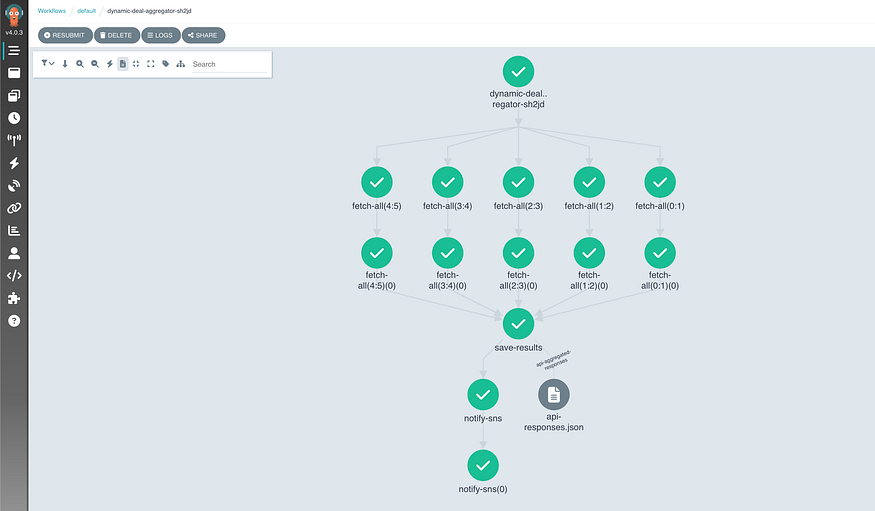
Running the workflow on the UI will show you the output of each step with the logs and intermediate metadata as the below screenshot shows.
Enhancements
The workflow presented is intentionally simple, but it can be extended in several ways to improve reliability, flexibility, and operational maturity without significantly increasing complexity.
Reliability and Operations
Argo provides several built-in controls to improve stability and cluster hygiene:
- TTL strategy (
ttlStrategy) Automatically clean up completed workflows after a defined period:
ttlStrategy:
  secondsAfterCompletion: 86400  # 24 hours
- Pod cleanup (
podGC) Remove completed pods to reduce resource usage:
podGC:
  strategy: OnWorkflowCompletion
- Execution limits (
activeDeadlineSeconds) Prevent workflows from running indefinitely:
activeDeadlineSeconds: 1800 # 30 minutes
- Parallelism control (
parallelism) Limit concurrent tasks to avoid overwhelming external systems:
parallelism: 3
Notifications and Outcomes
Currently, notifications are only sent on success. This can be extended to cover all outcomes:
- Exit handler (
onExit) Run a step regardless of success or failure:
onExit: notify-exit
Inside the exit template, you can branch based on status:
{{workflow.status}}
- Richer Amazon SNS payloads Include additional context such as workflow ID or duration:
MSG='{
  "workflow": "{{workflow.name}}",
  "status": "{{workflow.status}}",
  "uid": "{{workflow.uid}}"
}'
Security and Configuration
To improve security and avoid hardcoding sensitive values:
- Externalized parameters Pass values at submission time instead of embedding them:
argo submit workflow.yaml -p snsTopicArn=<YOUR_TOPIC_ARN>
- IAM roles (IRSA) On AWS (EKS), use a service account with an IAM role instead of storing credentials in secrets.
Flexibility and Reuse
To make the workflow reusable across different scenarios:
- Workflow templates (
WorkflowTemplate) Extract reusable logic:
kind: WorkflowTemplate
Then reference it:
workflowTemplateRef:
  name: my-template
- Parameterization Make values configurable:
parameters:
  - name: baseUrl
  - name: s3Bucket
  - name: awsRegion
Observability
Improve visibility into execution and debugging:
- Log archiving
archiveLogs: true
- Metrics (template-level)
metrics:
  prometheus:
    - name: workflow_success
      help: "Workflow success count"
      when: "{{status}} == Succeeded"
Conclusion
Argo Workflows provides a simple yet powerful way to orchestrate multi-step processes directly on Kubernetes. By combining parallel execution, retry handling, result aggregation, and integrations with services like Amazon S3 and SNS, it enables you to model complex workflows in a clear and declarative way.
While the example in this article is intentionally simple, the same patterns can be extended to support more advanced, production-grade use cases with minimal changes.
Further Reading
Discover more articles on similar topics across our network

Ventilator Vanguard: AI-Powered MultiOrganFailure Survival Engine Using AWS
Cubed
Comments
Loading comments…