
AI motion graphics explainer videos from PDFs work best when the document is treated as a source of truth, not as a ready-made storyboard. A PDF is organized for reading at the reader's pace. A video is organized for understanding at the editor's pace. The production decision is therefore not simply whether a tool accepts PDF files. It is whether the workflow can preserve the document's facts while rebuilding its sequence for motion, narration, and time. TapVid is an Explainer Video Engine designed around that source-first problem: it can turn a PDF or link into a structured motion graphics explainer while keeping the supplied material central to the result.
The practical question for a marketing, training, or product team is this: can the system select, sequence, and visualize the right information without quietly changing what the PDF says? This guide gives you a repeatable way to answer that question before you spend time polishing scenes.
What AI Motion Graphics Explainer Videos From PDFs Actually Require
The visible animation is only the final layer. A usable PDF-to-video workflow has to complete four different jobs.
First, it must extract meaning from the document. That includes headings, paragraphs, tables, captions, diagrams, and the relationships between them. Second, it must choose a viewer outcome. A thirty-page report may support several stories, but one short video should usually answer one main question. Third, it must convert the selected information into a timed sequence. Finally, it must preserve the evidence that makes each statement trustworthy.
Many product pages in this category describe a three-step flow: upload, generate, export. Current examples from Ozor, DistilBook, StoryMotion, DocReel, and PDF to Video AI confirm that this pattern now defines the basic market expectation. The pattern is convenient, but it hides the difficult decisions. Which claims were dropped? Were caveats separated from headline numbers? Did the system understand a chart, or merely place it on screen? Can a reviewer trace a spoken line back to the original page?
Those questions matter because motion increases confidence. Viewers often assume that a polished animation has already been checked. If a system misreads a denominator, swaps two product labels, or paraphrases a legal condition, the animation can make the mistake feel more authoritative.
Start With an Evidence Contract
Before uploading the PDF, write a one-sentence evidence contract. It should state what may change and what must not change.
For example: "The video may shorten transitions and omit supporting detail, but product names, quoted figures, dates, labels, and stated limitations must match the approved PDF."
This simple sentence separates editorial compression from factual rewriting. It also gives reviewers a clear standard. Without it, one person may optimize for speed, another for visual impact, and a third for exact wording. The result becomes a debate about taste instead of a check against the source.
For high-stakes documents, add a must-keep list. Include model names, prices, units, time periods, legal phrases, and any comparison labels. Do not assume the most visually prominent text is the most important. A small footnote can change the meaning of a large number.
Use a PDF Readiness Scorecard Before Generation
Not every PDF is equally suitable for direct conversion. A source can be excellent for readers yet weak for automated video planning. Score the document from zero to two on each of the following dimensions.
| Dimension | 0 | 1 | 2 |
|---|---|---|---|
| Purpose | Several competing goals | Main goal is implied | One explicit viewer outcome |
| Structure | Mostly continuous prose | Some useful headings | Clear hierarchy and summaries |
| Visual evidence | Decorative or absent | Mixed relevance | Charts and images prove claims |
| Fact clarity | Key facts are scattered | Facts are present but dense | Facts are labeled and attributable |
| Compression safety | Every detail feels essential | Some sections can be cut | Core story survives selective omission |
| Asset quality | Images are small or flattened | Mixed resolution | Original, readable assets are available |
A score of ten to twelve usually supports a direct first draft. Seven to nine means the document needs a short creative brief. Six or below means you should extract the intended story manually before asking any system to animate it.
The score is not a quality judgment on the PDF. It measures how much editorial interpretation the video workflow will need. An audited financial report can be an excellent document and a difficult video source because its meaning depends on definitions, periods, and footnotes.
Fix the Source, Not the Symptoms
If the score is low, do not compensate with a longer prompt full of aesthetic instructions. Create a one-page source brief instead. It should contain the target audience, the single outcome, the approved claims, the required assets, the preferred duration range, and the facts that must appear verbatim.
This brief becomes a bridge between the document and the video. It reduces the chance that a system interprets repeated headings as separate points or treats an appendix as equal to the executive summary.
Turn Document Structure Into Scene Structure
A PDF page is a spatial container. A scene is a temporal unit. The conversion should map ideas, not page numbers.
Use a claim-to-scene table before rendering:
| Scene job | Source evidence | On-screen asset | Voiceover role | Review question |
|---|---|---|---|---|
| Frame the problem | Executive summary | One approved headline visual | Explain why the issue matters | Does the opening match the source scope? |
| Establish the mechanism | Process section | Diagram or product screenshot | Describe the relationship | Is any causal claim stronger than the PDF? |
| Prove the point | Table, chart, or example | Highlighted data or labeled asset | State the key finding | Do number, unit, and time period match? |
| Add a boundary | Footnote or limitation | Short text card | Explain the condition | Is the caveat readable and audible? |
| Close with action | Recommendation section | Checklist or next step | Tell the viewer what to do | Is the action supported by the document? |
This method prevents a common failure: one scene per page. Page order often reflects print layout, not narrative priority. A chart may appear several pages after the claim it supports. An appendix may contain the diagram that makes the entire explanation understandable. Good video planning reunites those pieces.
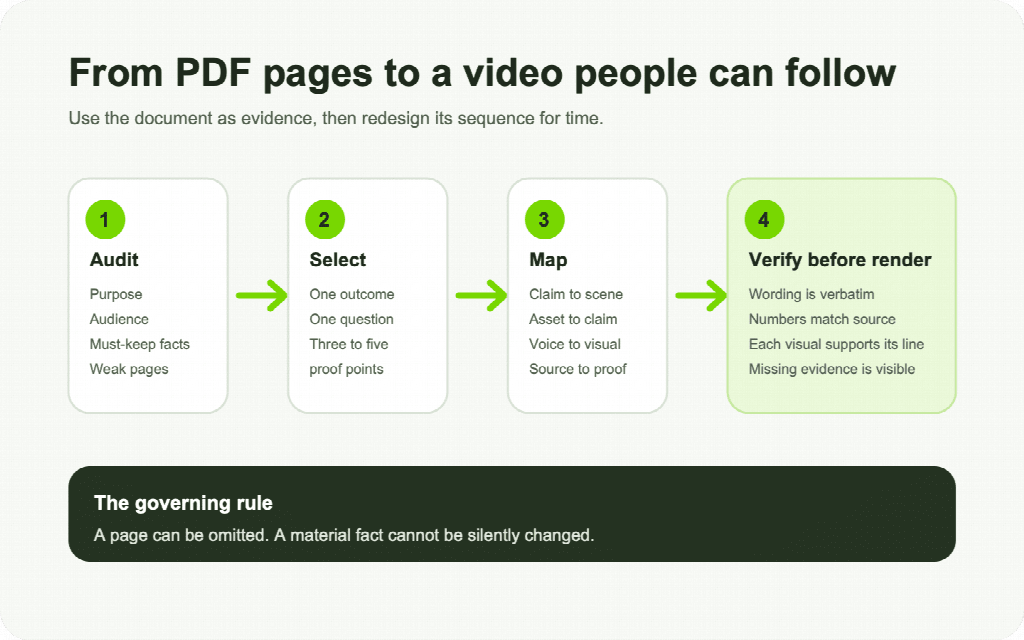
Figure: The source audit, selection, scene mapping, and verification stages should happen before final rendering.
Protect Facts While Compressing the Story
Compression is necessary. A video that reads every page aloud is not an explainer. The safer approach is to distinguish three types of content.
Immutable content includes exact names, numbers, units, prices, parameters, legal phrases, and direct quotations. These should remain verbatim when shown or spoken. Condensable content includes supporting explanation that can be shortened without changing the claim. Optional content includes detail that can be omitted because it does not affect the chosen viewer outcome.
Review each proposed scene with this classification. If a sentence contains both immutable and condensable material, split it. Keep the literal fact intact and simplify the surrounding explanation.
Asset fidelity matters for the same reason. A product image, interface screenshot, logo, or technical diagram should not be casually redrawn when its precise identity carries meaning. TapVid's current positioning addresses this through three layers: asset fidelity, information fidelity, and correct correspondence between script, scene, voiceover, and source asset. That is a more useful evaluation model than asking whether a video merely looks professional.
Accuracy still does not mean zero errors. Teams should keep a human approval step for material claims, especially when the source contains dense tables, scanned pages, uncommon terminology, or several similar products.
A Repeatable PDF-to-Video Workflow
1. Define the Viewer Decision
Write the question the viewer should be able to answer after watching. "Understand the report" is too broad. "Know which of the three options fits a small team" is specific enough to guide selection.
2. Build the Must-Keep List
Copy exact product names, numbers, dates, labels, and caveats into a review sheet. Include the page number for each item. This is your factual checksum.
3. Select Three to Five Proof Points
Choose only the claims needed to answer the viewer question. For every claim, identify the source page and the asset that best proves it. If no asset exists, decide whether a simple diagram can clarify the relationship without inventing new information.
4. Draft the Scene Map
Assign one job to each scene. A scene may introduce, explain, compare, prove, qualify, or prompt action. If a scene tries to perform three jobs, divide it.
5. Review the Script Before Visual Generation
Check the script against the must-keep list. Look for stronger verbs, missing qualifiers, altered numbers, and claims that combine facts from different periods. Review now, when changes are cheap.
6. Match Every Asset to the Spoken Line
The visual should prove or clarify what the viewer hears. Avoid generic footage that creates mood without information. When the narration discusses product A, the screen should not display a visually similar product B.
7. Render a Short Proof Segment
Generate the opening plus one evidence-heavy scene before committing to the full video. This exposes problems with text size, pacing, chart readability, and asset treatment.
8. Run a Two-Pass Quality Check
The first pass is factual. Compare every material statement and label with the PDF. The second pass is editorial. Check pace, hierarchy, transitions, and whether the animation helps the viewer understand rather than merely keeping the screen busy.
What a Documented TapVid Test Did and Did Not Prove
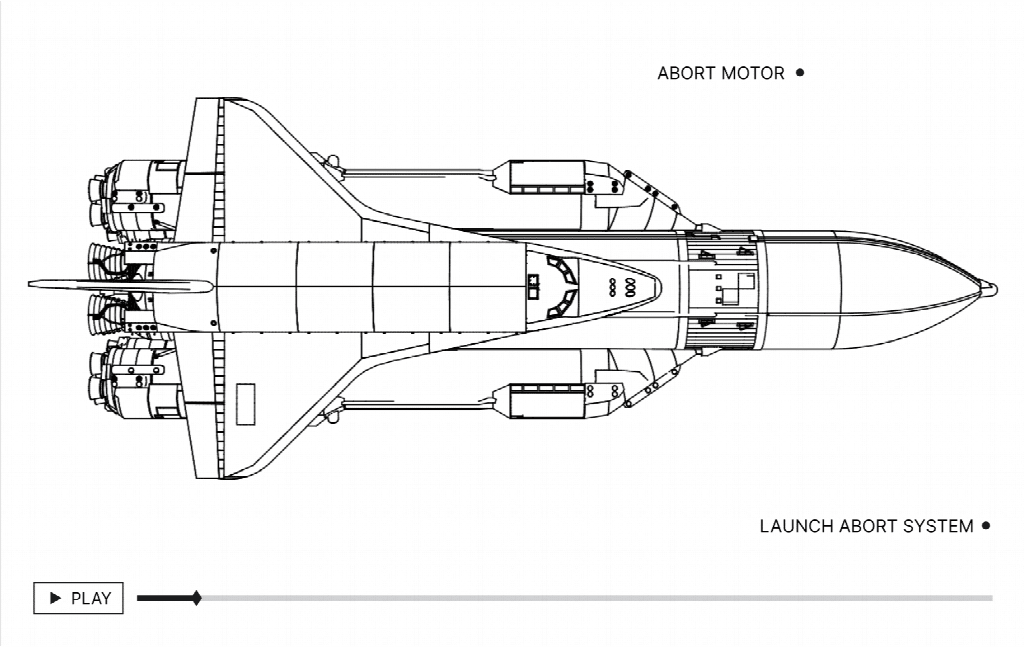
A documented TapVid test on August 25, 2026 inspected the current public product page, its PDF-to-explainer claim, and an official motion graphics output visual. The public page states that a prompt, PDF, or link can become a structured explainer with motion graphics. The official visual shows a source-specific technical asset presented with preserved labels and clean motion controls.
The same test did not complete a fresh private-account render. Google sign-in did not finish, and the email route returned "Could not check this email. Please try again." Therefore, this guide does not claim an observed generation time, a measured output quality score, or a successful export from that session. A buyer evaluating any platform should run one representative PDF in its own account and record the input, settings, output, corrections, and render result before making a production decision.
That limitation is useful. It demonstrates the difference between a public capability claim and first-hand production evidence. Both belong in an evaluation, but they should never be presented as the same thing.
Final Quality Assurance Checklist
Before publishing the video, confirm all of the following:
- The video answers one clearly stated viewer question.
- Every material number includes the correct unit and period.
- Product names, labels, prices, parameters, and legal wording match the PDF.
- Every chart is readable long enough to understand its point.
- The narration does not claim more than the source supports.
- The correct source asset appears with each spoken claim.
- Omissions do not remove a condition that changes the conclusion.
- Captions and on-screen text remain readable on a phone.
- The final call to action follows from the document.
- A reviewer can trace each material claim back to a source page.
Frequently Asked Questions
Can AI turn any PDF into a motion graphics explainer video?
Most text-based PDFs can provide a useful starting point, but quality depends on structure, asset resolution, scan quality, tables, and the amount of interpretation required. Dense or poorly structured sources need a brief and a must-keep list before generation.
Should the video follow the PDF page by page?
Usually not. Map claims to scenes and evidence to claims. Page order serves reading, while scene order serves timed understanding.
How long should a PDF-based explainer video be?
Set length by the viewer decision, not by page count. A long report may support a concise video if only a few proof points are needed. A short technical document may need more time if its relationships require careful visualization.
How do I prevent facts from changing during conversion?
Create an evidence contract, a must-keep list, and a claim-to-scene table. Review the script before rendering, then check every material on-screen fact against the original PDF.
Do motion graphics need to reproduce the PDF's design?
No. Preserve the source facts and the identity of meaningful assets, but redesign the hierarchy for video. A document layout should not be mistaken for a storyboard.
What should I test before choosing a PDF-to-video tool?
Use a representative document with at least one chart, one exact number, one branded asset, and one caveat. Record what the tool extracts, what it changes, how scenes can be corrected, and whether the final output preserves the source evidence.
The best AI motion graphics explainer videos from PDFs do not animate every page. They make a defensible editorial choice, preserve the facts that matter, and give the viewer a sequence that is easier to follow than the original document.
Comments
Loading comments…