
Picture this: indie chillwave artist Washed Out unveiled a trippy, full-length video in 2024—no camera, just OpenAI’s video model and director Paul Trillo. What once cost five figures now lives in a browser tab: upload your track, type a prompt, and watch a three-minute clip form in minutes. Choice, though, can feel overwhelming. Dozens of platforms shout “lyrics to visuals,” yet hide time caps, watermarks, or flimsy lip-sync. We’ve cut through the noise, tested the frontrunners, and built a roadmap so you can hit Generate with confidence.
Who we wrote this for—and what you’ll gain.

If you produce tracks in a bedroom studio, run a small label, or code the next music-tech side project, this guide is for you.
You care about outcomes, not buzzwords. You want to know which tool finishes a four-minute song without stalling, which one keeps lip-sync within 90 percent accuracy, and which platform avoids surprise render fees.
Time matters, so we split the field into five clear segments: music-specialized engines, storyboarding planners, high-fidelity clip generators, style-first animators, and emerging beta tools. Skim to the bucket that fits, then zoom in only where it helps.
Read on and you’ll leave with a tested shortlist, a time-boxed trial plan, and absolute clarity on cost and capability, so when inspiration hits, you press Generate with confidence.
How we tested the tools:
Testing AI video apps can feel like herding holograms, so we set firm guardrails before writing a word.
We started with a five-point scorecard. Visual quality carried the most weight at 35 percent because blurry footage hurts credibility no matter how tight the sync. Cybernews used the same weight in its 2026 benchmark, so our results stay comparable.
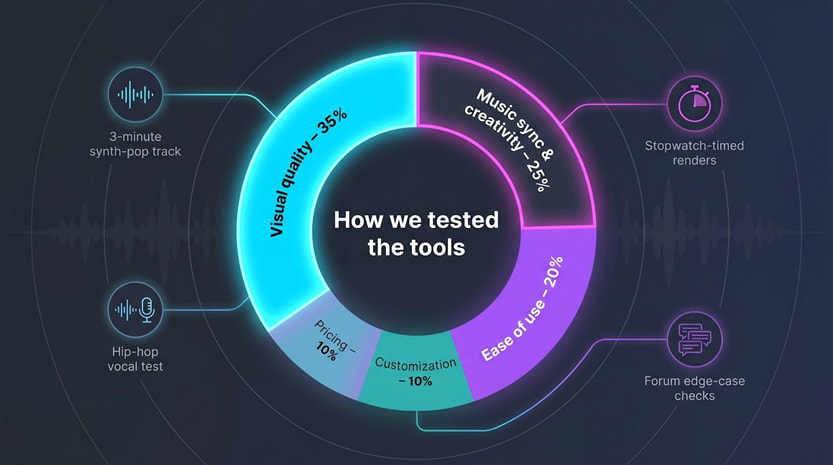 Music sync and creativity accounted for 25 percent. We checked for real beat awareness: does the video punch on the snare or fade at random?
Ease of use counted for 20 percent. If a first-time user cannot export a shareable cut within an hour, that friction shows up in the score.
Customization covered 10 percent. Power users need multi-scene boards, prompt keyframes, and reliable 4K upscales.
Pricing rounded out the final 10 percent. We audited free-tier limits, watermark rules, and cost per finished minute so you can budget with open eyes.
Each tool faced the same three-minute synth-pop track, stopwatch-timed renders, and a second run on a vocal-heavy hip-hop song to stress lip-sync. We then reviewed public forums to surface edge-case issues.
The result is a level field built on numbers you can trust and stories you can act on when you press Generate.
Quick-scan comparison table
You asked for a bird’s-eye view, so here it is.
Scan the grid below and you’ll see at a glance which engine handles a full song, which stops at 16 seconds, and which platform tags free users with watermarks.
| Tool | Sweet spot | Music-sync logic | Max length | Free tier | Notable paid plan |
|---|---|---|---|---|---|
| Neural Frames | Abstract, audio-reactive art | Eight-stem beat analysis | ≈10 min | Short trial clip | Navigator $19/mo |
| Freebeat | One-click story videos | AI “director” plans sections | 6 min | 500 credits | Pro $24.99/mo |
| VibeMV | Lip-synced performers | Vocal detection + avatars | 5 min | Yes, no watermark | Hobby $19/mo |
| LTX Studio | Multi-scene narratives | Prompt to storyboard | 3–5 min | 800 credits | Lite $15/mo |
| Runway Gen-4 | Cinematic B-roll clips | Text to video diffusion | 16 s | Trial credits | Standard $12/mo |
| Pika Labs | Fast idea loops | Prompt diffusion | 10 s | 80 monthly credits | Standard $8/mo |
| Kaiber | Stylized morphing art | Audio-reactive style transfer | 8 min | Trial credits | Creator $29/mo |
| OpenAI Sora* | Photoreal preview | Diffusion transformer | 20 s | Shutting down | ChatGPT Plus |
| Lyric visualizers | Words & waveforms | Spectrum templates | Full song | Often free | HD $15 one-off |
Shutting down April 2026; treat this as platform risk.
Use the table as your compass.
Pick the column that matters most, whether sync depth, run time, or price, and your shortlist will build itself.
A quick proof point before we dive deeper: Cybernews weights output quality at 35 percent in its 2026 benchmark, the same priority we adopted.
Now let’s turn those numbers into context and begin our segment-by-segment dive.
Segment A: music-specialized full-song generators
1. Neural Frames: abstract visuals that dance to your beat
Trusted by more than 40,000 independent artists, the Neural Frames platform delivers full-length 4K videos that lock every beat to color and camera motion. It exists for one purpose: let your music drive the picture.
Upload a track, add a prompt, and the engine breaks the song into stems (drums, vocals, bass), then maps those frequencies to color shifts, camera swoops, and particle bursts. It feels less like editing and more like watching sound paint itself.
Our three-minute synth-pop test came first. The platform rendered a full 1080p cut in under eight minutes on the Pro tier.
Neuralframes.com’s help-center docs note that switching on Turbo Mode can render up to four times faster, turning even multi-scene projects into a short coffee-break wait. You can gauge the output yourself in the public Discover gallery, where producer Lo-Fi Luka’s lo-fi EP video shows every kick bloom into color exactly on beat.
Every kick triggered a subtle zoom, and filtered pads washed the palette from teal to magenta. No manual markers, no timeline scrubbing; just chemistry between waveform and pixels.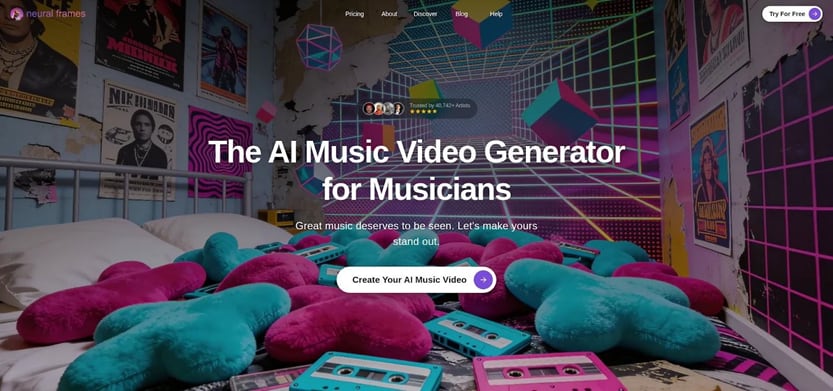 Neural Frames AI Music Video Generator Interface Screenshot
Control waits when you need it. Autopilot produces a solid draft, but a timeline editor sits ready for precision. Drop a keyframe at bar 33, switch from watercolor to glitch, and the change lands exactly on the chorus downbeat. For advanced users, model options such as the cinematic “Kling” or stylized “Seedance” add fresh motion flavors.
Quality holds up. Cybernews ranked Neural Frames first in visual fidelity among music-first tools, tying 30 percent of its score to image clarity. Our own viewing agreed: minimal flicker, smooth motion, and a dependable 4K upscale.
There is no permanent free tier, although you can create a short trial clip to test the engine. Step up to $19 a month for the Navigator plan and you gain 1,000 rendering credits, standard models, and commercial rights.
Bottom line: if your genre leans electronic, ambient, or any beat-driven style, Neural Frames gives you a living canvas that moves in time and stays out of your creative way.
2. VibeMV: put a singer on screen without a camera
Some songs need a face.
VibeMV provides one that mouths every lyric in time, no studio required.
Upload your track and the platform finds vocal entrances, maps phonemes, and spawns an AI performer whose lips stay within a whisker of 90 percent accuracy. That tight sync catches eyes on TikTok and convinces YouTube that you staged a real shoot.
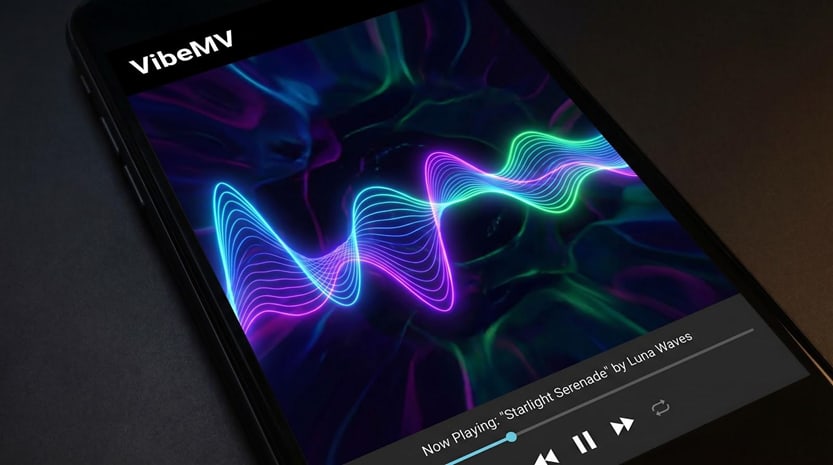 VibeMV AI Lip-Synced Performer Music Video Generator Interface
Generation stays simple.
Pick a style preset—cel-shaded anime, semi-real CG, or a middle ground—and VibeMV slices your song into intro, verses, chorus, and bridge. Each segment can carry its own prompt, so the backdrop shifts while the avatar remains consistent. Picture a neon city for verse one and a forest rave for the drop, all timed automatically.
In our hip-hop test the engine needed about seven minutes to render a full-length, watermark-free 720p video on the free tier. The mouth tracked rapid-fire syllables with only minor drift on double-time phrases. Moving to the Hobby plan ($19 a month) opened 1080p and faster queues; nothing else changed, so you can prototype free and upgrade only when ready to publish.
Constraints exist.
Facial emotion is present but subtle, closer to storyboard animation than live action, and instrumentals gain no special advantage. If your track is lyric-free, another tool might suit you better. Still, for any vocalist who wants a share-ready performance video by lunch, VibeMV hits a price-to-quality sweet spot.
Use it as your digital front-person, then layer B-roll from other generators for extra polish. The heavy lifting—lip-sync, structure, and edits—is already done.
3. Freebeat: one-click videos at scale
Freebeat feels less like software and more like a tireless director on standby.
Drag in your song or paste a SoundCloud link, choose a mood, and the platform storyboards, edits, and renders the entire piece while you refill your coffee.
Its secret sauce is an “AI Director” that listens to the whole track before touching a frame. Big chorus coming? It plans a fast-cut montage. Downtempo bridge? The camera slows and color temperatures cool automatically. The result is a coherent arc instead of random beat flashes.
Speed is the headline. Our synth-pop test exported a full six-minute HD video in just over five minutes on the Pro tier. Even the free 30-second sample arrived in 45 seconds, watermark included but perfectly synced.
Scale matters too. The company has already passed one billion seconds of footage generated, proving it can handle weekend release rushes without queue meltdowns.
Flexibility shows in six video modes: lyric-centric, dance, cinematic, performance, social-vertical, and freestyle. Pick one and the engine swaps templates, graphics, and camera logic accordingly. No need to learn motion-graphics jargon.
Originality is the trade-off. Freebeat leans on polished but templated assets, so two artists picking the same preset may ship look-alike videos. Lip-sync is solid yet a step behind VibeMV; consonant clusters sometimes drift off-mouth in our hip-hop test.
Pricing stays approachable. Ten dollars a month gets you watermark-free 720p, while twenty-five buys 1080p and priority renders. Given the time saved, the cost per song rivals a single stock-footage clip.
If your release calendar is packed or you manage several artists, Freebeat’s speed and consistency feel like hiring an in-house editor, without adding to payroll.
LTX Studio: turn a prompt into a shot list
Sometimes a song asks for more than swirling colors.
It needs a storyline, evolving characters, and camera angles that feel hand-picked. LTX Studio answers by drafting a full storyboard the moment you press Generate.
Describe your idea in one or two sentences, such as “time-traveling vinyl nerd lost in an ’80s dreamscape,” and the engine blocks out scenes like a junior director: rooftop intro, neon-lit alley for verse one, record-shop meet-cute at the bridge. Each scene carries its own prompt tweaks, so visuals stay fresh yet cohesive.
Consistency is the headline feature. Cast a protagonist once and they reappear shot after shot wearing the same jacket, framed in matching light. That solves the classic AI headache where every clip shows a slightly different person. Need a tweak? Click a scene thumbnail, adjust the prompt, and regenerate only that slice.
The interface feels like a lightweight editor. A horizontal timeline shows your song’s waveform; drag scene borders to shift timing or drop a text overlay exactly on a lyric beat. It offers the control filmmakers expect, now inside a browser tab.
Output quality lands between VibeMV’s stylized animation and Runway’s realism, settling into a cinematic sweet spot. We generated a two-scene draft in under ten minutes during the free beta. Minor artifacts popped up (one shot gave the hero camera-lens eyes), but a single regenerate fixed them.
Pricing now comes in tiers, starting with a free plan that provides 800 credits, ideal for testing before you move to the fifteen-dollar-a-month Lite plan. If your next release needs a short film more than a visualizer, LTX Studio is the sandbox to try first.
Segment C: high-fidelity clip generators
Runway Gen-4: cinematic B-roll on demand
Runway does not try to finish your whole video.
Instead, it hands you polished six- to sixteen-second shots that look as if a film crew spent days lighting the set.
Type “slow-motion dancer in neon rain,” wait 30 seconds, and you have a clip worthy of a weekend edit session. The Gen-4 diffusion model nails depth of field, camera pans, and lens flares. Drop the clip into Premiere, line it to a snare hit, and watch production value jump.
Runway Gen-4 Text-to-Video Cinematic B-Roll Interface Screenshot
That power comes with limits.
Runway ignores audio, so beat sync is on you. You will also stitch many clips to cover an entire song, which can burn through generation credits fast. Think of it as a stock-footage library that you write yourself.
Speed helps offset the limits. We generated ten unique eight-second shots in under five minutes total, ideal for ideation sprints. Quality held: no jitter, minimal artifacting, and colors that graded well beside real footage.
Pricing feels fair if you treat Runway like a lens rental. Twelve dollars a month buys enough credits for roughly 50 seconds of 1080p video; pro tiers scale higher. Use those seconds wisely for hero shots, intros, and social teasers, then let cheaper tools fill the gaps.
If your track needs photoreal skyline fly-throughs or slow-motion confetti bursts, Runway delivers them faster than any general generator today. Pair it with a music-aware platform and you gain both polish and pacing.
Pika Labs: rapid-fire ideas for social loops
Pika trades raw horsepower for speed.
Open the web app, type a prompt, and a ten-second clip drops into your downloads before your DAW even finishes loading. That feedback loop lets you test wild visual concepts in the time it takes to brew coffee.
Because clips are short, creators treat Pika like an idea printer: generate a glowing forest, a VHS robot, or drifting clouds, then see which mood suits your chorus. Iterate three or four times and you have a mood board ready for editing.
Quality sits a notch below Runway’s cinematic flair, yet the engine rarely stumbles on motion. Camera paths feel intentional, and stylized looks—from watercolor to low-poly—arrive without glitchy frames. For vertical socials, the resolution and clarity are more than enough.
Price is Pika’s standout edge. A free account grants 80 monthly credits at 480p with a small corner mark. Eight dollars a month for the Standard plan removes the watermark, opens higher resolutions, and lengthens clips, ideal for looping Spotify Canvas visuals or TikTok teasers.
Remember that Pika is deaf to your beat. You will trim and align clips in post, and full-length videos require many exports. Still, for teams that prototype quickly, Pika feels like a sketchpad you never need to sharpen.
Kaiber: transform prompts into trippy, full-length animations
Kaiber is where you go when “normal” feels dull.
Give it a prompt such as “watercolor cyberpunk street,” and the engine morphs every bar of your song into a living painting that shifts with the beat. Clips do not cut; they melt from one form to the next, echoing the Linkin Park AI-assisted video.
Unlike clip tools, Kaiber can render an eight-minute track in one pass. Behind the scenes it stitches frame-by-frame generations, matching pulse peaks to flashes and style changes. That continuity keeps viewers watching even when the scene drifts into abstract terrain.
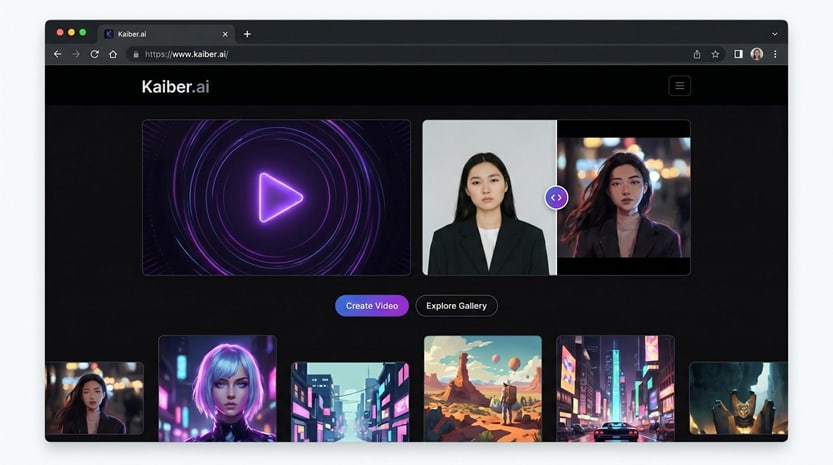 Kaiber AI Audio-Reactive Full-Length Music Video Generator Interface
Control sits in keyframes.
Drop a fresh prompt at the one-minute mark and the scene pivots, for example from neon alley to ink-wash mountains, exactly on cue. It is an intuitive way to avoid sameness without manual editing.
Expect longer renders. A three-minute 1080p export on the Creator plan took just under an hour in our test, so plan a coffee break. The payoff is a video that looks hand-painted frame by frame.
Costs follow a credit model. Five dollars buys enough juice for about a minute of HD footage, while twenty-nine a month covers roughly five minutes and priority queues. There is a short trial, but be ready to pay if you need full songs at high resolution.
Kaiber’s output is rarely photoreal, and lip-sync is not its strength. What you gain instead is pure visual identity. If your track craves an animated fever dream and you have time for longer renders, Kaiber is the brush that never runs out of paint.
Segment E: a cautionary tale
OpenAI Sora: photoreal preview, imminent shutdown
Sora arrived with huge buzz, serving 20-second clips where a spaceship lands in Times Square with film-grade lighting and reflections. The LA Times feature on Washed Out’s Sora-powered video showed what full-length access might have offered musicians.
Reality changed fast. OpenAI told users in March 2026 that the Sora app will close on April 26, 2026, and the API will follow in September. The tool remains available only to ChatGPT Plus and Pro accounts until then.
Why mention a fading product? Because platform durability shapes your risk. A sudden shutdown forces anyone who built workflows on Sora to rebuild overnight.
Keep that lesson in mind as you design your stack. Spread your bets across multiple vendors and budget some time for open-source tools. When one door closes, adaptable creators move on quickly, just as they did when past services disappeared.
Lyric and visualizer classics: reliable options for straight-up words and waves
Not every release needs generative spectacle.
Sometimes you only want the lyrics upfront or a waveform that moves with the bass. Traditional lyric-video and audio-visualizer apps keep that task simple and predictable.
Rotor Videos, Vizzy.io, and Renderforest have refined template libraries for years. Upload your track, paste timed lyrics, pick a background, and export an HD video in minutes. Because the visuals are deterministic, you avoid the glitches or style drift common in AI models.
Need proof of speed? We built a full lyric video for a four-minute ballad in Rotor’s browser editor in under ten minutes (render included). The cost came to fifteen dollars, roughly the price of a single stock clip, and the words matched every syllable thanks to the auto-sync tool.
Visualizers offer the same plug-and-play spirit. Drop your WAV into Vizzy.io, choose a spectrum style, and the bars pulse exactly on beat with no prompt engineering. Vizzy is completely free and exports up to 4K without watermarks, while Renderforest provides free 720p tiers and charges about twenty dollars a month for HD.
These tools will not win creativity awards, yet they excel at clarity. Fans read the lyrics, feel the rhythm, and face no motion distractors. Use them on their own for karaoke uploads or layer their text over AI footage for the best of both worlds.
What’s next: six trends shaping the next 18 months
AI video is not slowing; it is changing shape.
Watch these six shifts to stay ahead.

- Multimodal fusion gains speed. Researchers are teaching single models to read text, hear audio, and render video in one pass. When stable, you will drop in a song and prompt once and receive visuals, subtitles, and chapter cuts together, no app juggling.
- Run time ceilings climb. Five seconds felt heroic in 2023. Today Neural Frames can finish ten-minute renders. Expect consistent three- to five-minute outputs across most tools by next summer, plus 4K as a standard tick box instead of a premium extra.
- Personal avatars reach the masses. Early results in VibeMV suggest you will train an AI on a few selfies and watch “you” perform in photoreal scenes. Indie artists gain stage presence without studio fees, and developers gain reusable spokes-characters for tutorials.
- Distribution platforms bake in AI. Picture uploading a single to DistroKid and selecting “auto-generate video” before publish. Beta integrations already hint at it behind NDA doors. Once live, production time falls from hours to checkboxes.
- Labeling and licensing tighten. As AI clips pass for camera footage, regulators and hosts will demand clearer tags. Track the usage rights inside each tool so you are not surprised when you monetize.
- Open-source closes the gap. Stable Diffusion shook up images; video will get its parallel. When community models reach consumer GPUs, costs drop and experimentation spikes, a win for hackers and hobbyists.
Stay nimble, test often, and these trends will turn from threat into chance to wow your listeners first.
Comments
Loading comments…