TL;DR: This pipeline uses dbt Core + DuckDB locally — no infrastructure — to normalize domains, deduplicate URLs, enforce data contracts via tests, and materialize four analyst-ready mart tables from raw SERP API output.
Press enter or click to view image in full size

After web ingestion, you’ll have inconsistent domains, duplicate URLs across collection runs, null titles, and more. This is not wrong data, per se, just unprocessed data. The gap between “data in a table” and “data you can trust in a query” is bigger than you think.
dbt (data build tool) is an open-source transformation framework that can help us with exactly that problem: you write SQL models, it materializes them in dependency order, and it tracks lineage from raw source to final output. Paired with DuckDB via the community dbt-duckdb adapter — no infrastructure needed, it’s all.duckdb files — it's a surprisingly capable local setup for closing that gap.
I’ll walk you through the Python-based pipeline I use — one that takes SERP data and produces analytics ready tables.
Requirements
What you need: Python 3.x, first of all. Then we can install our requirements like so:
pip install dbt-core dbt-duckdb duckdb requests python-dotenv pandas
For ingestion, we’ll be using a SERP API — I’m using the one I have access to, Bright Data. For this, you’ll need an account with a SERP zone (get API key and zone from its dashboard).
Create a project directory with this layout:
ingest/for the Python scripts (bright_data.py, duckdb_manager.py, scraper.py),models/for dbt (with subfolders staging/, intermediate/, marts/),data/for the .duckdb files, andprofiles.yml, anddbt_project.ymlat the root.
So there are two main phases: a Python ingest layer that collects and streams results into DuckDB, and a dbt transformation layer with three tiers — staging, intermediate, and marts.
Phase 1: Ingesting SERP Data into DuckDB
Before dbt has anything to work with, we need data in the database. The ingest layer is three Python files: bright_data.py wraps the Bright Data SERP API, duckdb_manager.py handles the DuckDB connection and schema, and scraper.py orchestrates the collection loop. Place them in an ingest/ subdirectory.
The Bright Data Client
Bright Data’s SERP API works differently from a proxy setup. Rather than routing requests through a proxy, you POST a target URL to their API endpoint and get back structured JSON.
ingest/bright_data.py:
"""
Bright Data SERP API client for fetching search results
"""

import os
import requests
from typing import Dict, Any, Optional
from dotenv import load_dotenv

load_dotenv()


class BrightDataClient:
    """
    Client for Bright Data SERP API
    Uses the SERP API endpoint (not proxy) for Google search access
    """

    def __init__(
        self,
        api_key: Optional[str] = None,
        zone: Optional[str] = None,
        country: Optional[str] = None
    ):
        env_api_key = os.getenv("BRIGHT_DATA_API_KEY")
        env_zone = os.getenv("BRIGHT_DATA_ZONE")
        env_country = os.getenv("BRIGHT_DATA_COUNTRY")

        self.api_key = api_key or env_api_key
        self.zone = zone or env_zone
        self.country = country or env_country
        self.api_endpoint = "https://api.brightdata.com/request"

        if not self.api_key:
            raise ValueError(
                "BRIGHT_DATA_API_KEY must be provided via constructor or environment variable. "
                "Get your API key from: https://brightdata.com/cp/setting/users"
            )

        if not self.zone:
            raise ValueError(
                "BRIGHT_DATA_ZONE must be provided via constructor or environment variable. "
                "Manage zones at: https://brightdata.com/cp/zones"
            )

        self.session = requests.Session()
        self.session.headers.update({
            'Content-Type': 'application/json',
            'Authorization': f'Bearer {self.api_key}'
        })

    def search(
        self,
        query: str,
        num_results: int = 10,
        language: Optional[str] = None,
        country: Optional[str] = None
    ) -> Dict[str, Any]:
        """
        Execute a Google search via Bright Data SERP API

        Args:
            query: Search query string
            num_results: Number of results to return (default: 10)
            language: Language code (e.g., 'en', 'es', 'fr')
            country: Country code (e.g., 'us', 'uk', 'ca')

        Returns:
            Dictionary containing search results in JSON format
        """
        search_url = (
            f"https://www.google.com/search"
            f"?q={requests.utils.quote(query)}"
            f"&num={num_results}"
            f"&brd_json=1"
        )

        if language:
            search_url += f"&hl={language}&lr=lang_{language}"

        target_country = country or self.country

        payload = {
            'zone': self.zone,
            'url': search_url,
            'format': 'json'
        }

        if target_country:
            payload['country'] = target_country

        try:
            response = self.session.post(
                self.api_endpoint,
                json=payload,
                timeout=30
            )
            response.raise_for_status()
            return response.json()

        except requests.exceptions.HTTPError as e:
            error_msg = f"Search request failed with HTTP {e.response.status_code}"
            if e.response.text:
                error_msg += f": {e.response.text[:200]}"
            raise RuntimeError(error_msg) from e
        except requests.exceptions.RequestException as e:
            raise RuntimeError(f"Search request failed: {e}") from e
Note thebrd_json=1 parameter appended to the Google search URL — that’s what tells Bright Data to parse the response and return structured data rather than raw HTML.
Configuration
- API key, zone, country — read from environment variables with constructor overrides, so the client works both in scripts and in environments where secrets come in differently.
- Without
BRIGHT_DATA_API_KEYandBRIGHT_DATA_ZONEset, it raises immediately with a message pointing to the right place in the Bright Data dashboard. - The client also supports a
languageparameter (e.g.hl=en,lr=lang_en) for non-English or multi-region SERP analysis — pass it tosearch()or setBRIGHT_DATA_COUNTRYfor geo-targeting.
The DuckDB Manager
We’ll use two databases. The DuckDB Python API lets us create files, run SQL, and insert from pandas DataFrames directly:
serp_data.duckdb— the source DB that holds raw ingest output, andserp_analytics.duckdb— our analytics DB, one that holds the transformed models.
dbt attaches the source DB read-only and writes only to the analytics DB, so raw data stays untouched.
For our source DB, the schema is simple: one serp_results table with indexes on query and domain — the two fields that get hit hardest in the dbt transformations downstream.
ingest/duckdb_manager.py
"""
DuckDB connection and schema management for SERP ingest
"""

import duckdb
import os
from typing import Optional, List, Dict, Any
from datetime import datetime

class DuckDBManager:
    """Manages DuckDB connection, schema, and insert operations"""

    def __init__(self, db_path: str = "data/serp_data.duckdb"):
        # db_path = "serp_data.duckdb" gives dirname = "", which can cause issues on some setups
        # So...safer to guard like so:
        parent = os.path.dirname(db_path)
        if parent:
            os.makedirs(parent, exist_ok=True)

        self.db_path = db_path
        self.conn = duckdb.connect(db_path)
        self._create_schema()

    def _create_schema(self):
        self.conn.execute("""
            CREATE TABLE IF NOT EXISTS serp_results (
                id BIGINT PRIMARY KEY,
                query TEXT NOT NULL,
                timestamp TIMESTAMP NOT NULL,
                result_position INTEGER NOT NULL,
                title TEXT,
                url TEXT,
                snippet TEXT,
                domain TEXT,
                rank INTEGER
            )
        """)


    def insert_batch(self, results: List[Dict[str, Any]], query: str, timestamp: Optional[datetime] = None):
        if timestamp is None:
            timestamp = datetime.now()

        if not results:
            return

        def extract_domain(url: str) -> str:
            if not url:
                return ""
            try:
                from urllib.parse import urlparse
                parsed = urlparse(url)
                return parsed.netloc.replace("www.", "")
            except Exception:
                return ""

        max_id_result = self.conn.execute("SELECT COALESCE(MAX(id), 0) FROM serp_results").fetchone()
        next_id = (max_id_result[0] if max_id_result else 0) + 1

        rows = []
        for idx, result in enumerate(results):
            url = result.get('url', result.get('link', ''))
            domain = extract_domain(url)

            rows.append({
                'id': next_id + idx,
                'query': query,
                'timestamp': timestamp,
                'result_position': idx + 1,
                'title': result.get('title', ''),
                'url': url,
                'snippet': result.get('snippet', result.get('description', '')),
                'domain': domain,
                'rank': idx + 1
            })

        import pandas as pd
        df = pd.DataFrame(rows)
        # Best practice is to specify columns explicitly (like, INSERT INTO t (a,b,c) SELECT a,b,c FROM df)
        # to avoid mismatch if table or DataFrame order changes
        self.conn.execute("""
            INSERT INTO serp_results (id, query, timestamp, result_position, title, url, snippet, domain, rank)
            SELECT id, query, timestamp, result_position, title, url, snippet, domain, rank FROM df
        """)

    def get_row_count(self) -> int:
        result = self.conn.execute("SELECT COUNT(*) FROM serp_results").fetchone()
        return result[0] if result else 0

    def close(self):
        self.conn.close()

    def __enter__(self):
        return self

    def __exit__(self, exc_type, exc_val, exc_tb):
        self.close()
Just in case, the insert_batch method handles inconsistent SERP field names (link vs url, description vs snippet).
Also, it’s worth being honest about what the domain extraction is and isn’t: I’ve accounted only for a best-effort ingest-time extraction, not the canonical domain value. The dbt staging model is where the real normalization happens — lowercasing, stripping www., and falling back to regex extraction when the field is missing. The ingest layer just makes sure something is in the column.
Making the Two Work Together to Ingest Web Data
The scraper loops through a list of queries, calls the Bright Data client for each, and streams results into DuckDB in batches. Put a .env file in the project root with BRIGHT_DATA_API_KEY and BRIGHT_DATA_ZONE, then run from the project root:
python ingest/scraper.py --count 50000
Some other time saving flags to add:
--queries “foo” “bar” for custom queries (Here, I’ve made it default to 10 tech keywords),
--batch-size 10 for results per API call,
--delay 1.0 for seconds between calls, and
--db path/to/serp_data.duckdb to override the output path (default: data/serp_data.duckdb).
"""
SERP scraper that streams results to DuckDB (data/serp_data.duckdb).
Run from project root. Then run dbt to build analytics.
"""

import argparse
import time
import sys
import os
from pathlib import Path

sys.path.insert(0, os.path.dirname(os.path.abspath(__file__)))

from bright_data import BrightDataClient
from duckdb_manager import DuckDBManager

def _default_db_path() -> str:
    script_dir = Path(__file__).resolve().parent
    project_root = script_dir.parent
    return str(project_root / "data" / "serp_data.duckdb")

def scrape_and_insert( total_results: int,
    queries: list = None,
    batch_size: int = 10,
    delay_seconds: float = 1.0,
    db_path: str = None ):
    if queries is None:
        queries = [
            "python programming", "machine learning", "web development",
            "data science", "cloud computing", "javascript frameworks",
            "database design", "API development", "devops tools", "cybersecurity"
        ]

    db_path = db_path or _default_db_path()
    client = BrightDataClient()

    with DuckDBManager(db_path) as db:
        print(f"Starting scrape: {total_results} total results")
        print(f"Database: {db.db_path}")
        print("Then run: dbt run --profiles-dir .")

        results_scraped = 0
        query_idx = 0
        start_time = time.time()

        try:
            while results_scraped < total_results:
                query = queries[query_idx % len(queries)]

                try:
                    serp_data = client.search(query, num_results=batch_size)

                    organic_results = []
                    if isinstance(serp_data, dict):
                        if 'organic' in serp_data:
                            organic_results = serp_data['organic']
                        elif 'body' in serp_data and isinstance(serp_data['body'], dict):
                            if 'organic' in serp_data['body']:
                                organic_results = serp_data['body']['organic']

                    if organic_results:
                        db.insert_batch(organic_results, query)
                        results_scraped += len(organic_results)
                        print(f"[{results_scraped}/{total_results}] Query: '{query}' | Inserted: {len(organic_results)}")

                    query_idx += 1

                    if results_scraped < total_results:
                        time.sleep(delay_seconds)

                except Exception as e:
                    print(f"Error scraping query '{query}': {e}")
                    query_idx += 1
                    continue

        except KeyboardInterrupt:
            print("\nScraping interrupted by user")

        elapsed = time.time() - start_time
        final_count = db.get_row_count()

        print(f"\n=== Scraping Complete ===")
        print(f"Total rows in DB: {final_count}")
        print(f"Time elapsed: {elapsed:.2f}s")
        print(f"Rate: {final_count/elapsed:.1f} rows/sec")

if __name__ == "__main__":
    parser = argparse.ArgumentParser(description="Scrape SERP results to DuckDB for dbt")
    parser.add_argument("--count", type=int, default=50000)
    parser.add_argument("--batch-size", type=int, default=10)
    parser.add_argument("--delay", type=float, default=1.0)
    parser.add_argument("--queries", nargs="+")
    parser.add_argument("--db")

    args = parser.parse_args()

    scrape_and_insert(
        total_results=args.count,
        queries=args.queries,
        batch_size=args.batch_size,
        delay_seconds=args.delay,
        db_path=args.db
    )
A few things in here that are easy to overlook:
- In case your SERP API response structure isn’t always consistent — organic results can live at
serp_data[‘organic’]or nested atserp_data[‘body’][‘organic’]depending on the response format and search engine (Bright Data supports Google as well as others), so the parser checks both. - There’s a configurable delay between API calls (
--delay, default 1 second) to avoid hammering the API. - Progress is printed after each batch so you can track the run.
When the scrape finishes, you have a populated data/serp_data.duckdb file with a serp_results table. That’s our raw data. We now have everything dbt needs to begin.
Phase 2: Transforming with dbt
Connecting dbt to DuckDB
The dbt-duckdb community adapter supports attaching multiple database files, which is exactly what we need here: we’ll make dbt write transformed models to serp_analytics.duckdb while treating serp_data.duckdb as a read-only source. This separation is a good idea because, as a standard, you never want a transformation step to accidentally mutate the raw data it's reading from.
profiles.yml is where the connection lives. The attach block is the part that makes this work — it mounts the raw DB under the alias serp_source, which is the database name the source declaration will reference:
profiles.yml:
serp_analytics:
  target: dev
  outputs:
    dev:
      type: duckdb
      path: data/serp_analytics.duckdb
      threads: 1
      settings:
        max_temp_directory_size: '10GB'
        memory_limit: '12GB'
        preserve_insertion_order: false
      attach:
        - path: data/serp_data.duckdb
          type: duckdb
          alias: serp_source
Tune memory_limit and max_temp_directory_size based on how much data you’re working with. I’ve optimized these values for a stress-free 50k-row scrape but you may want to lower them on smaller machines.
dbt_project.yml holds the project-level configuration — model paths, materialization defaults per layer, and the two variables that control pipeline behavior:
dbt_project.yml
name: serp_analytics
version: 1.0.0
config-version: 2
profile: serp_analytics

model-paths: ["models"]
test-paths: ["tests"]
target-path: "target"
clean-targets:
  - "target"
  - "dbt_packages"

models:
  serp_analytics:
    staging:
      +schema: staging
    intermediate:
      +schema: intermediate
    marts:
      +schema: marts
Declaring the Source
In dbt, you don’t reference raw tables directly in your models. You declare them as sources first, and this is what makes lineage tracking possible.
models/sources.yml
version: 2
sources:
  - name: serp_source
    description: Raw SERP data from Bright Data collection
    database: serp_source
    schema: main
    tables:
      - name: serp_results
        description: Raw search engine result pages - id, query, url, domain, rank, position, etc.
        columns:
          - name: id
            description: Primary key
          - name: query
            description: Search query string
          - name: url
            description: Result URL
          - name: domain
            description: Extracted domain (e.g. example.com)
          - name: result_position
            description: Position on SERP (1-based)
          - name: rank
            description: Rank value (can differ from position)
          - name: title
            description: Result title
          - name: timestamp
            description: Scrape timestamp
The database: serp_source matches the attach alias — that’s how dbt finds the raw table. From here, every model references {{ source() }} or {{ ref() }} rather than a raw table path. This doesn’t sound too important, but in fact, it’s what gives dbt the information it needs to build a lineage graph — a visual DAG of how every output table was derived from the source.
It’s worth talking about what the lineage graph actually buys you, because it’s easy to dismiss as a visualization feature:
- When something looks wrong in a mart, you trace upstream through the graph to find where it came from.
- When you’re about to refactor staging, you can see which intermediate models and marts depend on it before you touch anything.
- When someone new joins the project, they get the full picture of how every output table was derived — in seconds, not by grepping through SQL files.
Run dbt docs generate && dbt docs serve to view it in the browser.
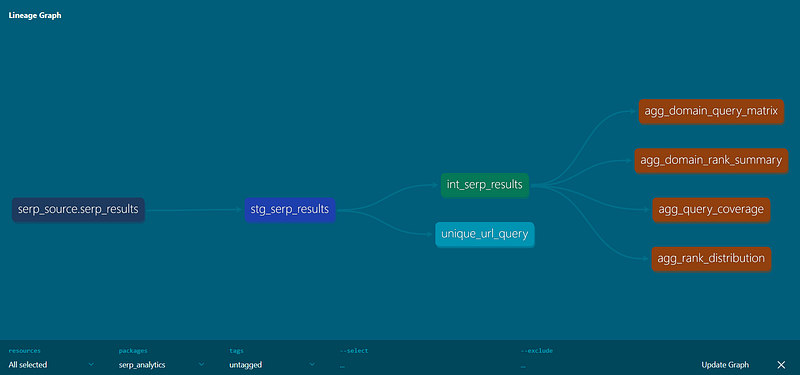
Lineage graph from dbt docs serve, showing the dependency chain from raw SERP data to analytics-ready aggregations.
See these dbt docs for more details on these commands.
Staging: The Contract
The staging model is where all the defensive work happens. Its job is a guarantee: by the time a row leaves staging, it is clean, normalized, and deduplicated. Every model downstream gets to assume that contract holds, which means none of them have to repeat the defensive logic.
Staging and intermediate models use materialized='view'; marts use [materialized='table'].
models/staging/stg_serp_results.sql
{{
  config(
    materialized='view',
  )
}}
with raw as (
    select * from {{ source('serp_source', 'serp_results') }}
),

cleaned as (
    select
        id,
        trim(query) as query,
        timestamp,
        result_position,
        coalesce(nullif(trim(title), ''), 'Untitled') as title,
        url,
        coalesce(nullif(trim(snippet), ''), '') as snippet,
        case
            when domain is null or trim(domain) = '' then coalesce(
                regexp_extract(url, '^https?://(?:www\.)?([^/]+)', 1),
                'unknown'
            )
            else lower(regexp_replace(trim(domain), '^www\.', '', 'i'))
        end as domain,
        rank
    from raw
),
deduplicated as (
    select *
    from (
        select *,
            row_number() over (partition by url, query order by id) as rn
        from cleaned
    )
    where rn = 1
)
select
    id, query, timestamp, result_position, title,
    url, snippet, domain, rank
from deduplicated
Now, the domain normalization block is the part worth paying attention to.
- The scraper provides a
domainfield, but it isn't always populated, and even when it is, capitalization andwww.prefixes create false cardinality in downstream aggregations. - The
CASEexpression handles both paths: if the field is present, lowercase it and stripwww.; if it's missing, fall back to extracting the domain from the URL via DuckDB's regexp_extract / regexp_replace. - Without this,
www.Example.com,example.com, and a row wheredomainis null but the URL ishttps://www.example.com/...all count as different domains in every GROUP BY. That kind of silent cardinality inflation is exactly what staging is supposed to catch.
Deduplication happens last. A window function partitions by (url, query) and keeps the row with the lowest id — the earliest record if a URL was collected more than once for a given query.
What about tests?
Add models/staging/stg_serp_results.yml next to your staging model with column-level tests — straightforward not_null checks on the four fields that everything downstream depends on:
version: 2
models:
  - name: stg_serp_results
    description: Cleaned and deduplicated SERP results; domain normalized
    columns:
      - name: url
        description: Result URL
        tests:
          - not_null
      - name: query
        description: Search query
        tests:
          - not_null
      - name: domain
        description: Normalized domain
        tests:
          - not_null
      - name: result_position
        description: SERP position (1-based)
        tests:
          - not_null
There’s also a custom test in tests/unique_url_query.sql:
-- Custom test because (url, query) should be unique in staging
select url, query, count(*) as cnt
from {{ ref('stg_serp_results') }}
group by url, query
having count(*) > 1
Why? Because dbt’s built-in unique test only checks a single column. Our custom test checks a combination — a given URL should appear only once per query after deduplication.
If the window function logic ever breaks due to a refactor, or if upstream data arrives in a shape the deduplication didn't account for, this test catches it before bad data reaches the marts. That's the value of encoding the business rule as a test: it runs every time, and it fails loudly.
Intermediate: Filter Once, Trust Everywhere
The intermediate model is intentionally short (also a view).
models/intermediate/int_serp_results.sql:
{{
  config(
    materialized='view',
  )
}}
select
    query,
    domain,
    url,
    result_position,
    timestamp
from {{ ref('stg_serp_results') }}
where result_position is not null
  and result_position > 0
  and domain is not null
  and domain != 'unknown'
You might wonder why this exists as its own layer rather than putting these filters in each mart. The reason is that all four mart models need the same filtered dataset.
If the filter logic lived in each mart, changing the definition of a “valid” result would mean changing it in four places and hoping they stayed in sync — which they won’t, eventually. Intermediate models are dbt’s answer to that: define the analysis-ready dataset once, name it, and let everything downstream reference it.
Marts: Four Questions, Four Tables
The mart layer is where the pipeline produces something you’d actually hand to an analyst or wire to a dashboard.
Staging and intermediate models are materialized as views — they’re always fresh and don’t consume extra storage. Marts are materialized as tables — written to disk on every run — so queries against them are fast regardless of upstream complexity.
That split keeps the feedback loop fast during development while giving analysts precomputed tables to query.
Query Coverage
models/marts/agg_query_coverage.sql
{{
  config(
    materialized='table',
  )
}}
select
    query,
    count(distinct url) as unique_urls,
    count(distinct domain) as unique_domains,
    count(*) as total_results,
    min(result_position) as best_position,
    max(result_position) as worst_position,
    avg(result_position) as avg_position
from {{ ref('int_serp_results') }}
group by query
order by unique_domains desc
For each search query: how many unique URLs and domains appeared, and what was the spread of positions? This is where you’d start to understand which queries have competitive SERP landscapes — lots of domains spread across positions — versus which are dominated by a handful of sites.
Rank Distribution
models/marts/agg_rank_distribution.sql:
{{
  config(
    materialized='table',
  )
}}
with rank_buckets as (
    select
        query,
        domain,
        case
            when result_position <= 3 then '1-3'
            when result_position <= 10 then '4-10'
            when result_position <= 20 then '11-20'
            when result_position <= 50 then '21-50'
            else '50+'
        end as position_bucket,
        result_position,
        count(*) as appearances
    from {{ ref('int_serp_results') }}
    group by 1, 2, 3, 4
)
select
    query,
    position_bucket,
    count(distinct domain) as unique_domains,
    sum(appearances) as total_appearances,
    avg(result_position) as avg_position
from rank_buckets
group by query, position_bucket
order by query, position_bucket
The position buckets — 1–3, 4–10, 11–20, 21–50, 50+ — map to how SEO practitioners actually think about SERP real estate. Positions 1–3 capture the majority of clicks. Anything past 10 is largely invisible. By bucketing in the mart rather than the BI layer, you’re encoding that domain knowledge once, in version-controlled SQL, rather than relying on every analyst who touches the data to re-derive it correctly.
Domain Rank Summary
models/marts/agg_domain_rank_summary.sql
{{
  config(
    materialized='table',
  )
}}
select
    domain,
    count(*) as total_appearances,
    count(distinct query) as query_coverage,
    count(distinct url) as unique_urls,
    avg(result_position) as avg_position,
    min(result_position) as best_position,
    max(result_position) as worst_position
from {{ ref('int_serp_results') }}
group by domain
order by total_appearances desc
This flips the perspective from query-centric to domain-centric. query_coverage is the field I find most useful here — it tells you how many distinct queries a domain appeared in, which is a rough proxy for breadth of SERP presence. A domain with high total_appearances but low query_coverage is strong in a narrow area; a domain with both metrics high is broadly dominant.
Domain x Query Matrix
models/marts/agg_domain_query_matrix.sql:
{{
  config(
    materialized='table',
  )
}}
-- Domain x query matrix: best position and appearances per (domain, query)
select
    domain,
    query,
    min(result_position) as best_position,
    count(*) as appearances
from {{ ref('int_serp_results') }}
group by domain, query
order by domain, query
The most compact mart, but also the most useful for visualization. Each row is a domain–query pair: the best position that domain achieved for that query, and how many times it appeared. Pivot this by query and you have an SEO visibility matrix — at a glance, which domains rank consistently across your whole keyword set, and which are only competitive in specific corners of it.
Running the Pipeline
From your project root (where dbt_project.yml and profiles.yml live):
# Mind the " ."
dbt run --profiles-dir .
dbt resolves the ref() graph before executing anything, so models always run in the right dependency order — staging first, then intermediate, then the four marts. To exclude synthetic data across the whole pipeline:
To run tests after materializing:
dbt test --profiles-dir .
To view the lineage graph and model docs in the browser:
dbt docs generate --profiles-dir .

dbt docs serve
If profiles.yml is in the project root,--profiles-dir . tells dbt to look there. If you use ~/.dbt/profiles.yml, you can omit it.
If the deduplication breaks, or if upstream data arrives with unexpected nulls in critical columns, the tests surface it before bad data reaches the marts. That’s the other thing the pipeline buys you beyond SQL organization: the tests run as a first-class step, not as a notebook someone wrote once and forgot to share.
The raw web data you ingest is queryable, certainly (and SERP APIs like Bright Data make that very convenient with their structured JSON response), but it isn’t trustworthy in the way analytics requires — where “trustworthy” means that every analyst querying it gets the same answers, because the decisions about normalization, deduplication, and what constitutes a valid result were made once and encoded somewhere they can be found.
Without a pipeline like this, those decisions happen ad hoc. Someone normalizes the domain in a notebook. Someone else doesn’t. The counts disagree, and it’s not clear why. dbt’s layered model is a response to that problem:
- the decisions are in version-controlled SQL,
- the contracts are enforced by tests that run on every execution, and
- when something changes upstream, the first place you’ll hear about it is a failing test rather than a confused analyst.
That’s reproducible analytics — the same inputs and the same logic producing the same outputs, every time.
That’s what the move from raw scrapes to a modeled pipeline with dbt actually buys you. Not fancier queries, but a system where the logic is visible, the contracts are testable, and the next person who touches the data doesn’t have to reverse-engineer what you were thinking.
Comments
Loading comments…