
Budget constraints no longer prevent quality video production. The emergence of no-cost editing platforms has eliminated financial barriers that previously restricted content creation to well-funded organizations. Today's free video editor online solutions deliver professional capabilities without subscription fees or software purchases, making video production accessible to students, small businesses, and independent creators.
This shift represents a fundamental change in who can create video content. Marketing teams at startups can produce promotional materials without depleting budgets, while educators generate instructional videos using school computers. The democratization extends beyond simple accessibility, offering feature sets that rival paid alternatives in many practical applications.
Understanding Free Online Editing Platforms
Traditional video editing software carried significant costs. Professional applications required hundreds or thousands of dollars in licenses, while even consumer-grade options demanded ongoing subscription payments. Hardware requirements added further expense, as editing demanded powerful processors and substantial storage capacity.
Free online platforms operate on different economics. Server-side processing eliminates local hardware demands, while advertising or premium upgrade options fund platform development. This model provides full editing functionality to users without direct payment, removing the primary barrier that prevented widespread adoption.
Several factors enable viable free offerings:
- Cloud infrastructure costs have decreased dramatically, making server-based processing economically sustainable
- Template libraries and preset effects reduce technical knowledge requirements, allowing platforms to serve larger audiences
- Standardized export formats mean platforms can optimize for common use cases
- Browser-based operation eliminates distribution costs associated with downloadable software
This economic foundation creates sustainable free offerings rather than temporary promotions. Users can rely on continued access to core functionality without concern about surprise charges or feature restrictions.
Essential Features Available Without Payment
Free platforms provide comprehensive editing toolsets. Users gain access to timeline-based editing, the foundation of professional video work. Multiple video tracks allow overlay effects and picture-in-picture presentations, while audio tracks enable background music, sound effects, and voiceover integration.
Format handling covers practical requirements. Common video files including MP4, MOV, and AVI upload without conversion, while export options accommodate different platform specifications. A creator can edit footage from a smartphone, add elements from various sources, and export specifically formatted for Instagram Stories, YouTube videos, or website embedding.
Core editing capabilities include:
- Precise trimming and cutting for removing unwanted footage and creating seamless transitions
- Speed adjustment for slow-motion emphasis or time-lapse compression
- Text overlay tools with font selection, positioning options, and animation effects
- Audio manipulation including volume control, fade effects, and basic noise reduction
- Aspect ratio conversion for repurposing content across different platforms
These features handle the vast majority of content creation needs. A marketing team can create product launch videos, a teacher can edit lecture recordings, or an individual can produce travel vlogs using only free platform capabilities.
Platform Comparison and Selection Criteria
Understanding the differences between free editing platforms helps teams select appropriate tools for specific requirements. While most platforms offer similar core features, implementation details and additional capabilities vary significantly.
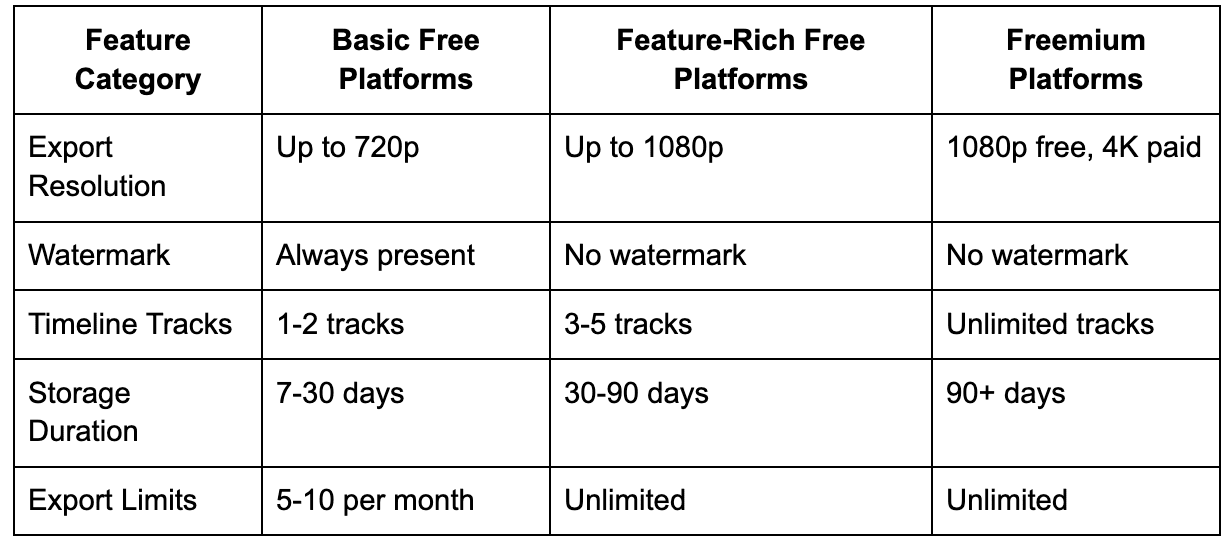
Platform selection depends on project frequency and quality requirements. Organizations producing daily social content benefit from unlimited export capabilities, while occasional users tolerate watermarks for projects with minimal budget allocation. Resolution requirements matter primarily for large-screen display, as mobile viewing accepts lower quality without audience complaints.
According to Pew Research Center, 84% of U.S. adults use YouTube and 71% use Facebook, with half using Instagram. This widespread platform adoption drives demand for accessible video editing tools that accommodate various output formats without requiring technical expertise or financial investment.
Content planning becomes critical when using free platforms. With limited post-production capabilities compared to expensive software, shooting footage with editing in mind reduces frustration. Recording multiple takes, capturing b-roll footage, and ensuring good lighting during filming make the editing process smoother.
Template usage accelerates production. Most free platforms offer preset layouts, transition effects, and title designs. While these lack uniqueness, they provide professional polish quickly. A business can maintain consistent branding by selecting and customizing templates rather than designing elements from scratch.
Evaluating Long-Term Viability and Limitations
Free platforms serve specific use cases exceptionally well while struggling with others. Understanding these boundaries prevents frustration and helps teams make informed decisions about when free solutions suffice versus when investment becomes necessary.
Platform strengths align with frequent, straightforward projects. Social media content production, regular YouTube uploads, basic promotional videos, and internal communications all fall within optimal use cases. Projects requiring quick turnaround benefit particularly from free platform simplicity.
Research from McKinsey indicates that 71% of consumers expect personalized content from companies, with video representing a critical component of digital marketing strategies. Free editing platforms enable smaller organizations to participate in this video-focused landscape without significant capital investment.
Workflow optimization addresses platform limitations effectively:
- Organize source footage before uploading to minimize time spent searching for clips
- Export intermediate versions for backup rather than relying solely on platform storage
- Batch similar projects to develop efficiency with specific features
- Maintain simple project structures that perform reliably
Limitations become apparent in specific scenarios. Large file handling may encounter restrictions, as platforms balance free user demands against server costs through upload size limits. Advanced color correction requires more granular control than simplified adjustment sliders provide. Complex audio work including multi-track mixing exceeds basic audio tools. High-resolution exports sometimes require paid upgrades, with free tiers limiting output to 1080p or lower.
These constraints matter differently depending on content requirements. A business creating website background videos may never encounter resolution limitations, while a filmmaker attempting festival submissions would immediately hit walls. The key consideration involves matching platform capabilities to actual needs rather than aspirational requirements.
Budget-conscious teams should consider free platforms as primary tools while maintaining awareness of alternatives for exceptional projects. Regular social content, training videos, and marketing materials proceed through free platforms, while occasional high-value projects might warrant temporary software rental or external production assistance. This balanced approach maximizes budget efficiency without compromising content quality for typical use cases.
Comments
Loading comments…