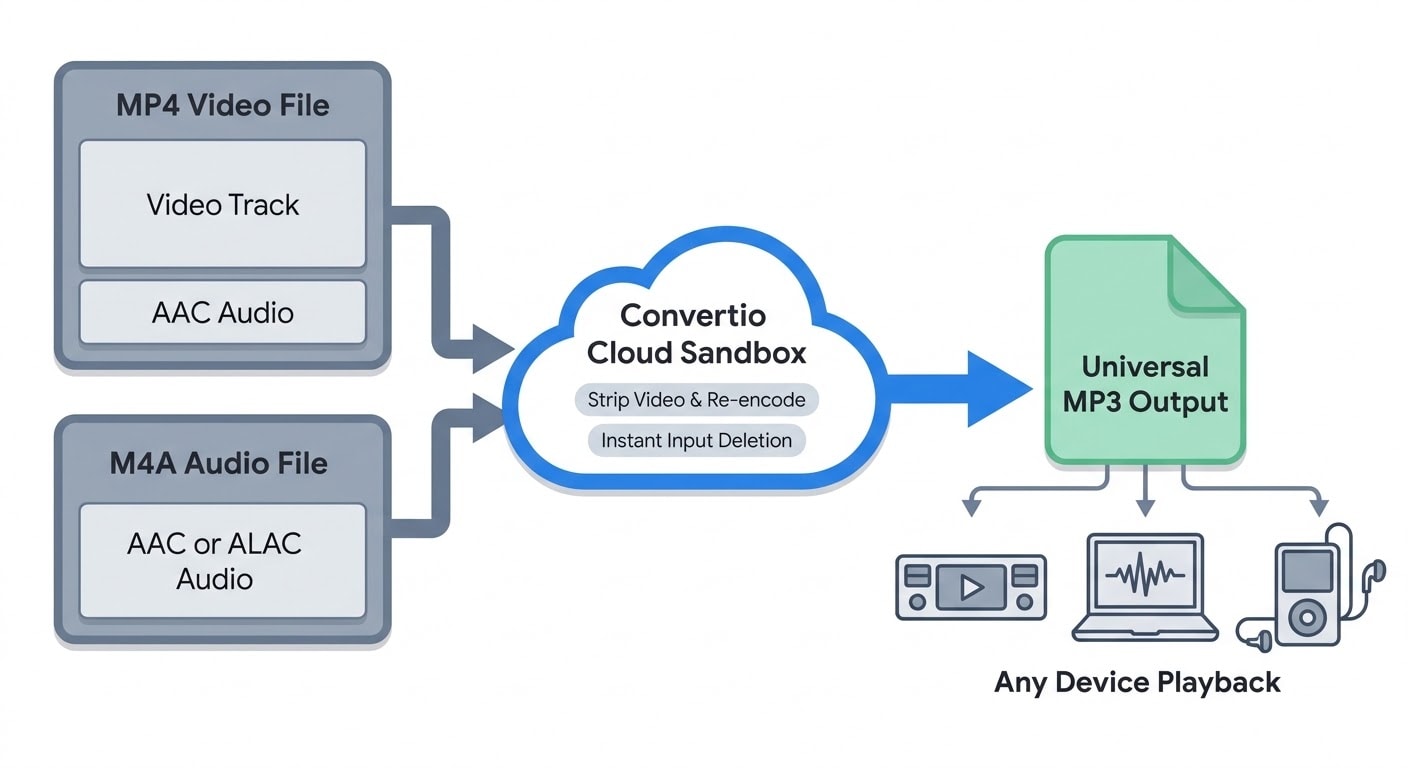
At a typical 3.5 Mbps video bitrate and 128 kbps audio stream, a one-hour 1080p MP4 lecture takes up about 1.63 GB of storage even though the audio track itself weighs just 57.6 MB. Users rely on Convertio to convert mp4 to mp3 directly in the cloud so recordings play on car stereos, legacy PCs, and portable players without installing desktop software. Because standard MP4 videos and audio-only M4A tracks share the exact same MPEG-4 container under the hood, both formats follow identical audio extraction and bitrate rules when moving to MP34.
Why MP4 and M4A Share the Same Core Container
People often treat .mp4 and .m4a as unrelated formats, yet both extensions wrap media inside the same MPEG-4 Part 14 specification (ISO/IEC 14496-14:2003). According to the Library of Congress Digital Preservation catalog, the .mp4 extension serves video, combined video-and-audio, or standalone audio files, whereas Apple introduced .m4a to distinguish unprotected audio-only MPEG-4 tracks from video clips and DRM-locked .m4p purchases. Inside either wrapper, the audio stream is usually encoded with Advanced Audio Coding (AAC), though .m4a files can also hold lossless ALAC audio.
From an engineering standpoint, AAC outperforms MP3 at equal bitrates. Its pure modified discrete cosine transform (MDCT) filter bank preserves frequencies above 16 kHz more cleanly than MP3's older hybrid filter bank while supporting 8–96 kHz sample rates and up to 48 channels. Even Fraunhofer IIS, where MP3 development began in the late 1980s, terminated its core joint Technicolor MP3 licensing program on April 23, 2017, as broadcast and streaming platforms adopted AAC and newer ISO-MPEG standards. Even so, the expiration of those core patents lowered adoption barriers, and MP3's near-universal compatibility across older car dashboards, USB decks, and DJ setups keeps it the safest delivery format when you cannot control the playback device.
 MP4, M4A, and MP3: Key Differences
MP4 Format
- Container: MPEG-4 Part 14, commonly containing video and AAC audio.
- Compression: Typically uses lossy compression for both video and audio.
- Sample Rate & Channels: Supports sample rates from 8–96 kHz and up to 48 audio channels with AAC.
- Best Uses: Web videos, online lectures, and mobile video clips.
M4A Format
- Container: MPEG-4 Part 14, designed for audio-only files using AAC or ALAC.
- Compression: AAC uses lossy compression, while ALAC provides lossless audio.
- Sample Rate & Channels: Supports up to 96 kHz and 24-bit audio.
- Best Uses: Apple Music, iPhone voice memos, and compact digital audio files.
MP3 Format
- Codec: MPEG-1/2 Audio Layer III (ISO/IEC 11172-3 / 13818-3).
- Compression: Uses lossy compression, typically achieving around a 10:1 compression ratio.
- Sample Rate & Channels: Supports 16–48 kHz and stereo playback, with support for multichannel configurations in the specification.
- Best Uses: Universal audio playback on both older and modern devices.
Step-by-Step Conversion Workflow on Convertio
Because stripping audio skips heavy video re-encoding, cloud extraction typically finishes in seconds rather than minutes and keeps your local CPU idle. Follow this sequence for clean results:
- Upload your source MP4 or M4A file from your computer, Google Drive, Dropbox, or a direct URL.
- Confirm MP3 as the target format (Convertio lists support for over 300 file formats overall, including 62+ audio types).
- Open the settings panel to select Variable Bitrate (VBR) or Constant Bitrate (CBR), pick your target bitrate, and adjust channels or sample rate instead of accepting defaults blindly.
- Click Convert to run the extraction in the cloud, then download the finished MP3, or queue multiple files together for batch processing.
Watch Out for Outdated Free-Tier Claims: Several third-party comparison pages still claim Convertio caps free uploads at 100 MB15. Convertio's current help documentation sets the free tier at 1 GB per file, 10 conversion credits per 24 hours, and 10 concurrent conversions with no account required14. Note that an hour-long 1080p MP4 (~1.63 GB) still crosses that 1 GB ceiling, while shorter clips and standalone M4A files fit easily.
Picking the Right Bitrate, VBR vs. CBR, and Channels
Most muddy MP3 exports stem from lossy-to-lossy generation loss. When an encoder converts a compressed AAC track inside an MP4 or M4A file into MP3, frequencies discarded by the first codec never return, and the MP3 encoder applies a second round of perceptual compression. Picking a higher bitrate cannot restore missing detail, yet giving the encoder headroom, 192 to 320 kbps for music, prevents noticeable smearing or harsh highs. If your .m4a source uses lossless ALAC instead of AAC, you avoid generation loss altogether.
Convertio's audio panel exposes the main controls that actually change output quality2. Under Variable Bitrate (VBR), ten ranges span 45...85 kbps through 220...260 kbps, letting the encoder spend extra bits on complex passages and save space during silence. Constant Bitrate (CBR) offers presets from Very low to Very high, Auto, and Custom up to 320 kbps; choose CBR whenever files are bound for older car stereos, basic hardware players, or timecoded review workflows, because some legacy players misreport duration on VBR tracks. Switching channels from Auto to Mono (1.0) trims spoken lectures cleanly, while Stereo (2.0) safely downmixes 5.1 surround tracks. Convertio populates basic tags like duration and bitrate automatically, though artist and title ID3 metadata require a separate tag editor afterward.
Recommended MP3 Settings for Different Listening Scenarios
1. Lectures, Webinars, and Voice Notes
- Recommended Bitrate: CBR 64–96 kbps or VBR 70–105 kbps
- Channels: Mono (1.0)
- Why It Works: These settings keep speech clear while reducing file size. For example, a 60-minute recording at 64 kbps takes approximately 28.8 MB.
2. Everyday Music and Podcasts
- Recommended Bitrate: VBR 170–210 kbps or CBR 192 kbps
- Channels: Stereo (2.0)
- Why It Works: This provides a good balance between audio quality, stereo detail, and storage space on mobile devices.
3. Dense Music Mixes, DJ Sets, and AAC Transcodes
- Recommended Bitrate: CBR 320 kbps or VBR 220–260 kbps
- Channels: Stereo (2.0)
- Why It Works: Higher bitrates help minimize additional quality loss when converting already-compressed audio.
4. Older Car Stereos and Hardware Players
- Recommended Bitrate: CBR 192–320 kbps
- Channels: Stereo (2.0)
- Why It Works: Constant Bitrate (CBR) can offer better compatibility with older devices that may not handle Variable Bitrate (VBR) files correctly.
Cloud Privacy, File Retention, and Free vs. Paid Limits
Uploading personal recordings or client interviews to an online service raises legitimate privacy questions. According to Convertio's security documentation, each job runs inside an isolated sandbox, transfers use TLS encryption with HSTS, and downloads remain bound to the uploader's IP address2. Convertio states that uploaded input files are erased immediately after conversion completes, while output MP3s are removed automatically within 24 hours, or immediately if deleted manually under "My Files", across ISO 27001-certified German data centers compliant with EU GDPR.
Even with those safeguards, practical limits still guide workflow choices. Regular batch work with multi-gigabyte 4K recordings quickly outgrows the free 1 GB / 10-credit daily cap; Convertio's paid tiers expand capacity to 3 GB (Basic, 3,000 monthly credits) or 10 GB (Pro, 10,000 monthly credits) with ad-free pages16. For strictly confidential legal, medical, or NDA-bound recordings that company policy forbids uploading anywhere, an offline local encoder remains the safer route.
Pre-Conversion Checklist for Clean Results
- Verify file size first: Confirm your MP4 or M4A stays under the 1 GB free upload ceiling before starting a batch.
- Start from lossless masters when possible: If you own a WAV, FLAC, or ALAC original, convert from that source rather than a compressed MP4 to avoid generation loss11.
- Use CBR for legacy gear: Skip VBR whenever tracks target older dashboard USB ports or timecoded editors.
- Downmix speech to mono: Selecting Mono (1.0) shrinks voice recordings without hurting clarity.
- Archive the original: Treat MP3 strictly as a playback copy, never as your only master file.
Match the bitrate to the device that will actually play the track, keep your original file intact, and cloud extraction turns stubborn MPEG-4 recordings into reliable MP3s in seconds.
Further Reading
Discover more articles on similar topics across our network




Comments
Loading comments…