Here's a bug report every web developer gets eventually: "The page looks wrong on my phone." You open Chrome DevTools, switch to iPhone mode, reload, and everything looks fine. You close the ticket. Two days later it comes back with a screenshot.
The problem is usually that device emulation only covers half of the picture. It swaps the user agent and the viewport, but your request still leaves from your office Wi-Fi or your home broadband. The site on the other end sees a desktop-class connection pretending to be a phone. A real user on 4G is coming from a mobile carrier's network, and plenty of sites treat that traffic differently.
That's the gap rotating mobile proxies fill. In this article I'll explain what they are in plain terms, why they behave the way they do, when they're actually worth paying for (and when they aren't), and how to fit them into a testing workflow without wasting money.
What is a rotating mobile proxy?
A proxy is just a middleman. Your browser or script sends a request to the proxy, the proxy forwards it to the website, and the website sees the proxy's IP address instead of yours.
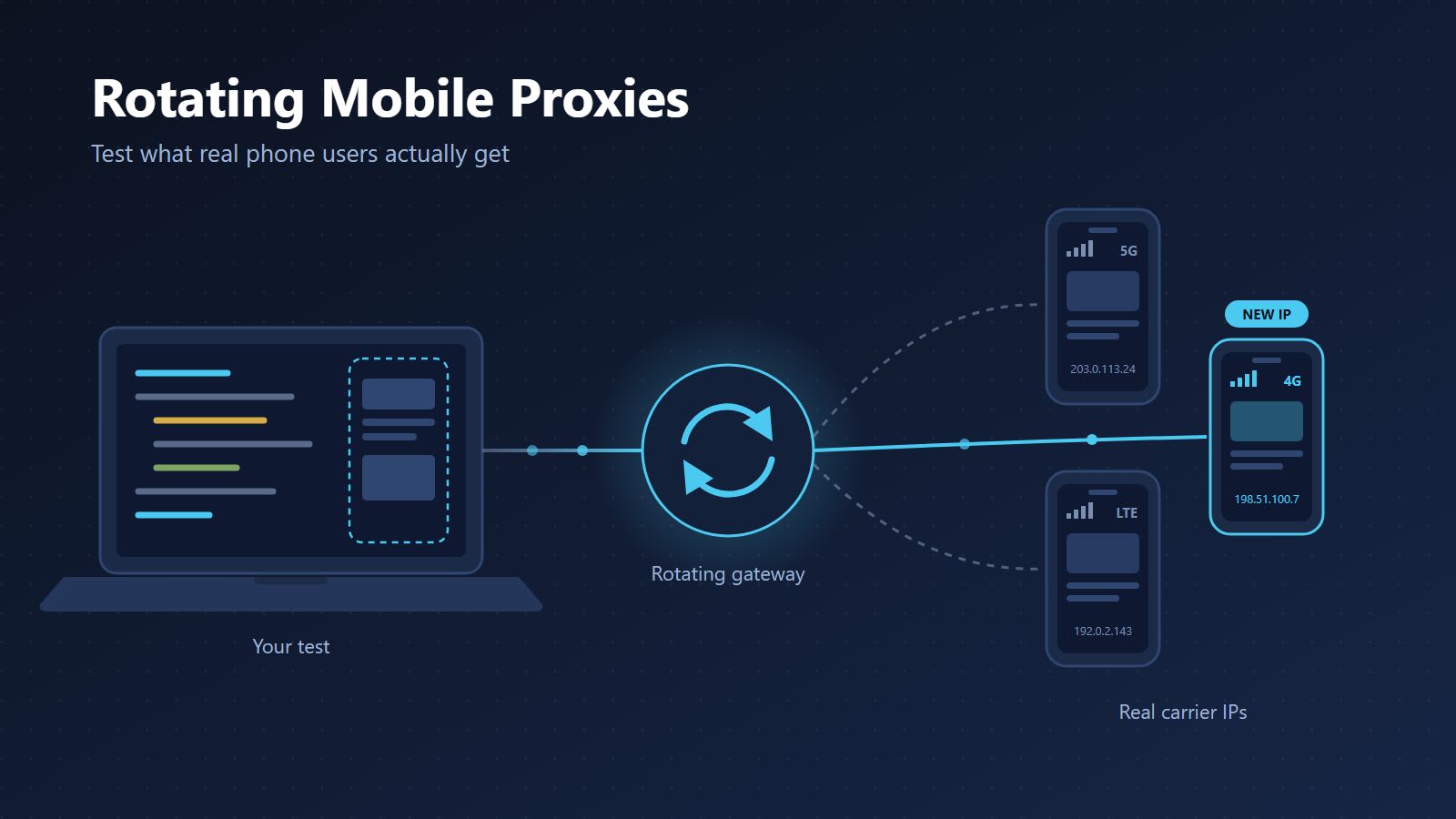
A mobile proxy forwards your traffic through a real device connected to a cellular network over 3G, 4G, 5G or LTE. The exit IP belongs to a mobile carrier, the same kind of address a person scrolling on their phone would have.
A rotating mobile proxy gives you access to a whole pool of those carrier IPs through one gateway address. You don't manage individual phones or SIM cards. You connect to a single host and port, and the provider decides which mobile IP your request goes out from, based on rules you set.
Those rules usually come in three flavours:
- New IP on every request. Each request exits from a different carrier IP. Good for spreading lots of independent requests across the pool.
- Sticky sessions. You keep the same IP across several requests, so a multi-page check (open a landing page, move to a product page, check the local price) looks like one visitor.
- Timed rotation. The IP changes on a timer you pick, which sits somewhere between the other two.
Why carrier IPs behave differently
This part is worth understanding, because it explains both why mobile proxies work and why they cost more than other types.
Mobile carriers don't have enough IPv4 addresses to give every phone its own public IP. So they use something called carrier-grade NAT (CGNAT). A large number of subscribers share a smaller set of public IPs, and the carrier keeps track of who is who internally.
From a website's point of view, that means one mobile IP can represent many real people at the same time. If a site blocks that IP aggressively, it might lock out a crowd of genuine customers on the same carrier. Most sites know this, so they tend to be more careful with mobile IP ranges than with datacenter ranges, which are easy to spot and rarely belong to real shoppers.
The other thing that changes is what the site shows you. A request from a carrier network can trigger:
- Mobile-specific pricing or promotions
- Different ad creatives and landing pages
- Geo redirects based on where the carrier routes traffic
- Mobile search results that don't match desktop rankings
- App install banners or lighter page variants
If you're testing any of those, an office IP with a spoofed user agent won't give you the real answer.
Emulation and the network are two different layers
It helps to think of a "mobile visit" as two separate layers that a website can look at.
The device layer is everything your browser says about itself: the user agent, screen size, touch support, language and timezone. DevTools device mode, Playwright, Puppeteer and Selenium can all fake this convincingly.
The network layer is where the request actually comes from: the IP address, who owns it, and roughly where it's located. No amount of browser configuration changes this. Only the connection itself does.
A real phone user has both layers pointing in the same direction. A phone user agent, coming from a carrier IP, in a city that matches the timezone. When you emulate a device from your desk, you only get the first layer. When you add a mobile proxy without emulation, you only get the second. For realistic testing you want both, and you want them to agree with each other.
That last point trips people up more than anything. A US carrier IP paired with a browser that reports a Berlin timezone and German language settings is an obvious mismatch. Some sites will quietly serve you a different experience because of it, and then you're debugging a problem your real users never have.
When you actually need them (and when you don't)
Mobile IPs are the premium option, so it pays to be honest about when they're the right tool.
Use rotating mobile proxies when:
- You're doing mobile QA and need to see what users on a specific carrier or in a specific city get
- You're verifying mobile ad placements and landing pages for a campaign
- You're tracking mobile search rankings in a particular location
- You're testing an app's web flows, redirects or localisation from a real mobile network
- A target treats mobile traffic differently and that difference is the thing you're measuring
You probably don't need them when:
- You're collecting public data from a site that doesn't care what network you're on. Rotating residential proxies are usually a better fit for broad data collection and desktop-focused testing.
- Speed and cost matter more than realism, and the target doesn't block datacenter IPs. Datacenter proxies are far cheaper per GB.
A rule of thumb I like: if the question you're asking starts with "what does a phone user in X see?", reach for mobile. If it starts with "what's on this page?", start cheaper and move up only if you have to.
How setup works in practice
First you need a provider. ProxyEmpire's rotating mobile proxies, for example, cover real 3G, 4G, 5G and LTE IPs in 170+ countries, with country, region, city and carrier targeting, which is the level of control you want for mobile QA.
Whichever service you choose, the setup tends to look the same. You get a gateway address, a port, and a username and password. Location targeting and session behaviour are set either in the provider's dashboard or as options attached to your proxy username. Every provider handles those options a little differently, so their documentation is the place to check rather than guessing.
The good news is that the proxy itself is standard. Almost anything that accepts an HTTP or SOCKS5 proxy will work with it: your browser, browser automation tools, API clients, testing frameworks and scraping libraries. You don't need special software, just the connection details in whatever settings field or config file your tool already uses.
One small habit worth building from day one: keep proxy credentials in environment variables or a secrets manager, not in your test files. Nobody wants proxy passwords showing up in a public repo.
Confirm you're really on a mobile network
Before you trust any test result, check that the proxy is doing what you think it's doing. This takes a minute and saves hours of confused debugging later.
The easiest way is to visit an IP lookup service through the proxy. Most of them show three useful things: the IP address, the approximate location, and the organisation that owns the IP. That last field is the one to look at. It should name a mobile carrier, not a hosting company, a cloud provider or your own internet service provider.
If the location or the network looks wrong, fix the targeting before you run anything else. A test run from the wrong country or the wrong kind of network isn't just useless, it's misleading, because it gives you a confident answer to the wrong question.
It's also worth recording the exit IP and location alongside every test result. When something fails, the first question will be "where was this request coming from?", and you'll want the answer already written down.
Picking a rotation mode
Here's how I'd choose for common jobs:
- Checking mobile search results across many keywords: new IP per request. Each query is independent, so it makes sense to spread them across the pool.
- Following a journey across several pages: sticky session. Going from a landing page to a product page to a regional offer should look like one visitor, so keep the same IP from start to finish.
- Monitoring an ad or landing page every few minutes: timed rotation. You get fresh IPs over time without having to manage sessions yourself.
- Comparing a page across carriers or cities: one sticky session per location. Hold a single IP for each location while you capture what it sees, then move to the next.
One thing to keep in mind with sticky sessions: a mobile IP lives on a real device connected to a real network. If that device drops off, your session moves to a new IP. Build your tests so they can recover from a mid-flow IP change instead of assuming the address is permanent.
Common mistakes to avoid
Most of the frustration people have with mobile proxies comes from a handful of avoidable mistakes.
Rotating on every request during a multi-page check. If each page of a journey comes from a different IP, the site sees a visitor teleporting between devices and may reset location-based content halfway through. Use a sticky session whenever the pages depend on each other.
Forgetting the device layer. A carrier IP with a desktop user agent and a 1920 pixel wide window still looks like a desktop. Pair the proxy with proper device emulation.
Mismatched location signals. As mentioned above, language, timezone and IP location should agree. Set your browser's locale and timezone to match the proxy location you picked.
Treating mobile proxies like a firehose. Mobile IPs are less likely to be blocked outright, but sites still watch behaviour. Fifty requests a second from one carrier IP is suspicious no matter where it comes from.
Practical tips that save money and headaches
- Block what you don't need. Images and video are usually the heaviest part of a page. If you're checking text, prices or layout structure, most automation tools let you skip loading them, which cuts bandwidth a lot.
- Set realistic timeouts. Cellular connections add latency compared with a wired office line. A generous timeout with one retry is kinder than a short one that fails half your tests.
- Start small. Run a handful of checks in one location first, confirm the results make sense, then scale up to more cities or carriers.
- Stay on the right side of the rules. Using a proxy is legal in most places, but what you do through it still has to follow the law, each site's terms, and data protection rules like GDPR. Test your own properties and collect public data responsibly.
What to look for in a provider
If you're comparing services, these are the things that actually affect your day-to-day work:
- Carrier and city targeting. Country-level targeting isn't enough for most mobile QA. You'll want to pick the carrier and the city.
- Rotation controls. Per request, sticky and timed rotation should all be available.
- Protocol support. HTTP, HTTPS and SOCKS5 cover nearly every tool you're likely to use.
- Pool size and coverage. A larger pool across more countries means fewer repeats and more locations to test from.
- Clear billing. Know whether you pay per GB, per IP or per port, whether you're charged only for successful requests, and whether unused bandwidth carries over to the next month.
- A cheap way to test. You want to confirm the IPs really show up as mobile carriers in your target market before committing to a big plan.
Wrapping up
Device emulation tells a website you're on a phone. Rotating mobile proxies make that true at the network level, which is the part emulation can't fake. Together they let you see what a real person on a real carrier sees, without buying a drawer full of SIM cards.
Start by confirming you're actually exiting from a mobile network, make sure your device settings and location agree, and pick the rotation mode that matches the job. And if a target doesn't care about mobile traffic, save your budget and use something cheaper. The best proxy setup is the one that answers your question for the least money.
Further Reading
Discover more articles on similar topics across our network
Comments
Loading comments…