
The first time you connect an AI agent to an MCP server, it feels like a breakthrough.
Suddenly, the agent is no longer limited to generating text. It can search documents, query internal systems, read files, update records, trigger workflows, send notifications, and interact with real business tools.
That is the promise of the Model Context Protocol: giving AI agents a standard way to connect with the systems where work actually happens.

But there is a hidden cost inside this new architecture.
Every new MCP server adds more tools. Every new tool adds more definitions. Every definition takes space in the model’s context. And as agents move from demos to production, this starts to become a real infrastructure problem.
The issue is not that MCP is inefficient by design. The issue is that most teams start with a simple mental model:
Connect tools to the agent, let the model decide what to use, and watch the workflow run.
That works when you have a few tools.
It breaks down when you have dozens of servers, hundreds of tools, and multiple teams building production agents on top of the same infrastructure.
At that point, the problem is no longer just tool access.
It is cost, latency, context management, governance, and observability.
The More Tools an Agent Has, the More Expensive Each Request Becomes
Classic MCP workflows usually expose tool definitions directly to the model. That means the model sees the available tools upfront before deciding which ones to call.
This is convenient. It is also expensive.
If an agent has access to a small set of tools, the overhead may be negligible. But as the tool catalog grows, the model may have to process a large amount of tool metadata before it even gets to the actual user task.
Anthropic describes this as one of the core scaling problems of MCP: as developers connect agents to hundreds or thousands of tools across many MCP servers, loading all tool definitions upfront and passing intermediate results through the context window slows agents down and increases cost.
This creates a strange economic pattern.
The user might ask for a simple task:
“Find this customer, check their last order, and send them a confirmation.”
But the model may still receive definitions for many tools that have nothing to do with that workflow: file tools, CRM tools, billing tools, search tools, internal admin tools, analytics tools, and more.
The task is small. The context is not.
That is the hidden tax of classic MCP.
The agent is not only paying for the work it performs. It is also paying for the entire tool surface area it carries into the request.
Intermediate Results Make the Problem Worse
Tool definitions are only the first part of the cost.
The second part is intermediate data.
In a classic tool-calling loop, the model calls a tool, receives the result, reasons over it, calls another tool, receives another result, and so on. Each intermediate response flows back through the model context.
This can become expensive very quickly.
Anthropic gives a simple example: if an agent downloads a meeting transcript from Google Drive and attaches it to a Salesforce record, the transcript may pass through the model multiple times. For a long meeting, this can mean tens of thousands of additional tokens just to move data between systems.
That is not just a cost problem. It is also a reliability problem.
The more data the model has to copy, summarize, transform, and pass between tool calls, the more room there is for mistakes. Large documents, spreadsheets, logs, and records can bloat the context window and make the workflow slower, more fragile, and harder to audit.
In other words, direct tool calling often forces the model to act as both the planner and the data bus.
That is not always the best use of a language model.
Code Mode Changes the Architecture
Code Mode introduces a different pattern.
Instead of dumping every tool definition into the model context, the agent gets a compact way to discover and use tools on demand.
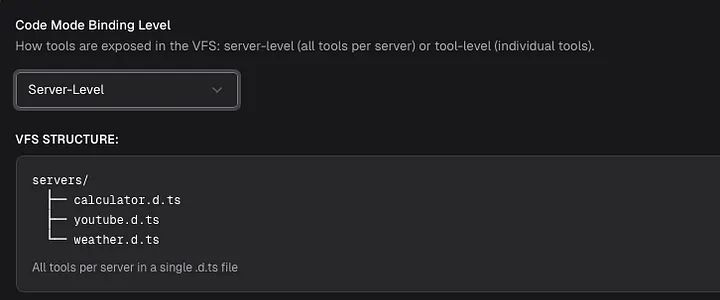
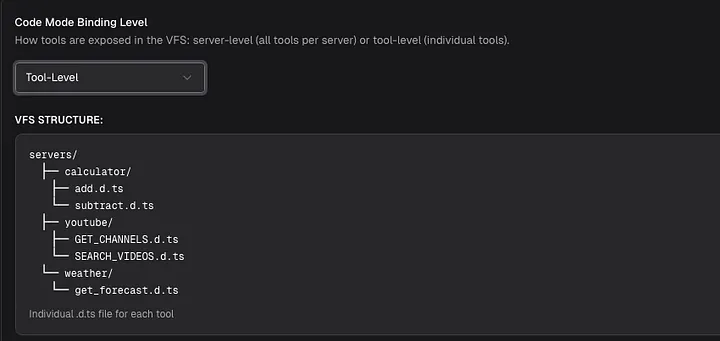
Bifrost’s implementation exposes MCP tools as lightweight Python-style stub files. The model can list available tool files, read only the function signatures it needs, fetch documentation for a specific tool, and then write a short script to orchestrate the workflow. Bifrost runs that script inside a constrained Starlark sandbox.
This matters because it changes the relationship between the model and the tool catalog.
Classic MCP says:
“Here are all the tools. Choose what you need.”
Code Mode says:
“Here is a way to discover tools. Load only what the task requires.”
That is a much better fit for production agents.
The model no longer needs to carry the entire tool universe into every request. It can inspect the available servers, read the relevant interfaces, and execute the workflow through code.
Bifrost provides four Code Mode meta-tools:
listToolFiles to discover available virtual .pyi stub files;
readToolFile to load compact Python function signatures;
getToolDocs to fetch detailed documentation for a specific tool;
executeToolCode to run the generated orchestration script.
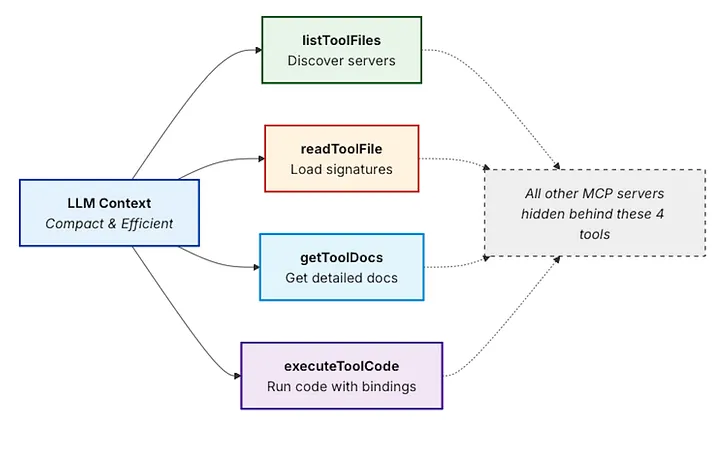
The result is a more efficient workflow: less context, fewer model round trips, and less intermediate data passing through the LLM.
From Tool Calling to Tool Orchestration
The most important shift is not only technical. It is conceptual.

With direct tool calling, the model performs the workflow step by step. It calls one tool, waits for the result, reasons again, calls another tool, and continues the loop.
With Code Mode, the model can write a small piece of orchestration logic and let the execution environment handle the steps.
For example, a customer support agent may need to:
- look up a customer;
- retrieve recent orders;
- calculate eligibility for a discount;
- apply the discount;
- send a confirmation email.
In a classic MCP flow, each step may become a separate model turn, and every turn may carry the full tool list again.
In Code Mode, the model can write a compact script that performs the sequence in one execution. The model does not need to see every intermediate result. It only needs the final output or the specific summary that should be returned.
This is closer to how software engineers already think about automation.
You do not ask a program to reason after every line of execution. You write logic, run it, and return the result.
AI agents can benefit from the same pattern.
Why This Matters at Scale
The savings become more important as the number of tools grows.
Bifrost’s documentation compares a workflow across five MCP servers with around 100 tools. In the classic flow, the model may go through six LLM turns with the tool list repeatedly present in context. With Code Mode, the same workflow can be reduced to roughly three or four LLM calls, with complex orchestration happening inside the sandbox.
The benchmark numbers from Maxim’s Bifrost blog are even more direct.
Across three controlled rounds, Bifrost compared Code Mode on and off while scaling from 96 tools to 508 tools. In the largest round — 508 tools across 16 servers — Code Mode reduced input tokens from 75.1M to 5.4M and estimated cost from $377.00 to $29.00. That is a 92.8% reduction in input tokens and a 92.2% reduction in estimated cost, while pass rate remained 100%.
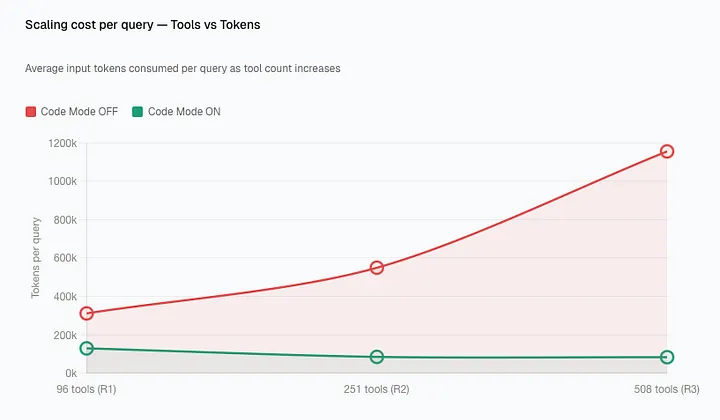
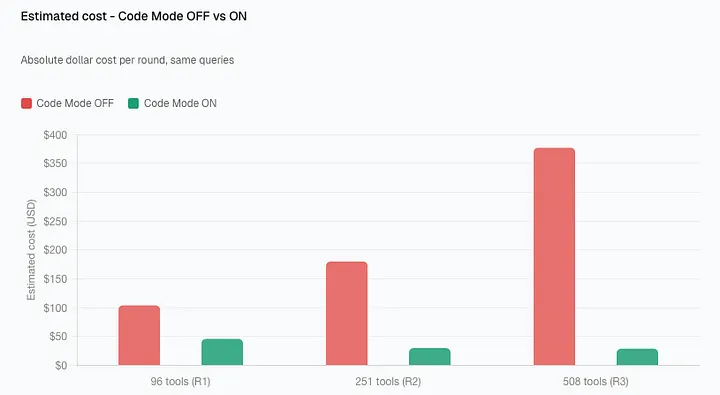
The key insight is that the savings are not linear.
Classic MCP becomes more expensive as more tools are added, because every new tool increases the context burden. Code Mode keeps cost closer to what the model actually needs to inspect and execute for a specific task.
Cloudflare observed a similar pattern in its own Code Mode work: the company described how a large API can be exposed through a compact code-based interface instead of loading every endpoint into the model context. In their Cloudflare API example, the Code Mode approach exposed the API with around 1,000 tokens, while an equivalent non-Code Mode MCP server would consume about 1.17 million tokens.
That is the larger trend: agents need access to more tools, but they cannot afford to carry every tool definition into every interaction.
Code Mode Also Reduces Data Exposure
Cost is the most obvious benefit, but it is not the only one.
When orchestration happens inside a sandbox, intermediate results do not always need to pass through the model. The model can receive only the final result or a filtered subset of the data.
Anthropic points out that this can be useful for large datasets: an agent can fetch a 10,000-row spreadsheet, filter it in the execution environment, and return only the relevant rows instead of pushing the entire dataset through the context window.
That has implications beyond token savings.
It can reduce accidental exposure of sensitive information. It can make workflows more reliable. It can make agents better at handling large documents, search results, logs, and structured records.
For production AI systems, this matters.
A model should not have to see everything just to act on something.
But Code Mode Needs Governance
There is one important caveat: giving agents the ability to execute tool orchestration code requires guardrails.
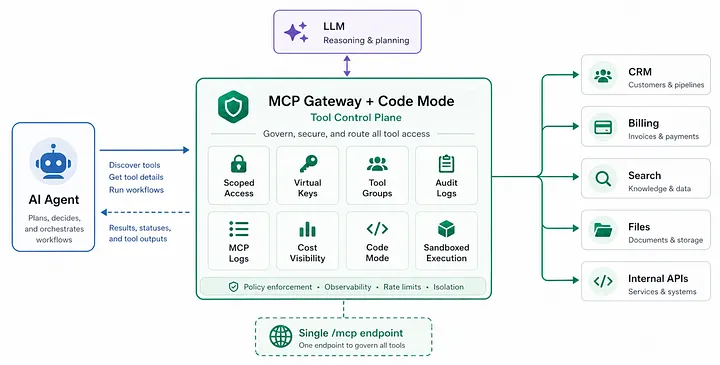
This is where Bifrost’s broader MCP Gateway architecture becomes important.
Bifrost does not position Code Mode as an isolated trick for token reduction. It combines Code Mode with access control, tool filtering, audit logs, auto-execution rules, and cost tracking.
For example, Bifrost’s MCP Tool Filtering lets teams define strict allow-lists of MCP clients and tools for each Virtual Key. If a Virtual Key has no MCP configuration, no MCP tools are available by default; teams must explicitly configure which tools can be used. The allow-list is enforced at inference time and again at tool execution time.
That is critical.
A customer-facing support agent should not have the same tool access as an internal admin agent. A read-only workflow should not accidentally gain write permissions. A billing assistant may need check-status, but not create-invoice.
Bifrost’s Agent Mode also requires explicit configuration for auto-execution. Tools must be marked as available through tools_to_execute, and only a subset can be marked as auto-executable through tools_to_auto_execute; by default, no tools are auto-executed.
For Code Mode specifically, Bifrost adds another validation layer: executeToolCode can auto-execute only if every tool call inside the generated code is allowed. If any call is not allowed, the request is returned for approval.
That turns Code Mode from a clever optimization into something more production-ready.
The agent can write code, but the gateway still controls what that code is allowed to call.
The Real Lesson: Agents Need a Tool Control Plane
MCP made it easier to connect agents to tools.
But connecting tools is only the first step.
Once agents move into production, teams need answers to harder questions:
Which tools is this agent allowed to use? Which tools should run automatically, and which require approval? How much context is being spent just to describe tools? Which tool calls happened during this run? Which team, customer, or key triggered them? What did the model see, and what stayed inside the execution environment? How much did the full workflow cost — not just the model call, but the tools too?
These are infrastructure questions.
And that is why MCP Gateway + Code Mode is such an important architectural pattern.
The future of AI agents will not be built only by giving models more tools. It will be built by giving teams a better way to manage those tools: scoped access, progressive discovery, sandboxed execution, auditability, and predictable cost.
Bifrost’s MCP Gateway points in that direction.
It can expose multiple connected MCP servers through a single /mcpendpoint for clients like Claude Desktop, Cursor, and other MCP-compatible applications. It also supports Virtual Key authentication, which means different clients can be shown different sets of tools through the same gateway layer.
That is the shift production teams need.
Not just more tools.
Not just bigger context windows.
Not just more powerful models.
They need a control plane for agent tool use.
Conclusion
MCP gives AI agents reach.
Code Mode gives them a more efficient way to use that reach.
The hidden cost of MCP is not obvious when a team has one server and a few tools. It appears when agents grow into real workflows: more servers, more tools, more teams, more permissions, more data, and more cost.
Classic MCP makes every new tool part of the context burden. Code Mode changes that by letting agents discover, read, and orchestrate only what they need.
For production AI systems, that difference is significant.
It means lower token usage, fewer unnecessary model turns, less intermediate data in context, and a more scalable foundation for agent workflows.
The next generation of AI infrastructure will not be defined only by which model an agent uses.
It will be defined by how safely, efficiently, and intelligently that agent can use the tools around it.
Comments
Loading comments…