
It’s documented behavior that if you give Claude Code access to the open web, the ability to write and execute code, and a task that lasts long enough, sooner or later it starts building something that looks a lot like a browser. Why does this happen?
It’s not that your agent wants to build a browser, per se. It’s just that it needs something cheap + reusable that can open a URL, click, fill a form, extract/wait for data, keep cookies and sessions, and take a screenshot when things go wrong. I tested this — and to extract data from JavaScript-heavy pages gracefully, the code here uses Bright Data’s Browser API and Web Unlocker with Scraper Studio to catch and self-heal edge cases with AI.
Let’s have a look at why this is actually very human-dev-shaped software engineering.
What are AI Agents Actually Building When They Build a Browser?
AI agents are not converging on Chromium as a product. They are converging on the job a browser does: translate the protocols and conventions of the web into operations.
Separate the product from the abstraction.
A browser, in the Chrome/Firefox sense anyway, is a large application with tabs, an address bar, a rendering engine, and a process model. These properties are not what these agents want. What they are interested in is the job it does: translating the protocols and conventions of the web into operations that can be issued.
We humans use that interface without thinking about it. We see a login page and understand that the fields are asking for credentials. We see a button and understand that it is actionable. We click it, wait for the next page, and continue. An agent cannot rely on that implicit knowledge. It has to turn the same work into explicit operations.
So if you ask a coding agent to operate on arbitrary websites, you have given it a problem whose natural abstraction is known. So it is simply converging on that abstraction boundary.
The Open Web Is Not an API
Most of the modern web is not designed to be consumed as a clean API. There’ll probably be an HTML document wrapped in JavaScript. There’ll probably be login sessions, cookies, redirects, client-side rendering, infinite scrolling, popups, file uploads, and async requests to handle. A simple HTTP GET is only the beginning.
So an agent trying to accomplish a real task in such an environment eventually needs these operations:
open(url)
click(selector)
fill(selector, text)
wait_for(selector)
extract(selector)
go_back()
screenshot()
Look familiar? Definitely not a browser with a GUI, but it is a general-purpose interface to the web you know.
Why Long-Running Tasks Change the Architecture
Short tasks can be accomplished ad-hoc. Long-running tasks make that architecture too expensive, so the AI agent writes a helper and stops using the LLM for every click.
For a short task on the open web, an agent can simply brute-force through.
"Find the current exchange rate."
"Look up this company's homepage."
"Find the opening hours of this restaurant."
There is no reason to build any infrastructure for such tasks. They’re non-repeatable, and they’ll be over in seconds anyway.
Long-running tasks are different. Suppose the agent has to monitor hundreds of websites every few hours, repeatedly execute a complicated workflow, scrape a collection of pages while staying authenticated, collect evidence over several days, or poll a service until something changes. If the model performs each click and each inspect, this naïve approach becomes way too expensive:
- Open a browser (acquisition tool).
- Inspect the page (observation source: the rendered DOM).
- Find the search box. Type the query. Click Search. Wait.
- Extract data.
- Reason about it.
- Repeat.
Given that, a capable agent decides to write a reusable helper function instead, just as a human dev would. The next run is simply this:
- Execute the script.
- Check whether what came back still looks right.
- Only call the model again if it doesn’t — if a selector came up empty, the page structure changed, the extracted data doesn’t match what the task expects, etc.
That is a big architectural change. The model has stopped being the thing that performs every operation. Instead, it has become the thing that figures out what procedure should be performed, while ordinary software uses the decided-upon acquisition tool and gets the observations. In other words, the agent compiles its own experience into a script.
When Do AI Agents Replace Per-Step Browsing With a Python Script?
A browser is an excellent exploration environment. But once the AI agent understands the sequence, replaying that sequence as Playwright (or similar) code is cheaper than reasoning through it again.
Web browsers are great for an agent to poke around and discover what a website actually does. It can navigate, observe results, and figure out which sequence of actions accomplishes a goal.
But once that sequence is understood, reasoning through every individual action is wasteful. Think about it. Say the agent has discovered that finding a product on Amazon always meant:
- Navigate to amazon.com.
- Search for “USB-C cables”.
- Apply filters (4+ stars + Prime shipping enabled + under $20).
- Paginate through the result pages.
- Extract titles, prices, and ASINs.
Then, is there any reason for a language model to rediscover those five operations every time? It can simply turn them into a procedure that gets used on subsequent runs for problems that are similar. This does need a live session, of course, including cookies — and so the agent converges on Puppeteer/Playwright etc. as the acquisition tool of choice.
async function getNewProducts(query) {
  const browser = await playwright.chromium.connectOverCDP(
    `wss://${AUTH}@brd.superproxy.io:9222`,
  );
  const page = await browser.newPage();
  await page.goto("https://example.com/products");
  await page.fill("input[name=q]", query);
  await page.click("button[type=submit]");
  await page.waitForSelector(".results");
  return extractResults(page);
}
My agent here uses the Bright Data hosted Browser API because such a long-running agent has to keep its session alive every few hours without the model being involved, and this is probably the easiest way to do it. If you’re using this, you’ll need your Browser API username and password formatted as that ${AUTH} string. Sign up here to get them. New pay-as-you-go accounts get 5,000 free credits per month, no credit card required, with a hard stop when you run out.
If the job is repeatable structured extraction on a site with no pre-built scraper, your agent does not even have to keep that Playwright helper as a local file. You’ll need a capable automation agent, but you can compile the same workflow into Scraper Studio. Describe the data you want as a natural-language prompt, get a collector generated by their hosted AI, and run it without your own model in the click loop. The interaction and parser functions will actually be the same open / click / fill / wait / extract / screenshot job — just a hosted version now.
This will break when the CSS/selectors change. Then the agent has to explore again and write a new script. If that procedure lives in Scraper Studio, it can self-heal using AI instead of a selector rewrite.
Look familiar? Human devs do this constantly. The first time we use a website, we learn how it works; once we understand the workflow, we stop thinking about every click. Then the site changes and we learn it again. The difference being, we get to keep that knowledge implicitly. An LLM has a much more expensive memory system. If the agent has to reconstruct the procedure from context every time, it is paying for the same discovery repeatedly. So it writes the learned workflow into a saved script, then runs that script instead of asking the model to find each click again — until the page stops matching the script.
Why Do AI Agents Store State in the Browser Instead of the Context Window?
A language model cannot hold a long web session in context, so the AI agent uses the browser’s cookies, origin storage, and history as memory that sits outside the model.
Writing to a .py file still invokes the model. You know what doesn't? Saving cookies. A browser automatically accumulates that memory as the session runs. So a browser is already off-model memory for the agent. When the model cannot hold a long web session in context (and no model can, at least as of writing), the agent can simply use same memory a browser already has, for free:
- Cookie jar. Especially HttpOnly cookies, and cookies JavaScript set after a login or a bot check. The model often cannot even read them. The browser holds them and sends them on the next request.
- Origin storage.
localStorage,sessionStorage, IndexedDB (almost exclusively site-written values) - Session history. The back/forward stack. That is how back() or tabs.goBack() works.
There’s also state that is not in the browser store, like a server-side session, or a URL that does not exist until JavaScript runs. The agent does not have to read that state itself, it only has to operate a browser layer that already has the session.
What Are the Safety Risks of Giving an AI Agent a Browser?
Once an agent can read arbitrary pages and cookies and operate a live session, prompt injection is an architectural risk, not a prompting problem. This risk isn’t unique to agents — it applies to any system that operates a live browser session — but its worse for coding agents, specifically, since they can usually also write and execute what it finds. You must limit what the agent can do without a human in the loop. Use a sandbox, people.
Also, Anthropic’s computer-use checklist is a good checklist to follow: dedicated VM or container, no logins unless the task needs them, domain allowlists, and human confirmation for money and consent, always.
Why Is Raw HTML a Bad Input for AI Agents?
Raw web pages are terrible inputs for a language model because there’s too much noise. So a useful browser tool returns a smaller action-and-observation space instead of the full HTML document.
The information the agent actually needs might be buried inside thousands of tokens of markup, styling, and app machinery.
Press enter or click to view image in full size
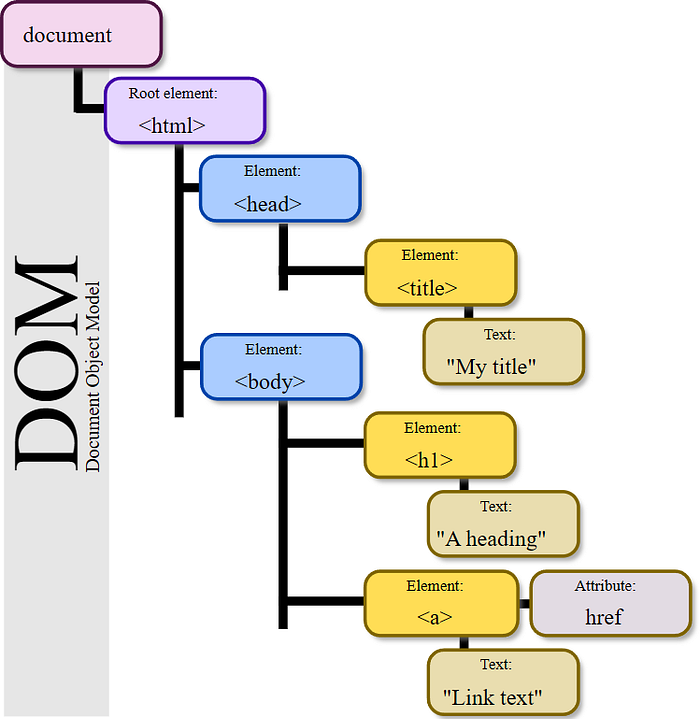
Figure: Document Object Model of an HTML page. This is the tree a compact view or accessibility tree has to shrink. Source: Birger Eriksson, Wikimedia Commons, CC BY-SA 3.0.
A useful browser tool can transform that into something much smaller. Instead of returning an entire document, it can give the model something like:
Title: Search results
Links:
  [1] Home
  [2] Next page
Forms:
  search: input[name=q]
Buttons:
  submit: button[type=submit]
Main content:
  ...
Or it can expose an accessibility tree:
- navigation
 - link "Home"
 - link "Search"
- main
 - heading "Results"
 - list
 - listitem "Item 1"
 - listitem "Item 2"
That representation is much closer to what a reasoning model actually needs. The browser-shaped layer therefore does something important beyond enabling interaction: it compresses the environment. It turns a messy implementation into a smaller action-and-observation space. The agent — using the LLMs intelligence, and the browser tooling — sees only the parts of the web that matter to the task rather than the entire machinery required to render the page. That saves context, reduces inference cost, and (often, but not always!) reduces errors.
Of course, dumping a full accessibility snapshot, refs and all, can be larger than the visible text. Compression only counts if the wrapper actually returns a short, manageable control list, after all. How short? That depends on the model. A small model cannot use a raw DOM. A strong model can, but the token cost will still be a thing. Regardless, neither wants the full HTML.
When Should an AI Agent Fall Back to Just HTTP?
Once the agent has discovered how a website works, the cheapest reliable implementation might not be browser automation at all. Sometimes it discovers that the browser is doing something remarkably simple underneath. A “Next page” button might ultimately make:
GET /api/products?page=2
If so, rendering the page is unnecessary. The agent can call the endpoint directly. That produces a useful ladder:
human interface
      ↓
browser automation
      ↓
discovered workflow
      ↓
direct HTTP/API calls   ← only if the site still allows it
The browser was useful because it exposed the behavior of the application. Once the behavior is understood, the agent can even peel away layers of machinery, sometimes, falling back to regular HTTP.
If you are sure the agent will never need a JavaScript-heavy page, you can forget the Browser API and stay on HTTP, using Web Unlocker if the GET is blocked. Whichever you use, it is usually worth giving an autonomous agent a fallback. Your agent will almost certainly run into a Cloudflare wall or an anti-bot check on the open web. Without a cheap retry, the model will bounce around, burn tokens, and blow up your bill.
There are two complications with this.
First: not every site can be stripped back to just HTTP. Most sites are not waiting to be reverse-engineered. They’ll rate-limit non-browser traffic, rotate selectors, fingerprint clients, and use Cloudflare anti-bot measures or CAPTCHAs. In those cases the agent should stick with the full browser approach (local or hosted.)
Second: not every fallback option is a guaranteed win. A documented public JSON API is, obviously. Structured, constrained, easy to log. But an undocumented internal endpoint the agent reverse-engineered on its own is a different object entirely. The call is cheaper to run, sure, but it’s also harder for a human to audit than a script that clicks a visible button. Logs get sparser. A 200 response full of garbage is easy to miss; a broken page is not.
Regardless, the agent does not actually care about browsers. It cares about the cheapest reliable interface to the environment:
- If that interface is a JSON endpoint, and the site will honor it, sure, use JSON.
- If it requires JavaScript execution and session state, use a real browser via Puppeteer/Playwright—or a hosted solution like the Browser API.
- If it only requires downloading HTML, use HTTP — a proxy or Web Unlocker will serve you well if the GET is blocked.
- If the job is repeatable structured extraction on a site with no pre-built scraper, compile it into Scraper Studio. A Code worker is the HTTP rung while a Browser worker is the live session.
- If the useful information is an accessibility tree, expose that.
Most long-running web agents end up with multiple approaches, really. The important thing is that it is able to move up and down this hierarchy when needed.
Does Training Data Bias The AI Towards Browsers?
TL;DR: It’s complicated. Training data can explain a model picking Playwright or Puppeteer, but not the choice to build browsers in the first place.
A 2026 study out of Oxford and Microsoft, BiasBusters, ran a controlled test of a related question: does exposure during training affect which tool a model picks?
The researchers took a small model and continued training it on a corpus stuffed with the metadata of just one weather API, out of several that all do the same job.
- Before that extra exposure, the model picked that API essentially never — about 0.6% of the time, roughly what you’d expect if it were choosing at random among the options.
- After training on the biased corpus though, its selection rate jumped to about 12%, a twentyfold increase, from that exposure alone.
So training exposure alone, independent of the task itself, measurably biases which tool, or product, a model chooses to use.
But that’s tool choice — not abstraction choice (open/click/fill/wait/extract as a shape, regardless of which library implements it) — this is forced by the environment, not by training. A model with zero exposure to Playwright would still need something that opens pages, waits for content, and reads results back, because that’s what interactive web pages require.
Basically, these are two separate things:
- The abstraction —
open,click,fill,wait,extract— is forced by the environment. Interactive pages have navigation, timing, controls, and rendered output whether or not Playwright exists in the weights. - The tool — Playwright versus a home-grown client — is forced by what the model has seen, the way BiasBusters showed for interchangeable APIs.
Training data explains the second, but not the first. It does not explain why the problem itself keeps pushing toward browser-like abstractions. The deeper reason is that the web is already organized that way.
AI Agents Aren’t Building Browsers — They’re Building Adapters with the Highest ROI.
Agents like Claude Code are not actually building browsers. They are building adapters between a reasoning system and an environment that just happens to be browser-shaped.
There’s a concept in evolutionary biology called carcinization: the strange tendency for different crustaceans, evolving independently, to converge on a crab-like body.
Press enter or click to view image in full size
Different species that have all adopted a similar, crab-like body structure. Source: J. Antonio Baeza, CC BY 4.0
They didn’t decide that being a crab was a good idea. It’s just that their environment kept rewarding roughly the same solution to roughly the same set of problems.
Something similar may be happening with coding agents.
Basically, Claude Code etc. discover that the current method is slow, write a script, add retries when the script fails, add session persistence when it needs authentication, and add DOM or accessibility extraction when the page is too large to reason about.
The task requires the web.
        ↓
The web exposes a browser-shaped interface.
        ↓
The agent needs a way to operate that interface.
        ↓
Repeated operations make ad-hoc reasoning expensive.
        ↓
The agent writes reusable tools.
        ↓
Those tools accumulate state, retries, and abstractions.
        ↓
The tools start looking like a browser.
        ↓
Known workflows get compiled into deterministic code.
        ↓
The page changes so the agent re-explores.
        ↓
If an API exists, use it to get the data.
If not, and the site allows it, fall back to regular HTTP.
If not, stay on the browser.
After enough iterations on this you end up with something that looks remarkably like a miniature browser.
That is a much more useful way to think about autonomous agents than imagining them as little digital people who have mysteriously developed a fascination with browsers. They are doing what good engineers do: looking at a messy environment, identifying the interface it actually exposes, and building abstractions around the parts that are repetitive, stateful, and expensive.
Turns out, the web actually has a very old, very successful abstraction for this.
We call it a browser.
Some links in this article are tracking links used for analytics purposes only. I do not receive any commission or compensation from them.
Comments
Loading comments…