
Conquering the FedRAMP wall: why smart SaaS teams now lead with automation
Landing a federal customer should feel like a victory lap. Instead, many SaaS teams hit FedRAMP, the Federal Risk and Authorization Management Program, and the work multiplied overnight.
FedRAMP pulls you into hundreds of NIST SP 800-53 controls, a phone-book System Security Plan, and timelines that can drag on far longer than a normal enterprise deal cycle. The upside is real, but so is the compliance burden, especially if you are building with a lean security team.
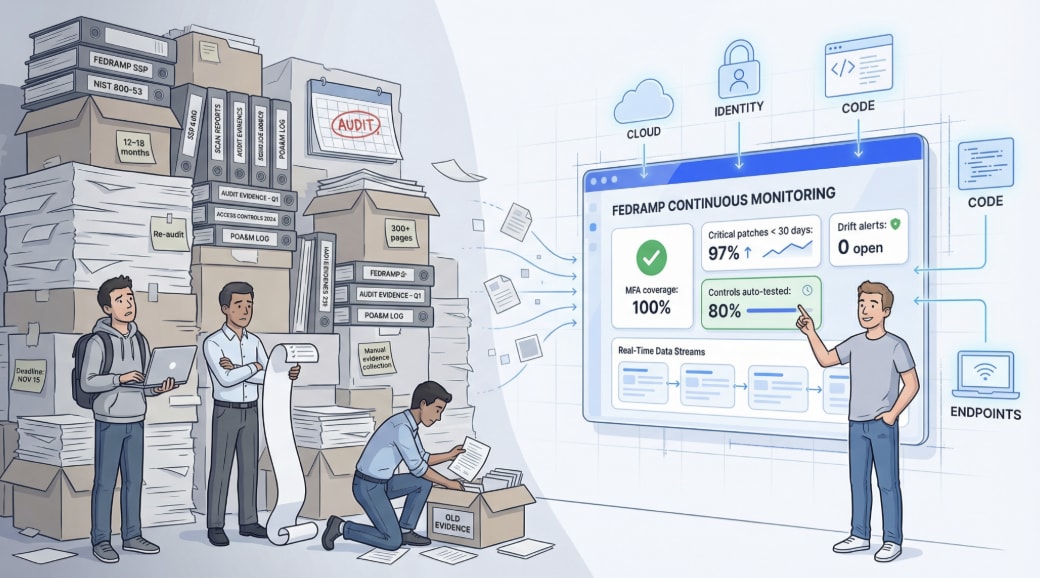
Automation changes the math. The best platforms map controls, pull evidence directly from systems like AWS and Okta, and flag drift before an auditor ever sees it. You stop chasing screenshots and start treating compliance like a live data feed.
Even the FedRAMP Program Management Office (PMO) is moving in that direction with FedRAMP 20×, which emphasizes real-time indicators over static documentation.
This guide breaks down why FedRAMP feels so heavy, how 20× and Key Security Indicators (KSIs) reshape the process, and which tools can help you get from an initial “yes” to an Authority to Operate (ATO) faster.
FedRAMP 101: why the rulebook feels endless, and how automation shrinks it
FedRAMP is the federal government’s master checklist for cloud security. For most SaaS companies, that means the FedRAMP Moderate baseline, which rolls roughly 325 NIST SP 800-53 controls into one playbook and expects evidence that each control is implemented and operating effectively.

That evidence is not a single file. It is a body of work. The System Security Plan (SSP) alone can exceed 300 pages, and it is only the start. Add monthly scan reports, quarterly assessments, and annual re-audits, and the documentation overhead can overwhelm a lean team.
The real pain is that the controls reach into everything you do. Identity, logging, patching, cloud configuration, and even HR background checks all land in scope. One missed MFA toggle or an unencrypted S3 bucket is not “just a small gap,” it can reset momentum and force you back into remediation mode. That is why traditional FedRAMP efforts often take 12 to 18 months and cost six figures.
Automation changes the work from manual collection to continuous validation. Modern platforms connect to systems like AWS, Okta, GitHub, and employee laptops, then pull evidence by API on a recurring schedule. Vanta, for example, runs more than 1,300 automated tests every hour against live configurations, surfacing drift long before an auditor arrives. Instead of packaging screenshots once a year, you grant read-only access and let the tool collect the same proof every day.
This shift also matches where the program is going. The FedRAMP Program Management Office’s FedRAMP 20× initiative aims to validate 80 percent of security controls automatically and shorten authorization timelines from months to weeks. The direction is clear: agencies want real-time indicators over static PDFs, and teams that can produce live evidence spend less time writing and more time fixing.
FedRAMP is still demanding, but the bottleneck has moved. When compliance becomes a data problem, your team can move at cloud speed.
FedRAMP 20× and KSIs: turning annual audits into a live data feed
FedRAMP 20× changes what “proof” looks like. Instead of asking you to demonstrate that a policy exists, the emphasis shifts to whether your controls are working right now.
Launched in 2025, FedRAMP 20× targets at least 80 percent automated control validation and aims to cut authorization timelines from months to weeks. The goal is not to remove rigor. It is to replace manual verification work with automated signals wherever possible.
Those signals are called Key Security Indicators (KSIs). KSIs take broad NIST control expectations and turn them into machine-readable measurements. A metric like “percentage of critical patches applied within 30 days” is easier to verify continuously than a long narrative describing your patch process. The Moderate baseline includes 61 indicators spanning identity, configuration, incident response, and more.
What this changes for your team:
- Always-on assurance: KSI data can stream from your cloud and security stack into dashboards shared with agencies, which reduces the end-of-quarter evidence scramble.
- Less document drag: When KSIs carry the operational story, the SSP and supporting documentation can shrink, and the remaining artifacts can be generated from the same evidence-gathering workflows.
- Faster remediation loops: If a KSI falls out of bounds—for example, MFA compliance dropping below 100 percent—you can catch and fix it immediately before it becomes an audit finding.
FedRAMP 20× rewards teams that treat compliance as an operational system, not a one-time deliverable. If you choose tools and workflows that align to KSIs from day one, you spend less time preparing for audits and more time staying in compliance continuously.
How we picked and ranked the platforms
FedRAMP tooling looks crowded until you evaluate it the way SaaS teams actually buy. The real questions are straightforward:
- Can it automate your path to an ATO, not just organize paperwork?
- Will it reduce duplicate work across other frameworks you already need (SOC 2, ISO 27001, HIPAA)?
- What is the total cost of ownership, including engineering time and outside services, not just the license?
To keep the list practical, we set four guardrails before scoring anything:
- Moderate coverage at minimum. Low-only tools did not make the cut.
- Real automation. If a platform cannot pull live evidence by API or deliver a pre-hardened environment, it was out.
- A verifiable FedRAMP story. The vendor needed a credible path, whether through its own authorization, participation in the 20× effort, or a track record supporting customer ATOs.
- Customer traction. We prioritized products with real-world adoption over roadmap promises.
From there, we scored each platform on five weighted factors:
- Automation depth (30 percent) How much can the tool continuously validate for you? Vanta’s 1,300-plus automated checks set the bar for always-on monitoring.
- FedRAMP track record (25 percent) We favored vendors that show real progress in the FedRAMP ecosystem, including alignment with the direction of FedRAMP 20× and its goal to automate 80 percent of validation work.
- Speed proof (20 percent) Marketing claims do not shorten timelines. We weighted published timelines, such as Smartsheet reaching audit-ready status in under 60 days with Anitian.
- 20× future-readiness (15 percent) Tools that map Key Security Indicators (KSIs) and export OSCAL packages are better positioned for continuous authorization, and they reduce rework as agencies shift toward machine-readable submissions.
- Practical fit (10 percent) Integrations, pricing transparency, and access to trusted 3PAOs matter because the best dashboard is useless if it does not fit your toolchain, budget, or staffing model.
The result is a ranking that spans lightweight accelerators, automation-first compliance platforms, and full-scale GRC suites, so you can match the tool to your runway, team maturity, and risk tolerance.
1. Vanta: automation depth you can see hourly
Vanta is built for teams that want FedRAMP to behave less like a document project and more like continuous operations. Once you connect core systems such as AWS, Okta, GitHub, and employee devices, Vanta continuously validates your control posture with 1,300+ automated tests running hourly across 400+ integrations. That cadence powers continuous compliance and, according to an IDC study of Vanta customers, cuts the time teams spend per framework and audit by 82 percent. Instead of screenshot-chasing, engineers see drift the same hour it happens and fix it while momentum is still on their side.
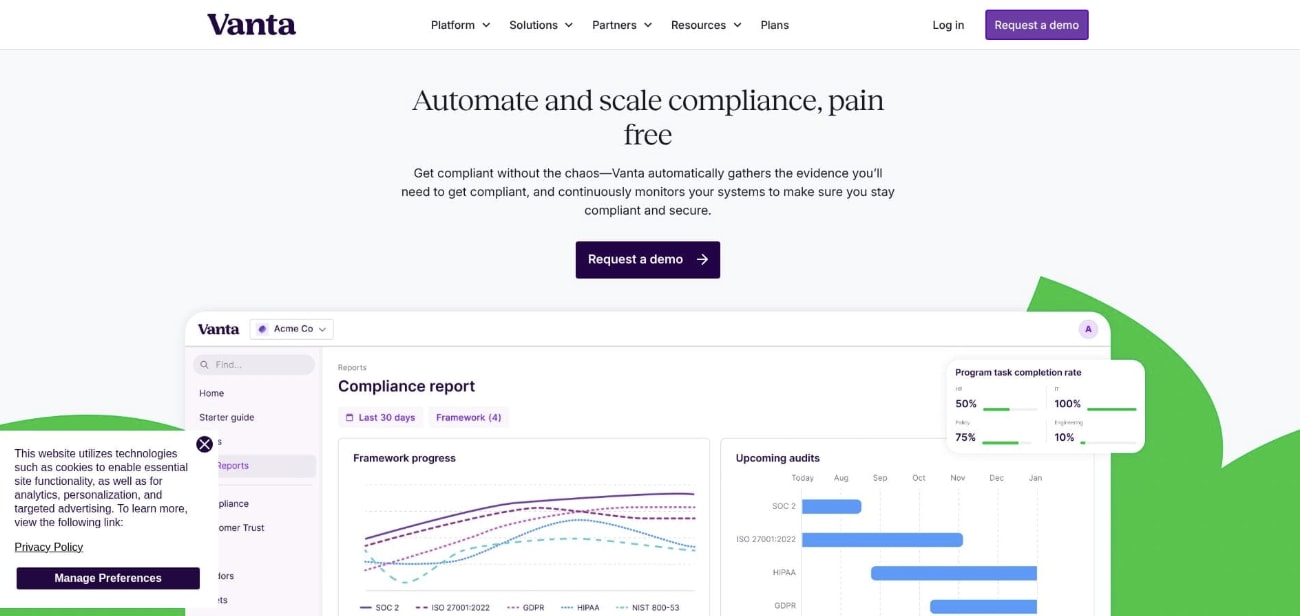
That automation is paired with a concrete FedRAMP story. Vanta earned a FedRAMP 20× Low authorization in 2025, and its FedRAMP module is designed around the direction the program is heading, including Key Security Indicator (KSI) reporting and OSCAL (Open Security Controls Assessment Language) outputs.
Under the hood, the FedRAMP module includes four pre-mapped control sets (Low, Moderate, High, and Li-SaaS) and tracks 411 controls and 459 pieces of evidence in-product. For teams living in AWS, Vanta’s FedRAMP automation includes 136 different tests against AWS, with scoping so you can focus on the environments that actually sit in your FedRAMP boundary.
Vanta also leans into day-to-day execution. Evidence collection is designed to be API-driven instead of screenshot-driven, auditors can review artifacts in-platform, and the workflow is built to look and feel like engineering work. When something drifts, Vanta flags it quickly and surfaces remediation guidance. It also includes a POA&M (Plan of Action and Milestones) management feature (V1), which helps you track gaps in a way that aligns with how FedRAMP teams actually report.
Where Vanta tends to win is leverage. It supports 35+ frameworks, and the same evidence you collect for programs like SOC 2 or HIPAA can map into FedRAMP, with Vanta citing roughly 40 percent overlap from SOC 2 and up to 50 percent from HIPAA. For SaaS teams already selling into regulated markets, that cross-mapping can remove a lot of duplicate effort.
Vanta is ideal for:
- Growth-stage SaaS teams pursuing FedRAMP Moderate or High who want continuous monitoring, not one-time “audit prep”
- Security and DevOps orgs that value deep integrations and fast drift detection
- Teams that need multi-framework leverage alongside FedRAMP, not a single-purpose federal tool
Pricing notes: Vanta typically sits in the premium tier. Core pricing starts around $10,500 per year for 1 to 20 employees, scaling to about $17,500+ for 20 to 50 employees, with the FedRAMP module as an add-on. Renewal increases are capped at 5 percent for startups and 10 percent standard.
Key strengths
- Deep, high-cadence automation, with 1,300+ hourly tests and 400+ integrations
- Purpose-built FedRAMP module (control sets, KSI views, OSCAL export, and evidence tracking)
- Strong multi-framework cross-mapping, which reduces duplicate work across compliance programs
Key limitations
- Premium pricing can be hard to justify for early-stage teams optimizing for lowest license cost
- POA&M management is still early (V1), so some teams may supplement with existing workflows
- Vanta does not build or manage your GovCloud environment for you, and FedRAMP control mapping still requires judgment because FedRAMP has real nuances beyond generic control libraries
2. Anitian: ATO-ready cloud in a box
Most compliance platforms start with your existing environment and then try to prove it meets FedRAMP. Anitian flips the order. It gives you a pre-hardened cloud landing zone and a security stack that is engineered for FedRAMP from day one.

Anitian’s current platform, FedFlex (launched June 2025), is built to accelerate authorization by combining environment build-out, automation, and services. It offers a Starter path aimed at FedRAMP Low, including a “sponsorless ATO” pathway, and a Comprehensive path that supports Moderate and High efforts. Anitian itself is not positioned as a FedRAMP-authorized SaaS you buy off the marketplace. It is an enablement platform and services model designed to help cloud service providers (CSPs) earn authorization.
The “automation” here is not about running thousands of discrete checks. It is about deploying a controlled environment fast, then keeping it in compliance through infrastructure guardrails and continuous monitoring. Anitian can deploy 15+ pre-engineered security tools around your application in about one day, with controls implemented in Terraform and CloudFormation. In practice, that means the platform can prevent certain classes of drift before they become findings.
On the documentation side, FedFlex emphasizes faster artifact production. It includes AI-powered SSP, POA&M, and artifact generation, plus OSCAL outputs for machine-readable packages, and tooling designed to detect and manage compliance drift (DriftDefend).
The speed claims are backed by public customer timelines. Smartsheet reported reaching audit-ready status in under 60 days using Anitian, and achieved an ATO in under four months. If your biggest bottleneck is getting to a credible, accessible environment quickly, those kinds of timelines are the reason Anitian stays on shortlists.
Anitian is ideal for:
- SaaS companies where FedRAMP is the primary revenue gate, and environment build-out is the critical path
- Teams that want a turnkey GovCloud or government-ready blueprint, plus help running readiness and continuous monitoring
- Organizations with budget for a platform-plus-services model, not a self-serve tool
Pricing notes: Anitian generally sits in the enterprise tier. Engagements are often framed as a lower-cost alternative to traditional FedRAMP consulting, but it still requires a significant investment, commonly in the $300K to $1.5M range depending on scope and services.
Key strengths
- Extremely fast path to a compliant baseline because the environment and security stack are delivered as a package
- Documentation acceleration through AI-driven SSP and POA&M support, plus OSCAL output
- End-to-end support, including optional managed continuous monitoring and coordinated assessment motion
Key limitations
- Less flexibility than “bring your own stack” approaches—you are adopting Anitian’s architecture and tooling choices
- Not a multi-framework GRC platform; it is primarily FedRAMP-focused
- Newer “agentic AI” capabilities and recent company changes (including the Arkenstone Defense merger) add uncertainty, and some case studies reference older platform branding rather than today’s FedFlex experience
3. Coalfire Compliance Essentials: when your auditor brings the app
Coalfire Compliance Essentials is best understood through Coalfire’s role in FedRAMP. Coalfire is a long-standing FedRAMP 3PAO, and Compliance Essentials is the platform it uses to operationalize that audit mindset, evidence expectations, and assessor workflow inside a single workspace.
For FedRAMP readiness, the product centers on evidence management. It includes a library of 1,300+ evidence items mapped across 65+ frameworks, with pre-mapped NIST and FedRAMP-aligned structures. Practically, that means when you open a requirement, you are guided toward the exact artifacts an assessor is likely to request, with a place to attach evidence and track status.
Automation exists, but it is important to understand what it is and how it is packaged. Evidence collection automation is a separately purchased add-on, not a default capability. With the add-on, the platform can automatically collect roughly 400 pieces of evidence using 75+ plugins across common cloud and security systems. That is helpful for reducing manual uploads, but it is different from continuous technical control testing that detects drift hourly.
“Continuous compliance” here is also workflow-driven. The platform focuses on evidence freshness, task completion tracking over long assessment cycles, issue tracking tied to controls, and audit readiness coordination. If you want always-on security posture monitoring, you should treat Compliance Essentials as a GRC and audit execution hub first, not a real-time controls engine.
Where it shines is the assessor collaboration model. Coalfire assessors can review artifacts, communicate findings, and track testing status inside the same system your team uses for remediation. For organizations already committed to Coalfire as their assessor, that eliminates a lot of spreadsheet and PDF churn and reduces last-minute misunderstandings about what counts as “acceptable evidence.”
Coalfire Compliance Essentials is ideal for:
- Organizations already working with Coalfire as their 3PAO and wanting a shared workspace for evidence and remediation
- Enterprise teams managing many frameworks and trying to reuse artifacts across programs
- GRC-led organizations that value audit execution structure over developer-first automation
Pricing notes: Pricing is typically enterprise and commonly bundled with services. The automation capability is an add-on, so total cost depends heavily on which modules you purchase.
Key strengths
- Assessor-native workflows, built around how a 3PAO actually requests and reviews evidence
- Strong multi-framework evidence reuse, supported by its large evidence library and Shared Evidence Wizard approach
- Cleaner audit-day collaboration when your assessor and your team operate in the same platform
Key limitations
- Evidence automation is an add-on, so you need to scope and price it explicitly
- Plugin ecosystem is smaller than automation-first platforms, which can increase manual collection for modern stacks
- Best value assumes you stay with Coalfire as your assessor; switching 3PAOs can reduce the advantage
4. Elvan
Elvan is a lightweight customer feedback intelligence platform that captures Voice of Customer signal across the full CX lifecycle — NPS, CSAT, CES, eNPS, PMF, and more. It collects responses where customers already are: in-product via a JavaScript SDK, inside transactional emails through native embeds (Klaviyo, Mailchimp, ActiveCampaign), or via shareable links — and routes results directly into Slack and Zendesk. The value is speed-to-signal: teams go from zero to live feedback loop in minutes, not weeks.
Where Elvan.ai stands out is accessibility and immediacy. Surveys trigger on real interactions — account creation, ticket resolution, feature launch — so you capture sentiment while it's still fresh, not in a batch email three days later. Unlike enterprise VoC platforms, there's no taxonomy to design, no data pipeline to configure, and no professional services engagement to get started. For customer success managers, founders, or eCommerce operators running lean, it's the difference between actually having a feedback program and planning to build one.
Trade-offs: Elvan.ai is purpose-built for simplicity, so it won't replace a full experience analytics suite for organizations needing cross-channel journey analysis, predictive churn modeling, or deep text/speech analytics at scale. It also currently integrates natively with Zendesk and Slack, so more complex automation across a broader tech stack requires additional tooling.
Pros
- 8 survey types (NPS, CSAT, CES, eNPS, PMF, 5-Star, Thumbs, Smiley) in a single platform with no per-survey setup overhead
- Event-based triggering catches feedback at the exact moment of experience — not after the memory has faded
- Native embeds in Klaviyo, Mailchimp, and ActiveCampaign mean eCommerce teams get post-purchase CSAT with zero developer dependency
- AI-powered response summaries (Pro) surface plain-English insights without needing a data analyst
- Dramatically more affordable than enterprise VoC tools — free tier available, Pro at $49/month vs. $200–$420/month elsewhere
Cons
- Not a help desk - it generates signal but relies on your ticketing or communication layer to act on it
- Analytics depth is optimized for simplicity, not the kind of driver analysis or statistical modeling that Qualtrics or similar enterprise platforms provide
- Integration ecosystem is still maturing (currently Zendesk + Slack natively; broader connections require workarounds)
Pricing
Free plan includes 100 responses/month and 1 user. Pro is $49/month for 1,000 responses, 10 users, unlimited projects, and AI analytics. Enterprise is custom pricing with unlimited responses and priority support — significantly undercutting comparable tools.
Verdict
Pick Elvan.ai if your team needs a live feedback loop right now — especially if you're a SaaS team running NPS post-onboarding, an eCommerce brand embedding CSAT into Klaviyo flows, or migrating off a shutting-down tool (Delighted closes June 2026). It fills the VoC layer of your customer service stack without the cost or complexity of enterprise platforms.
5. Telos Xacta: RMF-grade control rigor for FedRAMP High and DoD programs
Xacta is built for teams that run security authorization as a formal lifecycle, not a one-time audit project. If your roadmap includes FedRAMP High or defense-oriented requirements such as DoD impact levels, Xacta’s core strength is that it speaks the government’s language end to end, especially around NIST Risk Management Framework (RMF) workflows.
Xacta’s own authorization status is also a differentiator. The platform achieved FedRAMP High authorization, with Xacta 360 authorized in July 2025 and the full platform (including Xacta.io and Xacta.ai) authorized in April 2026. It is deployed on AWS GovCloud (US), has also achieved StateRAMP High, and is listed on the FedRAMP Marketplace with three authorizations and two reuses. For programs where tooling itself must operate at High, that matters.
On the FedRAMP execution side, Xacta functions as RMF mission control. It supports the full workflow progression that federal teams expect, including multi-stage control status, approvals, and structured evidence requirements. It also outputs packages in both human-readable formats (Word/PDF) and machine-readable OSCAL, which aligns with the direction of modernized authorization and reuse. Xacta includes a KSI dashboard for tracking control ratings against FedRAMP Rev. 5 assessments, and it offers Xacta Data Exchange (XDE) to support evolving FedRAMP 20× requirements.
Automation in Xacta looks different than in automation-first SaaS compliance platforms. It is strongest where federal programs already have mature tooling, especially scanners. Xacta can ingest results from Nessus, ACAS, and SCAP, and Xacta.io is positioned to correlate outputs from multiple security products into a single view mapped to controls.
Xacta has also added generative AI capabilities through Xacta.ai, which uses GenAI via Amazon Bedrock. Telos reports that Xacta.ai can draft control implementation statements in under five minutes versus one hour or more manually, and that pilot efforts showed 93 percent time savings, including reductions of critical tasks from four to six months down to nine days. Treat these as reported pilot outcomes, but they highlight the direction: Xacta is investing in speeding up the parts of RMF that traditionally consume analyst time.
Xacta is ideal for:
- Defense primes, federal system integrators, and national-security SaaS vendors managing FedRAMP High or RMF-heavy programs
- Organizations running multiple ATO packages and needing structured approval workflows, inherited control tracking, and formal POA&M management
- Teams with dedicated GRC analysts who can operate a full-featured RMF platform
Pricing notes: Xacta is sold in government and enterprise tiers. On AWS Marketplace, published pricing includes $25,102 per year (Tier 1, 1 project), $62,755 per year (Tier 2, 5 projects), and $94,502 per year (Tier 3, 10 projects). Training and quick-start installation services are typically separate line items.
Key strengths
- FedRAMP High authorized platform that can operate at the security level many agencies require
- Deep RMF workflow support, plus OSCAL outputs for modernized packages and reuse
- Strong scanner ingestion and reporting alignment for government security toolchains, plus emerging GenAI acceleration for RMF authoring work
Key limitations
- Steep learning curve and heavier operational overhead than lightweight compliance automation tools; many teams plan for training and a dedicated analyst
- Less oriented around modern SaaS integrations (for example, broad Okta and GitHub style ecosystems) than automation-first platforms
- User experience can feel dated to some buyers; one partner perspective described it as “legacy, outdated,” which is worth validating in a hands-on demo before committing
Quick-scan comparison matrix
Choosing a platform often comes down to a handful of must-haves. Use the matrix below to compare each option on FedRAMP coverage, automation style, and how ready it is for the FedRAMP 20× direction of travel.
| Tool | Impact levels supported | Own FedRAMP status | Automation depth / type | Document generation | 20× KSI ready | Ideal team size | Cost tier* |
|---|---|---|---|---|---|---|---|
| Vanta | Low, Moderate, High, Li-SaaS | FedRAMP 20× Low authorized (2025) | 1,300+ automated tests run hourly, 400+ integrations | SSP + OSCAL support, policy library | Yes | 50–500 | $$$ |
| Anitian | Low (Starter), Moderate, High | N/A (environment + services model) | Pre-hardened cloud landing zone + guardrails, deploys 15+ security tools | AI-powered SSP/POA&M and OSCAL output | In progress | 100+ | $$$ |
| Coalfire Compliance Essentials | Moderate, High | No (platform) | Evidence collection automation is an add-on, ~400 evidence items via 75+ plugins | SSP / POA&M workflow | Partial | 200+ | $$$ |
| ZenGRC (RiskOptics) | Moderate (Federal ZenGRC), plus broader program tracking | FedRAMP Marketplace listed (Federal ZenGRC, Moderate) | Limited technical automation, strongest as configurable GRC system of record | Exportable compliance packets | Partial | 100+ | $$–$$$ |
| Telos Xacta | Moderate, High | FedRAMP High authorized | Scanner ingestion (Nessus/ACAS/SCAP) + RMF workflows | Full RMF package, OSCAL output | Partial | 500+ | $$$ |
*Cost tier: $ = lower, $$ = mid, $$$ = higher. Vendors quote custom pricing, so treat this as directional guidance.
Two reminders before you decide:
- Automation is not just a number. Hourly control validation supports continuous authorization. A pre-hardened environment can be faster when infrastructure is your bottleneck. Choose the automation style that removes your biggest constraint.
- Future proofing reduces rework. Tools that already support KSIs and export OSCAL packages are better aligned with FedRAMP 20× and the direction agencies are signaling.
FedRAMP tool FAQs: your next moves, answered
Do these platforms guarantee an ATO (Authority to Operate)?
No. Software cannot promise an authorization. You still need strong security controls, a sponsoring agency (outside FedRAMP 20× Low), and a 3PAO assessment. What the right platform does provide is on-demand evidence and continuous monitoring, which can cut preparation time by half or more by reducing manual collection and last-minute documentation work.
When is the right moment to buy a platform?
As soon as a federal deal is on your roadmap. The earlier you connect your systems, the earlier the tool starts collecting baseline evidence. That turns year-end surprises into weekly fixes and keeps your program moving even while product and infrastructure change.
Can we mix and match tools?
Yes, but be deliberate. Some teams pair a pre-hardened environment from Anitian with a documentation and evidence workflow tool. The risk is operational sprawl. Assign clear owners and choose a single source of truth for evidence, POA&M tracking, and auditor access.
Do agencies care if our compliance platform is FedRAMP authorized?
For Moderate data, many agencies accept a tool outside your authorization boundary as long as no federal data touches it. Even so, using a platform with a strong FedRAMP story can reduce friction. For example, Vanta’s FedRAMP 20× Low authorization can remove one more objection, and tools with FedRAMP 20× pilot experience can help you speak the program’s language during reviews.
Treat these FAQs as guardrails. Every agency and assessor has its own expectations, so use these answers to ask sharper questions during demos and scoping calls.
Wrapping up: turn compliance drag into competitive lift
FedRAMP no longer belongs only to the Fortune 500. When controls are measured continuously and FedRAMP 20× pushes programs toward real-time indicators, you can replace months of document churn with a smaller set of focused sprints.
The key is choosing a platform that solves your biggest constraint:
- Evidence collection: If your team is drowning in screenshots and exports, prioritize deep integrations and automated evidence capture.
- Documentation: If SSP and policy work is the bottleneck, prioritize strong templates and guided artifact generation.
- Environment readiness: If you need a compliant foundation fast, consider a pre-hardened landing zone and infrastructure guardrails.
Once you have a shortlist, treat demos like due diligence. Bring your security and DevOps leads, and press vendors on specifics:
- How many FedRAMP Moderate controls are continuously validated out of the box, and how often are checks run?
- Can you export an OSCAL-ready SSP with your current boundary assumptions?
- Which real customer timelines support the “faster ATO” claim?
When you get clear answers, budgeting and planning become easier, and your path to authorization becomes predictable.
Your future ATO is not a binder. It is a live dashboard.
Further Reading
Discover more articles on similar topics across our network

Why Cloud-Native and Serverless Development Are Now the Default for Custom Software
Stackademic

Comments
Loading comments…