I’ll admit it — like many developers, I spent years blindly using NPM. It got the job done, sure, but somewhere along the way, my projects grew, dependencies multiplied, and node_modules started feeling like a black hole. That’s when I discovered PNPM, and it changed everything.
“Efficiency isn’t just speed — it’s reliability, maintainability, and peace-of-mind.”
The Problem with NPM
Imagine this: you’re working on three projects simultaneously. Each project installs the same package, maybe even the same version. With NPM, every project gets its own copy. Gigabytes of redundant packages pile up, installs take forever, and updating dependencies becomes a nightmare.
It’s not just disk space. NPM’s leniency sometimes allows “phantom dependencies” — packages that work on your machine but break in CI or on a teammate’s computer. I learned this the hard way. Trust me I’ve been there…
Enter PNPM: Speed and Efficiency
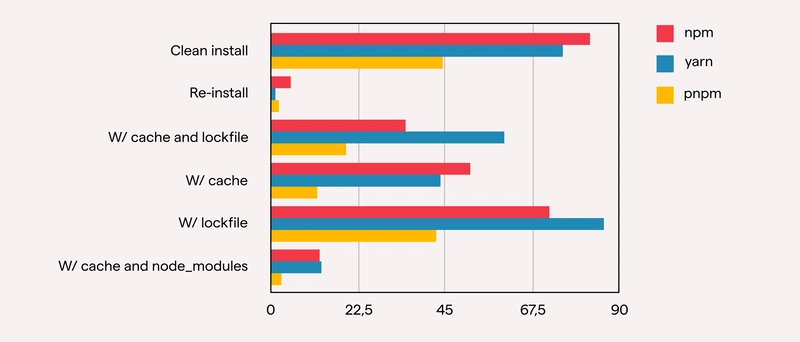
PNPM solves these problems elegantly. Instead of duplicating packages, it uses a global content-addressable store and links dependencies into each project.
The result?
- Massive disk savings: no more bloated
node_modules. - Lightning-fast installs: once a package is in the store, linking is instantaneous.
- Easy to set-up and use.
I went from watching my install progress crawl for minutes to seeing it finish in seconds. For large monorepos, this is a game-changer.
Strict Dependencies, Fewer Surprises
One thing that stood out to me was how PNPM enforces strict node_modules resolution. My projects now only have access to the dependencies they explicitly declare. No more relying on packages buried deep inside another package’s tree.
The benefits are immediate: fewer deployment bugs, more consistent builds, and easier debugging when things go wrong.
uilt for Monorepos
If you’re managing multiple packages in a monorepo, PNPM shines. Tools like TurboRepo and Nx integrate seamlessly with PNPM workspaces. You can link internal packages, manage versions cleanly, and avoid the chaos of tangled dependencies.
For anyone working at scale, this isn’t just a convenience — it’s a necessity.
Why PNPM Feels Like Magic
PNPM solves these common problems elegantly:
- Global store: Packages are downloaded once and reused across all projects.
- Symlinked node_modules: Projects link to the global store instead of duplicating files.
- Fast installs: Linking is almost instantaneous.
Developer Experience That Wins You Over
PNPM’s CLI is fast, intuitive, and packed with helpful commands:
pnpm install       # lightning-fast installs
pnpm update        # easy updates
pnpm audit         # security checks
pnpm add <pkg>     # add dependencies effortlessly
For anyone hesitant to switch, this is reassuring — the learning curve is minimal, and the payoff is immediate.
Migration Made Simple
Worried about switching? Don’t be. PNPM is fully compatible with existing NPM projects. A simple command:
pnpm import
…translates your package-lock.json into a PNPM-friendly setup. Your project stays intact, and you gain all the benefits instantly.
For all the doubters and the hesitant
- If you’re new to web development, stick with NPM for now.
- If you work on monorepos or large-scale applications, go for Yarn.
- If you want the best performance and efficiency, PNPM is the future.
⚠️ Not Sponsored, Just Genuinely Hooked If you’re thinking, “This is a paid ad!”, nope! I just genuinely love PNPM — and my hard drive thanks me daily :)
Why I’ll Never Go Back…!
I still remember the first time I ran pnpm install on a project and watched it finish in a fraction of the time NPM would have taken. It felt like magic. Disk space reclaimed, fewer bugs, faster installs, and stricter dependencies—it’s everything I needed.
NPM served us well, but for modern, scalable JavaScript development, PNPM is the clear winner. If you want speed, efficiency, and reliability, give it a try — you might never go back either.
Send in your thoughts in the comments below! See you in the next one. Cheers, have a nice day!
Further Reading
Discover more articles on similar topics across our network



Comments
Loading comments…