What is SonarQube?
SonarQube is an open-source quality management platform, dedicated to continuously analyze and measure technical quality, from project portfolio to method.
Code Quality and Code Security | SonarQube
Basic of SonarQube
-
SonarQube (formerly just “Sonar”) is a server-based system. Of course, you can install it on your local machine (the hardware requirements are minimal). But it is a central server with a database.
-
SonarQube is an open-source platform developed by SonarSource for continuous inspection of code quality. Sonar does static code analysis, which provides a detailed report of bugs, code smells, vulnerabilities, code duplications.
-
SonarQube also highlights the complex areas of code that are less covered by unit tests.
Basic Highlights
Release Quality Code: Catch tricky bugs to prevent undefined behaviour from impacting end-users.
Application Security: Fix vulnerabilities that compromise your app, and learn AppSec along the way with Security Hotspots.
Technical Debt: Make sure your codebase is clean and maintainable, to increase developer velocity!
Setup Sonarqube on the local machine
We are going to use a bitnami-docker-sonarqube image to set up Sonarqube on our local machine.
For more details, you can check a bitnami-docker-sonarqube GitHub repository.
bitnami/bitnami-docker-sonarqube
Run the application using Docker Compose
Docker Compose is a tool for defining and running multi-container Docker applications. With Compose, you use a YAML file to configure your application's services.
Use the following command to get the docker-composeconfiguration on your local machine.
$ curl -sSL https://raw.githubusercontent.com/bitnami/bitnami-docker-sonarqube/master/docker-compose.yml > docker-compose.yml
$ docker-compose up -d
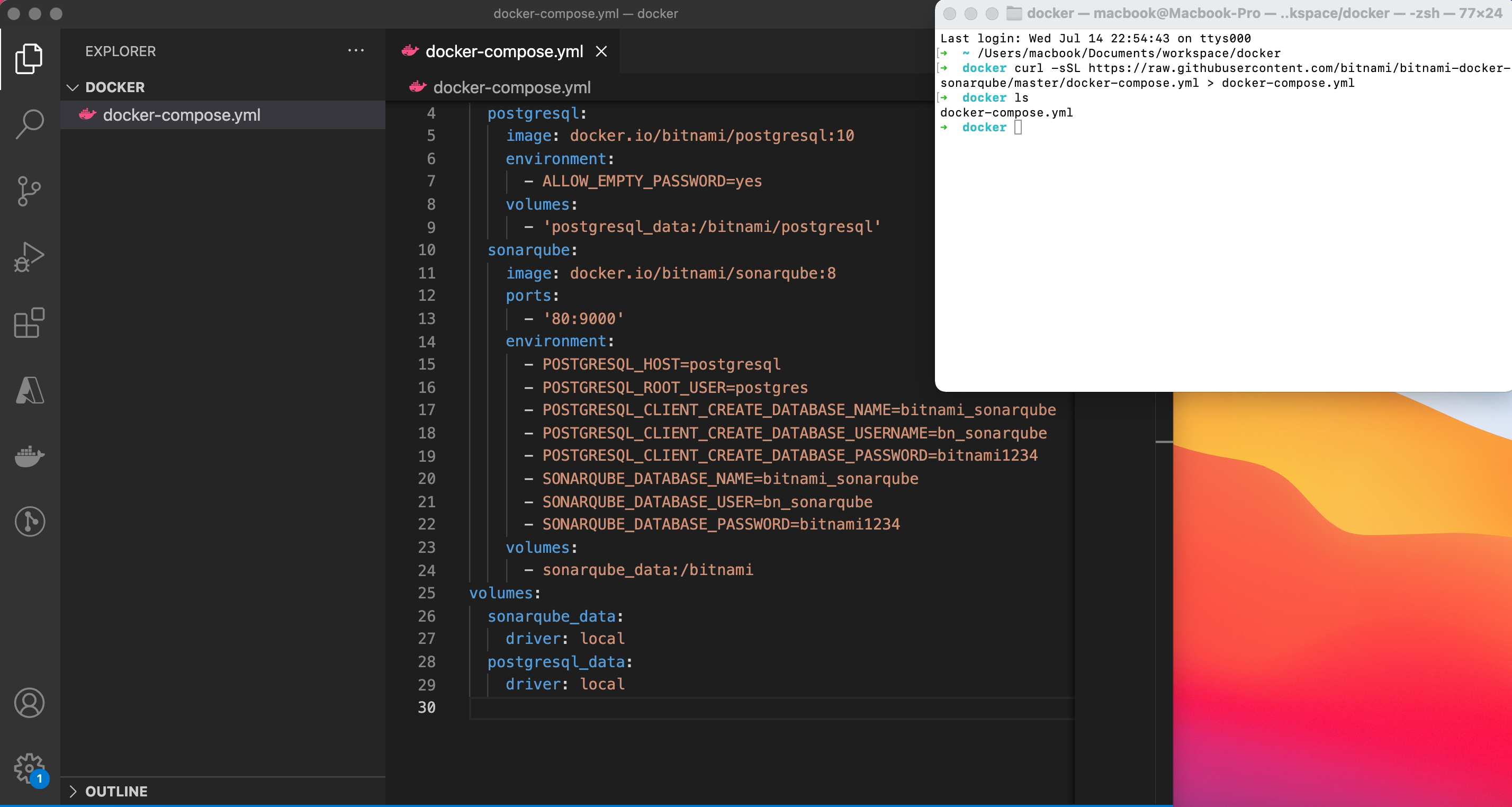 bitnami image
Or else you can create docker-compose.yml file and use the following configuration to run Sonarqube using docker-compose up -d command.
version: '2'

services:
  postgresql:
    image: docker.io/bitnami/postgresql:10
    environment:
      - ALLOW_EMPTY_PASSWORD=yes
    volumes:
      - 'postgresql_data:/bitnami/postgresql'
  sonarqube:
    image: docker.io/bitnami/sonarqube:8
    ports:
      - '80:9000'
    environment:
      - POSTGRESQL_HOST=postgresql
      - POSTGRESQL_ROOT_USER=postgres
      - POSTGRESQL_CLIENT_CREATE_DATABASE_NAME=bitnami_sonarqube
      - POSTGRESQL_CLIENT_CREATE_DATABASE_USERNAME=bn_sonarqube
      - POSTGRESQL_CLIENT_CREATE_DATABASE_PASSWORD=bitnami1234
      - SONARQUBE_DATABASE_NAME=bitnami_sonarqube
      - SONARQUBE_DATABASE_USER=bn_sonarqube
      - SONARQUBE_DATABASE_PASSWORD=bitnami1234
    volumes:
      - sonarqube_data:/bitnami
volumes:
  sonarqube_data:
    driver: local
  postgresql_data:
    driver: local
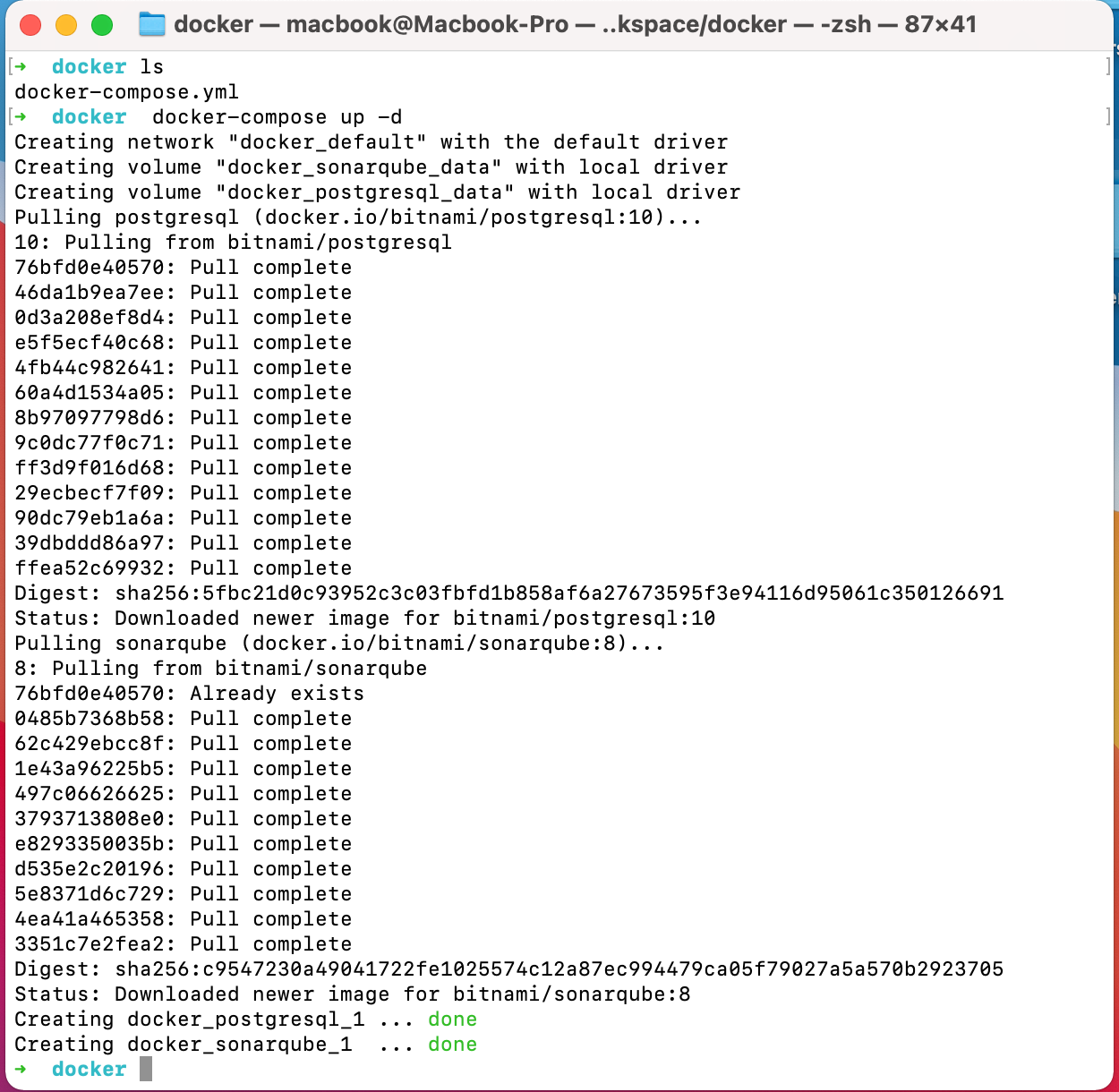 Run the application using Docker Compose
Access your application at http://127.0.0.1 and use the below credentials to login into the application.
**Username** - **admin**
**Password** - **bitnami**
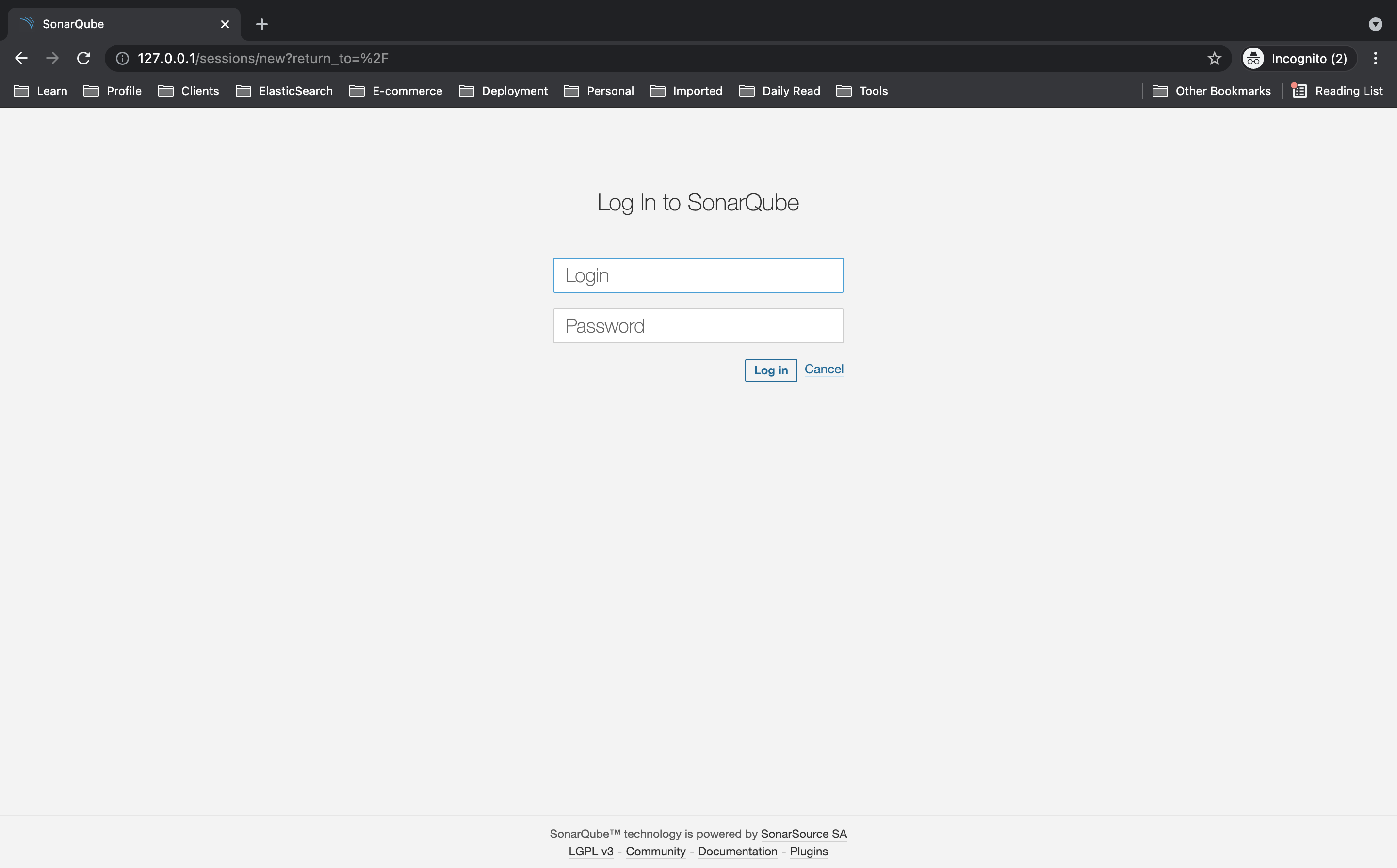
Analyzing a Project
-
Click the Create new project button.
-
Give your project a **Project key **and a Display name and click the Set Up button.
-
Under Provide a token, select Generate a token. Give your token a name, click the Generate button, and click Continue.
-
Copy the generated token and paste it into our .env file corresponding to the variable SONARQUBE_TOKEN.
-
Example : SONARQUBE_TOKEN=generated-token
-
Make sure to set environment variables in .env file.
SONARQUBE_URL=http://127.0.0.1 SONARQUBE_PROJECTKEY=sonarqube-node-tpescript-demo SONARQUBE_TOKEN=43b915a482ba1dce4b36c215718e56e37ad9e910
Configuring SonarQube over our Node and TypeScript project
First, you need to clone the Skeleton for Node.js applications written in TypeScript
santoshshinde2012/node-boilerplate
// clone the repository
git clone [https://github.com/santoshshinde2012/node-boilerplate.git](https://github.com/santoshshinde2012/node-boilerplate.git)

// install the npm modules
npm install
Use sonarqube-scanner npm module to run SonarQube/SonarCloud analyses.
To add code analysis to your build files, simply add the package to your project dev dependencies:
npm install --save-dev sonarqube-scanner
SonarQube Configuration File
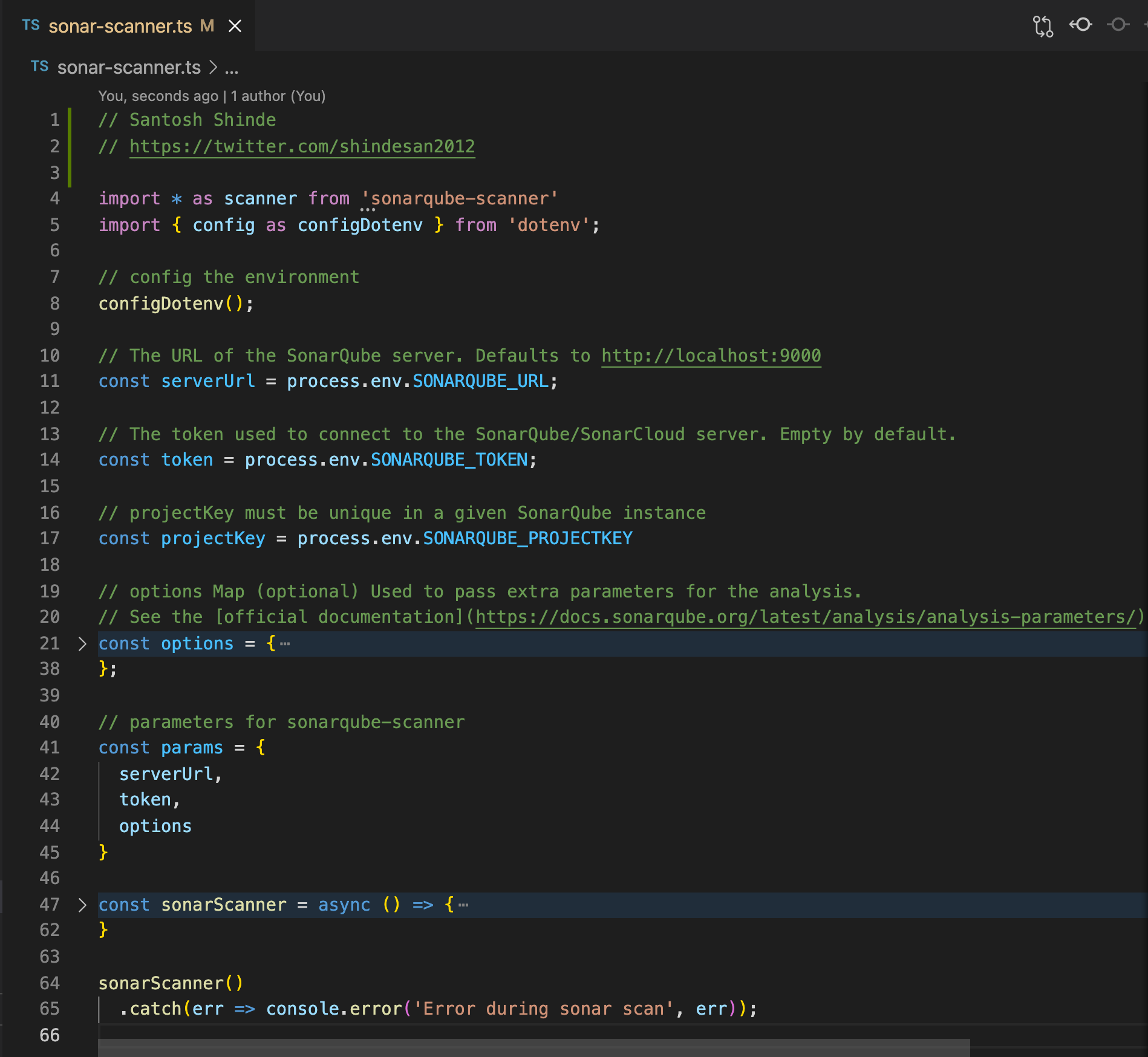
At the root of the project, we are going to create sonar-scanner.ts a file that contains the source code for the SonarQube scanner configuration.
import * as scanner from 'sonarqube-scanner'
import { config as configDotenv } from 'dotenv';

// config the environment
configDotenv();

// The URL of the SonarQube server. Defaults to http://localhost:9000
const serverUrl = process.env.SONARQUBE_URL;

// The token used to connect to the SonarQube/SonarCloud server. Empty by default.
const token = process.env.SONARQUBE_TOKEN;

// projectKey must be unique in a given SonarQube instance
const projectKey = process.env.SONARQUBE_PROJECTKEY

// options Map (optional) Used to pass extra parameters for the analysis.
// See the [official documentation](https://docs.sonarqube.org/latest/analysis/analysis-parameters/) for more details.
const options = {

  'sonar.projectKey': projectKey,

  // projectName - defaults to project key
  'sonar.projectName': 'node-typescript-boilerplate',

  // Path is relative to the sonar-project.properties file. Defaults to .
  'sonar.sources': 'src',

  // source language
  'sonar.language': 'ts',

  'sonar.javascript.lcov.reportPaths' : 'coverage/lcov.info',

  // Encoding of the source code. Default is default system encoding
  'sonar.sourceEncoding': 'UTF-8'
};

// parameters for sonarqube-scanner
const params = {
  serverUrl,
  token,
  options
}

const sonarScanner = async () => {

  console.log(serverUrl);

  if (!serverUrl) {
    console.log('SonarQube url not set. Nothing to do...');
    return;
  }

  //  Function Callback (the execution of the analysis is asynchronous).
  const callback  = (result) => {
    console.log('Sonarqube scanner result:', result);
  }

  scanner(params, callback);
}

sonarScanner()
  .catch(err => console.error('Error during sonar scan', err));
How to fix “parserOptions.project” has been set for @typescript-eslint/parser ?
Simply instruct eslint to ignore them by adding the ignorePatterns option to your .eslintrc: "ignorePatterns": ["sonar.js"]
{
  "parser": "@typescript-eslint/parser",
  "extends": [
    "airbnb/base",
    "plugin:@typescript-eslint/recommended",
    "plugin:import/errors",
    "plugin:import/warnings",
    "plugin:import/typescript",
    "prettier"
  ],
  "parserOptions": {
    "ecmaVersion": 2018,
    "project": "./tsconfig.json"
  },
  "ignorePatterns": ["sonar-scanner.ts"], // This line should be add in configuration
  "plugins": ["prettier"],
  "rules": {}
}
Example — https://raw.githubusercontent.com/santoshshinde2012/sonarqube-node-tpescript-demo/master/.eslintrc
// source code with all files needed for the demo
git clone [https://github.com/santoshshinde2012/sonarqube-node-tpescript-demo.git](https://github.com/santoshshinde2012/sonarqube-node-tpescript-demo.git)
How to Run SonarQube Scanner
Please add the below script in package.json to run SonarQube Scanner, make sure you already installed ts-node locally or globally.
"sonar": "ts-node sonar-scanner.ts"
Start the SonarQube Scanner by using the command on terminal
npm run sonar
Output after running npm run sonar
➜  node-boilerplate git:(master) ✗ npm run sonar

> sonarqube-node-tpescript-demo@1.0.0 sonar
> ts-node sonar-scanner.ts

http://127.0.0.1:80
[23:30:35] Starting analysis...
[23:30:35] Getting info from "package.json" file
[23:30:35] Checking if executable exists: /Users/macbook/.sonar/native-sonar-scanner/sonar-scanner-4.5.0.2216-macosx/bin/sonar-scanner
[23:30:35] Platform binaries for SonarScanner found. Using it.
INFO: Scanner configuration file: /Users/macbook/.sonar/native-sonar-scanner/sonar-scanner-4.5.0.2216-macosx/conf/sonar-scanner.properties
INFO: Project root configuration file: NONE
INFO: SonarScanner 4.5.0.2216
INFO: Java 11.0.3 AdoptOpenJDK (64-bit)
INFO: Mac OS X 10.16 x86_64
INFO: User cache: /Users/macbook/.sonar/cache
INFO: Scanner configuration file: /Users/macbook/.sonar/native-sonar-scanner/sonar-scanner-4.5.0.2216-macosx/conf/sonar-scanner.properties
INFO: Project root configuration file: NONE
INFO: Analyzing on SonarQube server 8.9.1
INFO: Default locale: "en_IN", source code encoding: "UTF-8"
INFO: Load global settings
INFO: Load global settings (done) | time=150ms
INFO: Server id: FD2E0B99-AXqmE06gm3W0APi1RPSm
INFO: User cache: /Users/macbook/.sonar/cache
INFO: Load/download plugins
INFO: Load plugins index
INFO: Load plugins index (done) | time=71ms
INFO: Load/download plugins (done) | time=4641ms
INFO: Process project properties
INFO: Process project properties (done) | time=6ms
INFO: Execute project builders
INFO: Execute project builders (done) | time=3ms
INFO: Project key: sonarqube-node-tpescript-demo
INFO: Base dir: /Users/macbook/Documents/workspace/node-boilerplate
INFO: Working dir: /Users/macbook/Documents/workspace/node-boilerplate/.scannerwork
INFO: Load project settings for component key: 'sonarqube-node-tpescript-demo'
INFO: Load project settings for component key: 'sonarqube-node-tpescript-demo' (done) | time=101ms
INFO: Load quality profiles
INFO: Load quality profiles (done) | time=100ms
INFO: Load active rules
INFO: Load active rules (done) | time=4058ms
INFO: Indexing files...
INFO: Project configuration:
INFO:   Excluded sources: node_modules/**, bower_components/**, jspm_packages/**, typings/**, lib-cov/**
INFO: 12 files indexed
INFO: 0 files ignored because of inclusion/exclusion patterns
INFO: 0 files ignored because of scm ignore settings
INFO: Quality profile for ts: Sonar way
INFO: ------------- Run sensors on module node-typescript-boilerplate
INFO: Load metrics repository
INFO: Load metrics repository (done) | time=81ms
INFO: Sensor CSS Rules [cssfamily]
INFO: No CSS, PHP, HTML or VueJS files are found in the project. CSS analysis is skipped.
INFO: Sensor CSS Rules [cssfamily] (done) | time=1ms
INFO: Sensor JaCoCo XML Report Importer [jacoco]
INFO: 'sonar.coverage.jacoco.xmlReportPaths' is not defined. Using default locations: target/site/jacoco/jacoco.xml,target/site/jacoco-it/jacoco.xml,build/reports/jacoco/test/jacocoTestReport.xml
INFO: No report imported, no coverage information will be imported by JaCoCo XML Report Importer
INFO: Sensor JaCoCo XML Report Importer [jacoco] (done) | time=3ms
INFO: Sensor TypeScript analysis [javascript]
INFO: Found 1 tsconfig.json file(s): [/Users/macbook/Documents/workspace/node-boilerplate/tsconfig.json]
INFO: Analyzing 12 files using tsconfig: /Users/macbook/Documents/workspace/node-boilerplate/tsconfig.json
INFO: 12 source files to be analyzed
INFO: Load project repositories
INFO: Load project repositories (done) | time=105ms
INFO: 12/12 source files have been analyzed
INFO: Sensor TypeScript analysis [javascript] (done) | time=11441ms
INFO: Sensor JavaScript/TypeScript Coverage [javascript]
WARN: No coverage information will be saved because LCOV file cannot be found.
WARN: Provided LCOV file path: coverage/lcov.info. Seek file with path: /Users/macbook/Documents/workspace/node-boilerplate/coverage/lcov.info
WARN: No coverage information will be saved because all LCOV files cannot be found.
INFO: Sensor JavaScript/TypeScript Coverage [javascript] (done) | time=1ms
INFO: Sensor C# Project Type Information [csharp]
INFO: Sensor C# Project Type Information [csharp] (done) | time=1ms
INFO: Sensor C# Properties [csharp]
INFO: Sensor C# Properties [csharp] (done) | time=1ms
INFO: Sensor JavaXmlSensor [java]
INFO: Sensor JavaXmlSensor [java] (done) | time=1ms
INFO: Sensor HTML [web]
INFO: Sensor HTML [web] (done) | time=3ms
INFO: Sensor VB.NET Project Type Information [vbnet]
INFO: Sensor VB.NET Project Type Information [vbnet] (done) | time=1ms
INFO: Sensor VB.NET Properties [vbnet]
INFO: Sensor VB.NET Properties [vbnet] (done) | time=0ms
INFO: ------------- Run sensors on project
INFO: Sensor Zero Coverage Sensor
INFO: Sensor Zero Coverage Sensor (done) | time=13ms
INFO: SCM Publisher SCM provider for this project is: git
INFO: SCM Publisher 12 source files to be analyzed
INFO: SCM Publisher 0/12 source files have been analyzed (done) | time=66ms
WARN: Missing blame information for the following files:
WARN:   * src/server.ts
WARN:   * src/environments/environment.constant.ts
WARN:   * src/lib/logger.ts
WARN:   * src/abstractions/ApiResponses.ts
WARN:   * src/middleware/error-handler.ts
WARN:   * src/components/system-status/system-status.controller.ts
WARN:   * src/components/system-status/system-status.types.ts
WARN:   * src/routes.ts
WARN:   * src/environments/environment.ts
WARN:   * src/components/BaseApi.ts
WARN:   * src/abstractions/ApiError.ts
WARN:   * src/App.ts
WARN: This may lead to missing/broken features in SonarQube
INFO: CPD Executor 3 files had no CPD blocks
INFO: CPD Executor Calculating CPD for 9 files
INFO: CPD Executor CPD calculation finished (done) | time=13ms
INFO: Analysis report generated in 68ms, dir size=124 KB
INFO: Analysis report compressed in 51ms, zip size=35 KB
INFO: Analysis report uploaded in 159ms
INFO: ANALYSIS SUCCESSFUL, you can browse http://127.0.0.1/dashboard?id=sonarqube-node-tpescript-demo
INFO: Note that you will be able to access the updated dashboard once the server has processed the submitted analysis report
INFO: More about the report processing at http://127.0.0.1/api/ce/task?id=AXqmLdoG21WQGzQaFi7o
INFO: Analysis total time: 25.450 s
INFO: ------------------------------------------------------------------------
INFO: EXECUTION SUCCESS
INFO: ------------------------------------------------------------------------
INFO: Total time: 32.270s
INFO: Final Memory: 12M/50M
INFO: ------------------------------------------------------------------------
[23:31:08] Analysis finished.
Sonarqube scanner result: undefined
➜  node-boilerplate git:(master) ✗
Let's check the results on http://127.0.0.1/dashboard?id=sonarqube-node-tpescript-demo
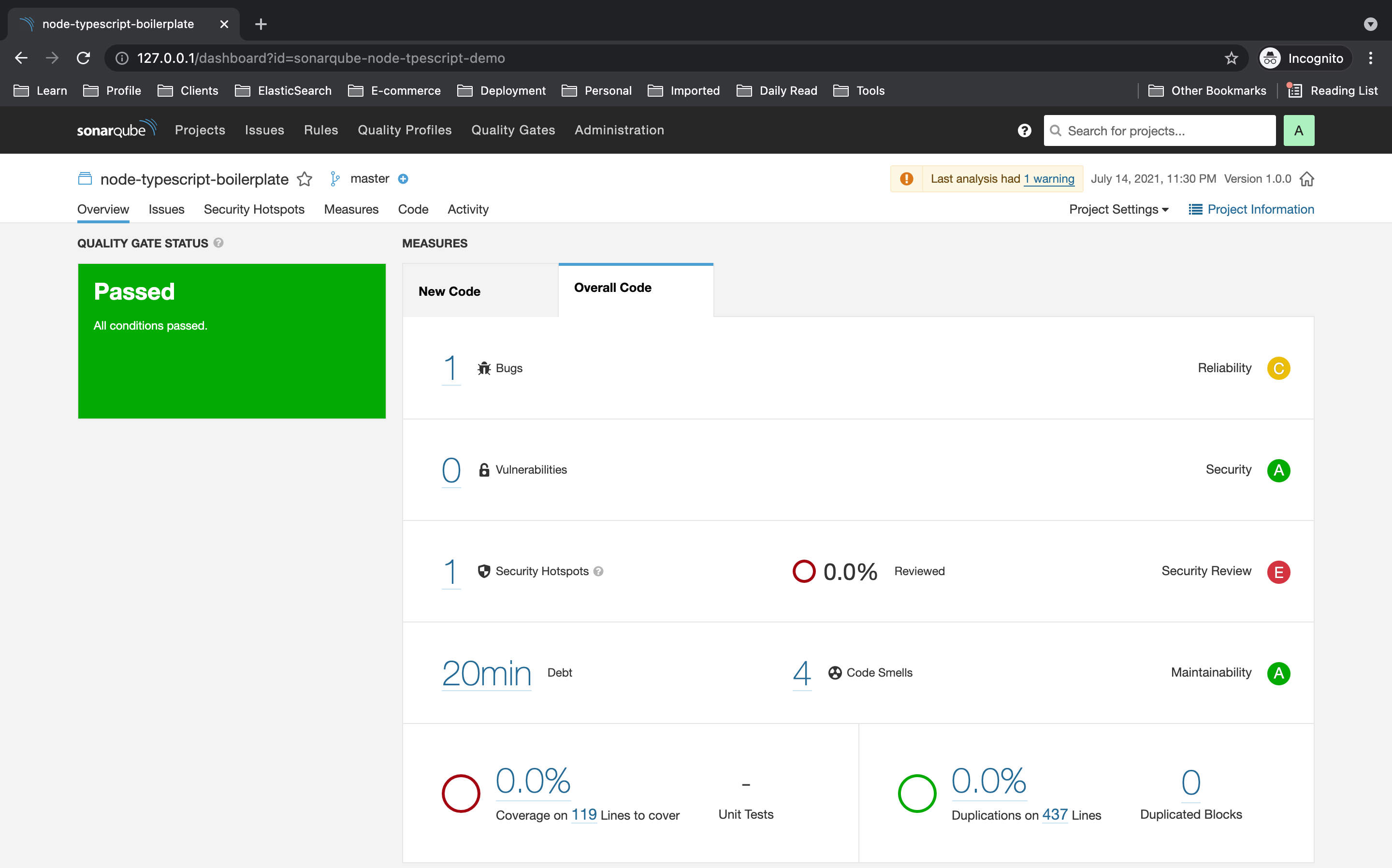 Result
Let's see the detailed list of problems pointed by SonarQube analysis on the 'Issues' tab.
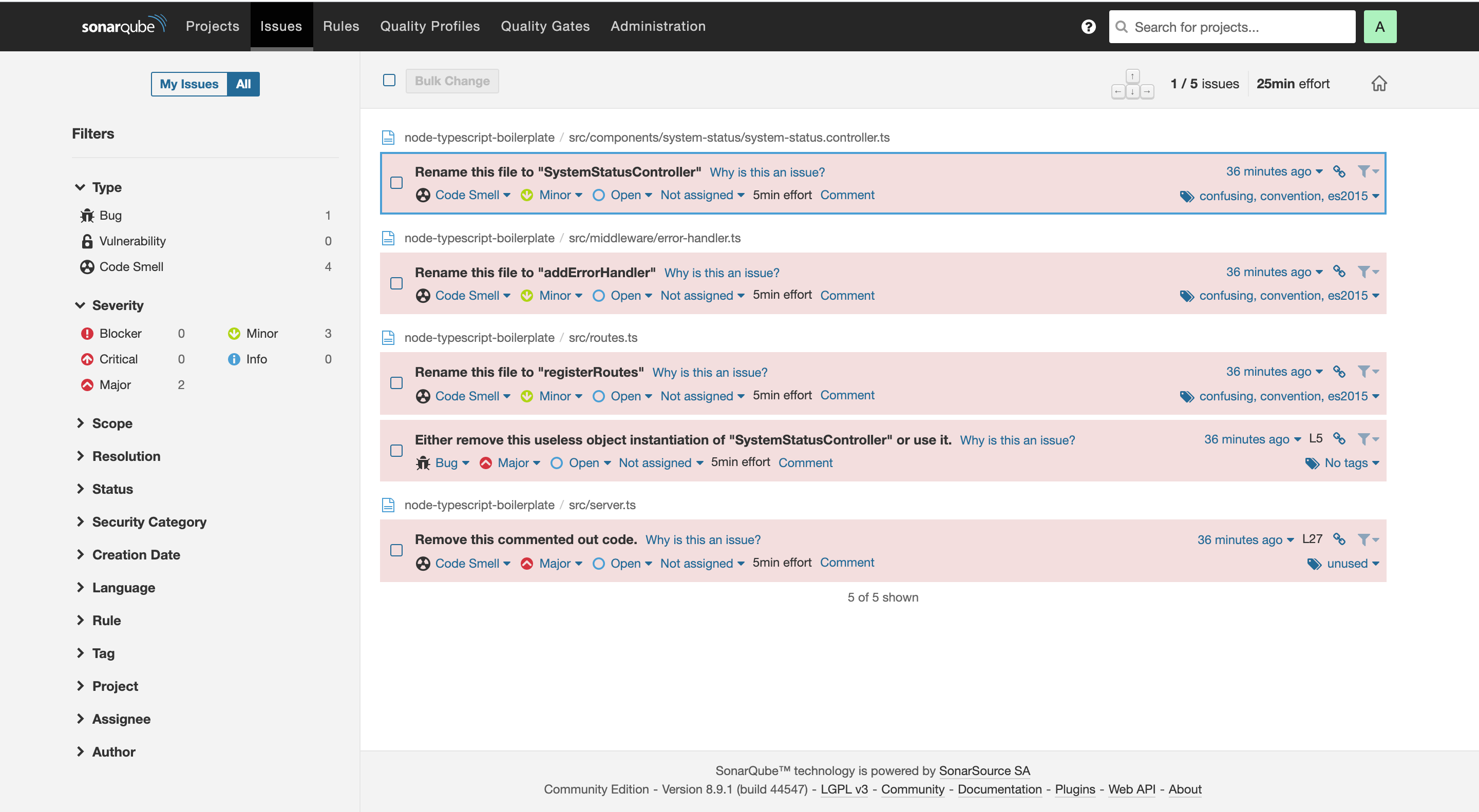 Issues
References
Source code for SonarQube for Node JS and Typescript Project
santoshshinde2012/sonarqube-node-typescript-demo
Further Reading
Discover more articles on similar topics across our network
The Technical Foundations behind Effective Healthcare Website Design
Stackademic
Claude Meetings Beta in Google Meet Pushes Developer Marketing Battle With Gemini Note-Taking
Anthropic's in-call agent can draft artifacts live while Google Meet's native Gemini features target the same workflow, setting up a competitive story for B2B AI distribution.
Comments
Loading comments…