
You’ve hardened your validation layers and tightened your schemas. But then the real world hits: a user uploads a 500MB CSV, or your app triggers a complex AI inference that takes 20 seconds.
If you force a user to wait for an HTTP response while these finish, you’ve already lost. Browsers will timeout, Nginx will sever the connection, and frustrated users will spam the “Submit” button until your server’s RAM looks like a forest fire. To build resilient, enterprise-grade systems, you must decouple acknowledgment from execution.
1. The 500ms Rule: Why Backgrounding is Non-Negotiable
In modern backend architecture, the “Request-Response” cycle is for logic that executes in < 500ms. Anything else is a performance bottleneck.
Press enter or click to view image in full size
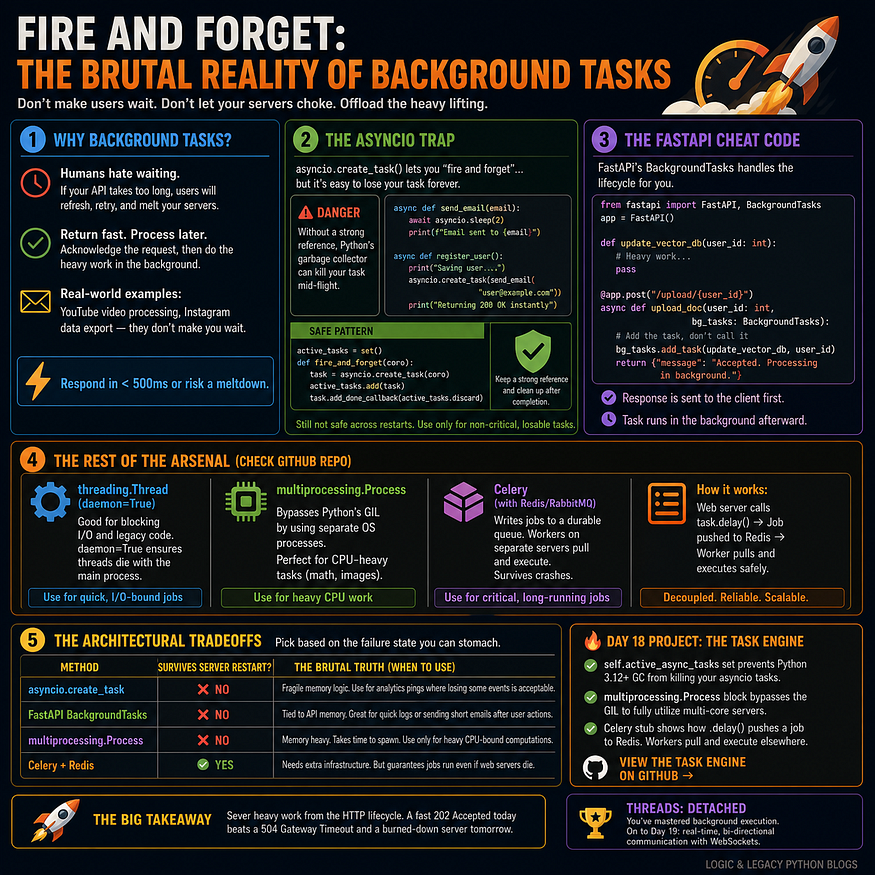
Consider a high-end e-commerce checkout:
- The API: Receives the order, validates the payment token, and writes a “Pending” status to the DB.
- The Response: Instantly returns
HTTP 202 Accepted. - The Background: A separate process handles the heavy lifting — inventory synchronization, PDF invoice generation, and dispatching webhooks.
2. The “Asyncio” Garbage Collection Trap
When using FastAPI or any async framework, your first instinct might be asyncio.create_task(). It’s tempting because it doesn't block the main thread, but it introduces a silent failure point in Python 3.10+.
The Risk: The Python Garbage Collector (GC) is aggressive. If you create a task but don’t await it or store a strong reference to it, the GC may reap the task while it’s still running to reclaim memory. Your background job simply... vanishes.
The Fix: The Reference Registry Pattern
Python
import asyncio
# A global set to keep tasks alive in memory
running_tasks = set()
def run_in_background(coro):
    task = asyncio.create_task(coro)

    # Add to set so the Garbage Collector ignores it
    running_tasks.add(task)

    # Clean up the set once the task completes
    task.add_done_callback(running_tasks.discard)
async def handle_request():
    # Fire and forget safely
    run_in_background(send_heavy_email("dev@example.com"))
    return {"status": "Processing"}
3. Native FastAPI BackgroundTasks
FastAPI provides a built-in BackgroundTasks class. It is safer than raw asyncio because it ensures the task is triggered after the response has been sent to the client.
Python
from fastapi import FastAPI, BackgroundTasks
app = FastAPI()
def generate_report_pdf(data: dict):
    # Long-running PDF logic
    pass
@app.post("/reports/generate")
async def request_report(data: dict, bg: BackgroundTasks):
    # Pass the function and arguments separately
    bg.add_task(generate_report_pdf, data)
    return {"message": "Report generation started."}
Note: Use this for lightweight tasks like logging or internal notifications. It still shares the same memory as your web server.
4. Choosing Your Weapon: The Decision Matrix
Selecting the right tool depends on a single question: If your server crashes, do you care if the task is lost?
MethodPersistenceScalabilityBest Use CaseAsyncio TasksZeroLowNon-critical telemetry, pings.FastAPI NativeZeroMediumAudit logs, simple emails.MultiprocessingZeroMediumImage resizing, CPU-heavy math.Celery + RedisHighHighInvoicing, video encoding, migrations.
5. The Enterprise Solution: Distributed Queues (Celery)
When the work is too heavy for a single server, or the data is too important to lose, you move to Distributed Task Queues.
- The Producer (Web Server): Pushes a message (e.g., “User 5 needs an invoice”) into a Broker like Redis or RabbitMQ.
- The Consumer (Worker): A completely separate server pulls that message and executes the code.
Even if your web server explodes, the message stays safe in the Broker until a worker is ready. This is how you achieve horizontal scalability and fault tolerance.
Summary Checklist
- Is it heavy? If it takes >1s, move it out of the request.
- Is it critical? Use Celery/RabbitMQ if it must survive a server restart.
- Is it CPU-bound? Use
multiprocessingto escape Python's Global Interpreter Lock (GIL). - Is it Async? Always maintain a “Strong Reference” to avoid GC assassination.
Next Up : Intercepting the Flow — Mastering Middlewares to control every request.
Further Reading
Discover more articles on similar topics across our network

Comments
Loading comments…