You cleared your cookies. You turned on private mode. Yet, you still saw ads that seemed to know you. You are not imagining this. Websites can tell which device you use by getting tech details from your browser. This is known as browser fingerprinting. With cookies, sites store something in your computer. With fingerprinting, nothing is stored, so there is nothing you can delete.
This article explains what is meant by fingerprinting and which indicators may be used by web pages to recognize their users. Moreover, you will understand how fingerprinting is not the same thing as cookie tracking and learn about the ways of really reducing the risks of being fingerprinted. Here you will get to know about when privacy technologies succeed and when they fail.
No matter if you use the web now and then, want to know as a marketer, or build stuff as a developer, you will see the risks more clearly when you read this. Tools like the Incogniton anti-detect browser are made to solve this problem. We will talk about how they work and where to use them below.
What Is Browser Fingerprinting?
Browser fingerprinting is a way to track people online. It brings together small details from your device and browser to create one ID. This ID can be used to spot you each time you visit, without saving any files on your device.
No one detail makes you special. Your screen size, time zone, and language are set for many people. It is the mix of all these things that makes you stand out. The Electronic Frontier Foundation did some early Panopticlick research. This showed that most browsers they tried could be picked out from others. Their Cover Your Tracks tool lets you check your own browser.
How Is Fingerprinting Different From Cookies?
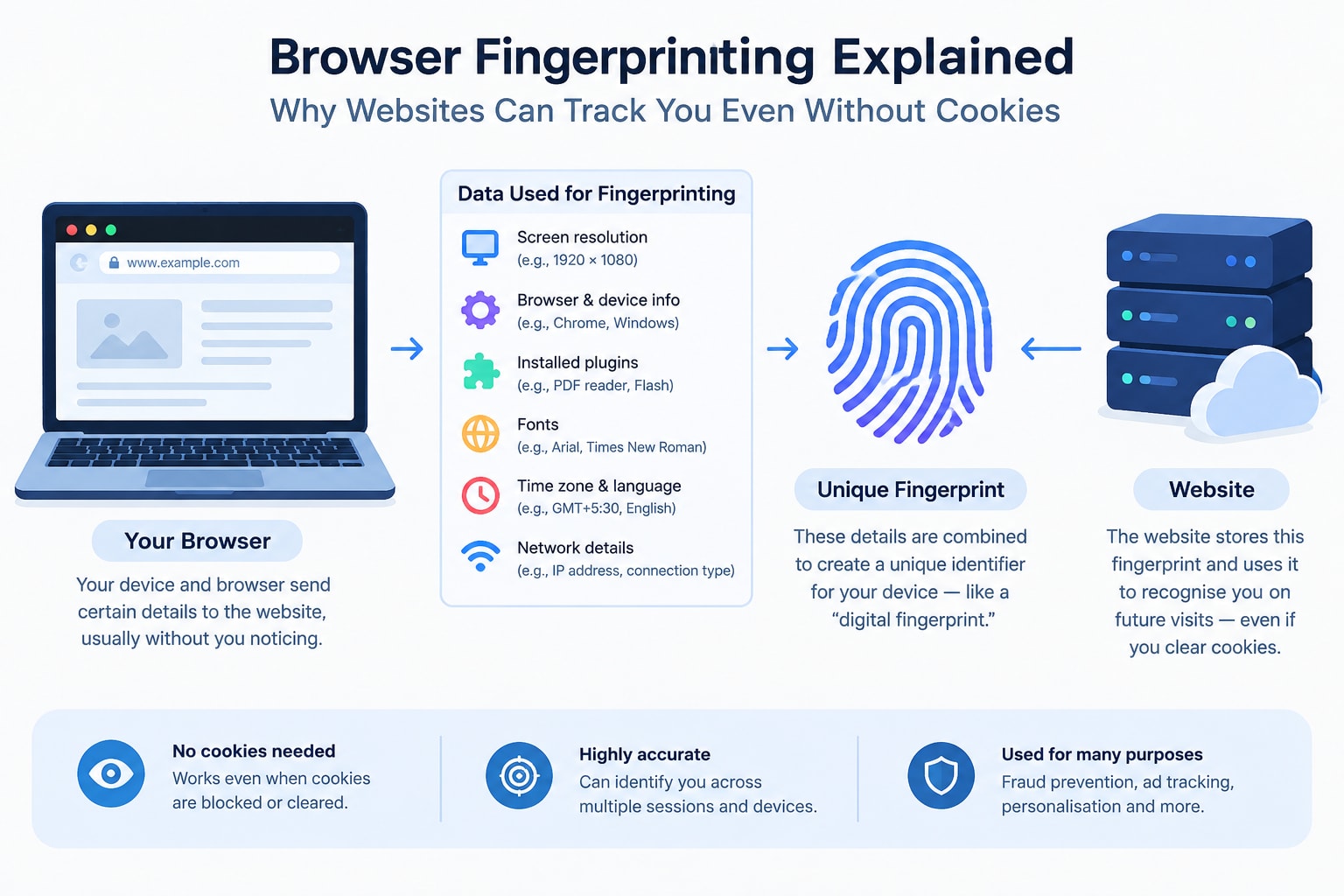
Cookies keep an ID on your device. Fingerprinting finds one by looking at your device’s details. That is why clearing cookies or using incognito mode does not stop it most of the time.
- Cookies: You can see cookies in your settings. You can also delete cookies. Now, more browsers block cookies by default.
- Fingerprints: You cannot see fingerprints. There is nothing to delete with these. They stay the same until you change how your device is set up.
- Regulation: Rules like GDPR and ePrivacy can cover fingerprinting when it is used to find people.
Why Do Websites Use It?
Not every use is bad. Banks and shops use fingerprints to find out if someone gets into an account when they should not. They also use them to see if there is fraud. Advertisers and data brokers use them to follow people across websites. The same signal can help keep things safe and also show what people like. That is why intent and being open about how things work are important.
How Can You Reduce Your Fingerprint?
You cannot get rid of a fingerprint, but you can try to make it less clear or not the same every time. Here are some simple things you can do:
- Use a browser that keeps your privacy safe. Tor Browser tries to make all people look the same. Brave and Firefox can help protect against fingerprinting.
- Use fewer extensions. Every one you add can make your browser feel more unique.
- Update your browser often, because there is a chance to get more protections as vendors may add them.
- Try out Cover Your Tracks to see your setup before and after any change.
Limitations are a big deal here. If you block too many signals, you may get noticed more. Some sites do not work right when scripts are not allowed.
When Do You Need Separate Browser Identities?
This is because one browser links elements that must not be linked. It is done by agencies, social media managers, researchers, and testers, and we do so too. Everyone needs their own permanent configuration and proxy. Thus, we will not confuse any accounts.
For example, when it comes to Manage multiple Facebook accounts for different clients, it can be problematic if they are logged in through one browser. In this case, using different profiles, which have their fingerprints and proxies, is necessary in order to not mess up the work of every client. Remember always to respect the conditions of each platform and use only those accounts where it is appropriate.
Conclusion
Browser fingerprinting can locate you since the combination of everyday aspects of the browser creates a unique pattern. Cookies represent only one aspect of the technology that allows people to be traced on the Internet, and thus, their removal cannot make a person anonymous. The best approach would be to know what the person's browser fingerprint looks like, to minimize exposure through increased use of privacy controls, and to maintain consistency between different aspects of life when necessary. Treat each tool as a compromise and not as a solution. Always test the configuration, adhere to the guidelines of the platforms and privacy regulations, and rethink your approach as browsers evolve.
Further Reading
Discover more articles on similar topics across our network



Comments
Loading comments…