
In this tutorial, you will learn:
- Why DIY LinkedIn scrapers fail (and the specific technical reasons)
- How to build a production pipeline using Bright Data's LinkedIn Scraper API
- Complete Python code for batch profile extraction with error handling
- Cost analysis: API vs. maintaining your own infrastructure
Let's dive in.
Why DIY LinkedIn Scraping Fails, and What I was Doing Wrong
I spent three months building LinkedIn scrapers that kept dying. The first lasted 47 profiles before the IP got blacklisted. The second survived two days using rotating proxies before LinkedIn's fingerprinting caught on. The third attempt, with Selenium and residential proxies, made it to 2,000 profiles before my test account got permanently banned.
Each failure taught me something about LinkedIn's defenses, and after digging into my failures, I identified three core problems.
- Rate limiting kicks in fast. LinkedIn employs aggressive anti-bot measures. Without authentication, you're limited to about 50 profile views per day per IP. A logged-in session buys you a few hundred before triggering detection, which is exactly where my first scraper died within hours.
- Session management is fragile. Authenticated scraping requires extracting li_at and JSESSIONID cookies from browser DevTools, and these expire every few days. LinkedIn also tracks behavior patterns. If you access profiles too quickly, skip the homepage, or navigate unnaturally, and your session gets flagged. I learned this the hard way when my second scraper's "efficient" direct-to-profile navigation triggered immediate detection.
- Browser fingerprinting catches headless browsers. LinkedIn validates TLS fingerprints, user agents, WebGL rendering, and dozens of other browser characteristics. My Selenium scraper passed basic checks but failed on canvas fingerprinting. Playwright with stealth plugins lasted longer, yet still got caught. The lesson: passing 95% of fingerprint checks means nothing if one failure exposes you.
The maintenance burden compounds these problems. LinkedIn changes its DOM structure regularly. CSS selectors that worked last month break without warning. Every change requires debugging, testing, and redeployment. Add proxy management, cookie refresh logic, and CAPTCHA handling, and you're maintaining a full system rather than shipping your actual product. I calculated I was spending 15+ hours per month on scraper infrastructure that always fails.
That’s when I decided to stop fighting LinkedIn's systems and started working around them, and everything changed.
The Architecture That Works
Bright Data offers a pre-built LinkedIn Profiles Scraper that handles everything I struggled to maintain: proxy rotation across 150M+ residential IPs, automatic CAPTCHA solving, session management, and DOM parsing.
You provide profile URLs. You get structured JSON back.
The scraper returns comprehensive profile data:
| Field Category | Example Fields |
|---|---|
| Identity | name, country_code, city |
| Current Role | current_company, position, about |
| History | experience, education, certifications |
| Skills | languages, skills |
| Social | followers, connections, posts, activity |
Two approaches exist for using this scraper: the web UI for quick jobs and the API for production pipelines. I'll walk through both, starting with the fastest way to get data.
Option 1: Quick Start with the Web UI
For one-off extractions or testing, the web interface is the fastest path to data.
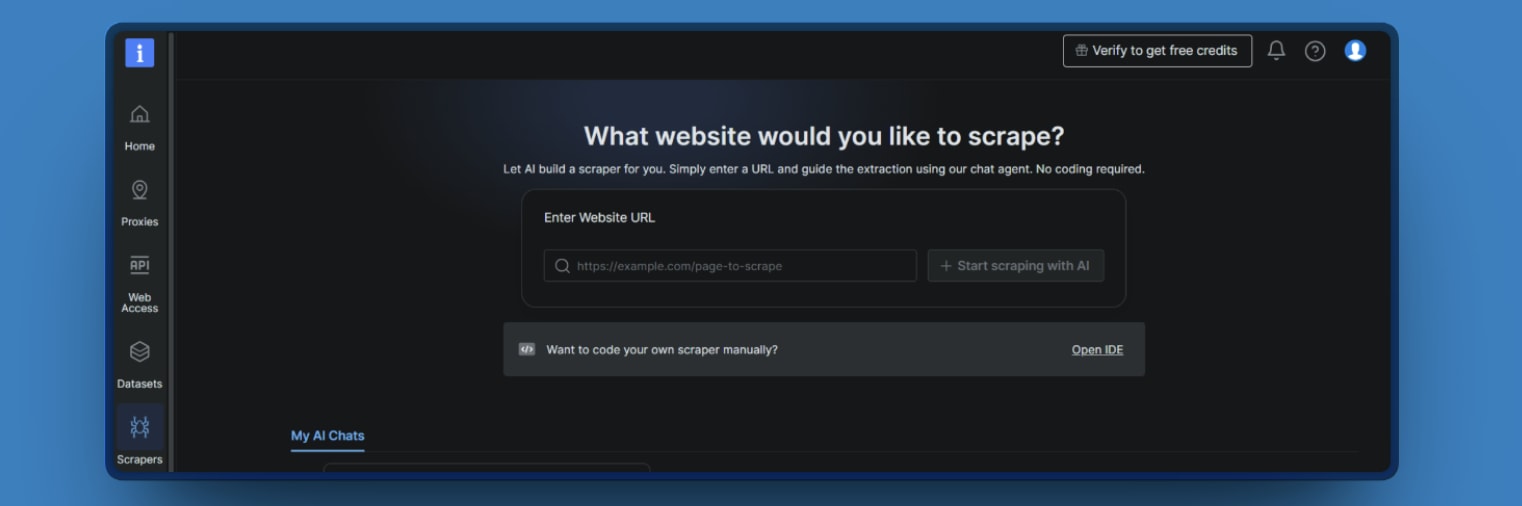
Step 1: Open the Scraper studio in your Bright Data dashboard, and click on the IDE.
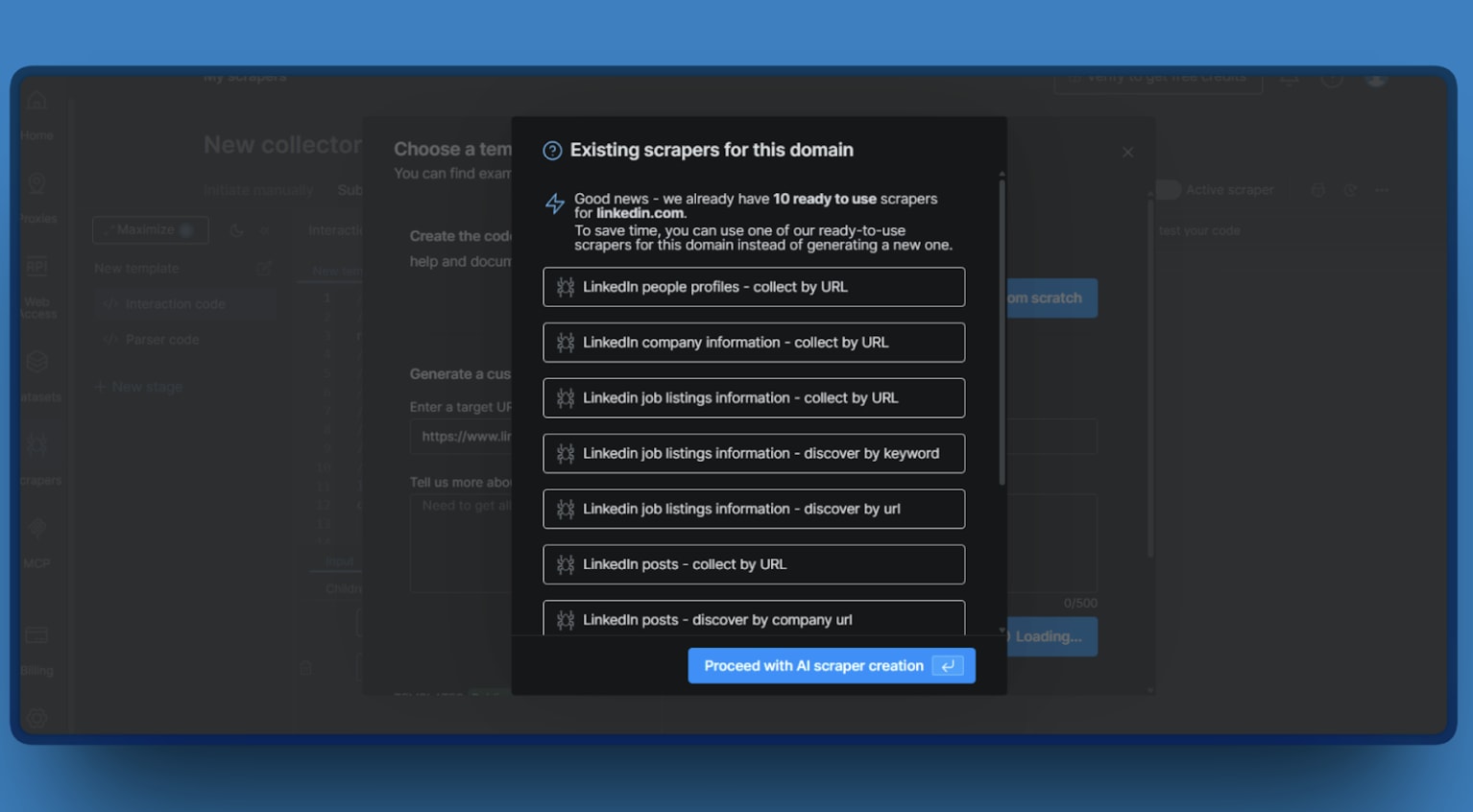
Step 2: If you add your target LinkedLn URL, the Web UI will show you 10 different templates you can use.
Step 3: Choose your output format (JSON or CSV).
Step 4: Run the collection and download the snapshot when it completes.
This works well for ad-hoc research or validating data quality before building a programmatic pipeline. But once you're ready to automate, you'll want the API.
Option 2: Production Pipeline with the API
For automated pipelines, I used the Web Scraper API directly. The workflow follows three steps:
- Trigger a collection
- Wait for completion
- Download results.
PS: You need Python 3.9+ and a Bright Data API key.
The LinkedIn Profiles API uses dataset ID, and you can send a POST request with your profile URLs to trigger a collection. Once the collection completes, download the snapshot using the snapshot endpoint.
💡 Test it without the risk that got you here: New Bright Data accounts get 5,000 free credits every month (~$7.50 value) to try the LinkedIn Scraper API — no credit card, hard stop when credits run out. Enough to trigger a real collection and see the snapshot before trusting it with anything bigger. Try it free.
Here's the full pipeline combining trigger, polling, and download with proper error handling. Given my past experience with Beautiful Soup web scraping, I particularly appreciated how the API handles parsing for you.
import os
import csv
import time
import requests
from dotenv import load_dotenv
from dataclasses import dataclass

load_dotenv()

API_KEY = os.getenv("BRIGHTDATA_API_KEY")
DATASET_ID = "gd_l1viktl72bvl7bjuj0"  # LinkedIn People Profiles dataset
BASE_URL = "https://api.brightdata.com/datasets/v3"


@dataclass
class CollectionStatus:
    snapshot_id: str
    status: str
    records: int = 0


class LinkedInProfileScraper:
    """Production-ready LinkedIn profile scraper using Bright Data Dataset API."""

    def __init__(self, api_key: str):
        if not api_key:
            raise ValueError(
                "BRIGHTDATA_API_KEY is not set. "
                "Set it in your environment or .env file."
            )
        self.headers = {
            "Authorization": f"Bearer {api_key}",
            "Content-Type": "application/json"
        }

    def scrape_profiles(
        self,
        urls: list[str],
        poll_interval: int = 10,
        timeout: int = 600
    ) -> list[dict]:
        """
        Scrape LinkedIn profiles end-to-end.

        Args:
            urls: List of LinkedIn profile URLs
            poll_interval: Seconds between status checks
            timeout: Maximum wait time in seconds

        Returns:
            List of profile data dictionaries
        """

        # Step 1: Trigger collection
        print(f"Triggering collection for {len(urls)} profiles...")
        snapshot_id = self._trigger(urls)
        print(f"Snapshot ID: {snapshot_id}")

        # Step 2: Wait for completion
        elapsed = 0
        while elapsed < timeout:
            status = self._get_status(snapshot_id)
            print(f"Status: {status.status} | Records (total): {status.records}")

            if status.status == "ready":
                break

            if status.status == "failed":
                raise Exception(f"Collection failed: {snapshot_id}")

            time.sleep(poll_interval)
            elapsed += poll_interval
        else:
            raise TimeoutError(f"Timed out after {timeout}s")

        # Step 3: Download results
        print("Downloading results...")
        return self._download(snapshot_id)

    def _trigger(self, urls: list[str]) -> str:
        """Trigger async collection job."""

        response = self._request(
            "POST",
            f"{BASE_URL}/trigger",
            params={"dataset_id": DATASET_ID, "format": "json"},
            json=[{"url": url} for url in urls]
        )

        data = response.json()
        # Expected: {"snapshot_id": "..."}
        return data["snapshot_id"]

    def _get_status(self, snapshot_id: str) -> CollectionStatus:
        """
        Check collection status using the snapshot endpoint.
        This returns status and metadata for the snapshot.
        """
        response = self._request(
            "GET",
            f"{BASE_URL}/snapshot/{snapshot_id}"
        )
        data = response.json()

        # Typical fields: status, total, created_at, etc.
        status = data.get("status", "unknown")
        total_records = data.get("total", 0)  # may be missing while building

        return CollectionStatus(
            snapshot_id=snapshot_id,
            status=status,
            records=total_records
        )

    def _download(self, snapshot_id: str) -> list[dict]:
        """Download snapshot data as JSON."""

        response = self._request(
            "GET",
            f"{BASE_URL}/snapshot/{snapshot_id}",
            params={"format": "json"}
        )

        return response.json()

    def _request(
        self,
        method: str,
        url: str,
        max_retries: int = 3,
        **kwargs
    ) -> requests.Response:
        """Make request with exponential backoff for rate limits."""

        delay = 1.0

        for attempt in range(max_retries + 1):
            response = requests.request(
                method,
                url,
                headers=self.headers,
                **kwargs
            )

            if response.status_code == 429:
                retry_after = float(
                    response.headers.get("Retry-After", delay)
                )
                print(f"Rate limited. Retrying in {retry_after}s...")
                time.sleep(retry_after)
                delay *= 2
                continue

            response.raise_for_status()
            return response

        raise Exception(f"Max retries exceeded for {url}")


def export_to_csv(profiles: list[dict], filename: str):
    """Export profile data to CSV."""

    fieldnames = [
        "name", "position", "current_company", "city", "country_code",
        "followers", "connections", "about", "experience_count", "education_count"
    ]

    with open(filename, "w", newline="", encoding="utf-8") as f:
        writer = csv.DictWriter(f, fieldnames=fieldnames)
        writer.writeheader()

        for profile in profiles:
            row = {
                "name": profile.get("name"),
                "position": profile.get("position"),
                "current_company": profile.get("current_company"),
                "city": profile.get("city"),
                "country_code": profile.get("country_code"),
                "followers": profile.get("followers"),
                "connections": profile.get("connections"),
                "about": (profile.get("about") or "")[:500],
                "experience_count": len(profile.get("experience", [])),
                "education_count": len(profile.get("education", []))
            }
            writer.writerow(row)

    print(f"Exported {len(profiles)} profiles to {filename}")


if __name__ == "__main__":
    scraper = LinkedInProfileScraper(API_KEY)

    target_urls = [
        "https://www.linkedin.com/in/williamhgates/",
        "https://www.linkedin.com/in/satlouis/",
        "https://www.linkedin.com/in/jeffweiner08/",
    ]

    profiles = scraper.scrape_profiles(target_urls)

    print(f"\nScraped {len(profiles)} profiles:")
    for profile in profiles:
        name = profile.get("name", "Unknown")
        position = profile.get("position", "N/A")
        followers = profile.get("followers", 0)
        print(f"  - {name}: {position} ({followers:,} followers)")

    export_to_csv(profiles, "linkedin_profiles.csv")
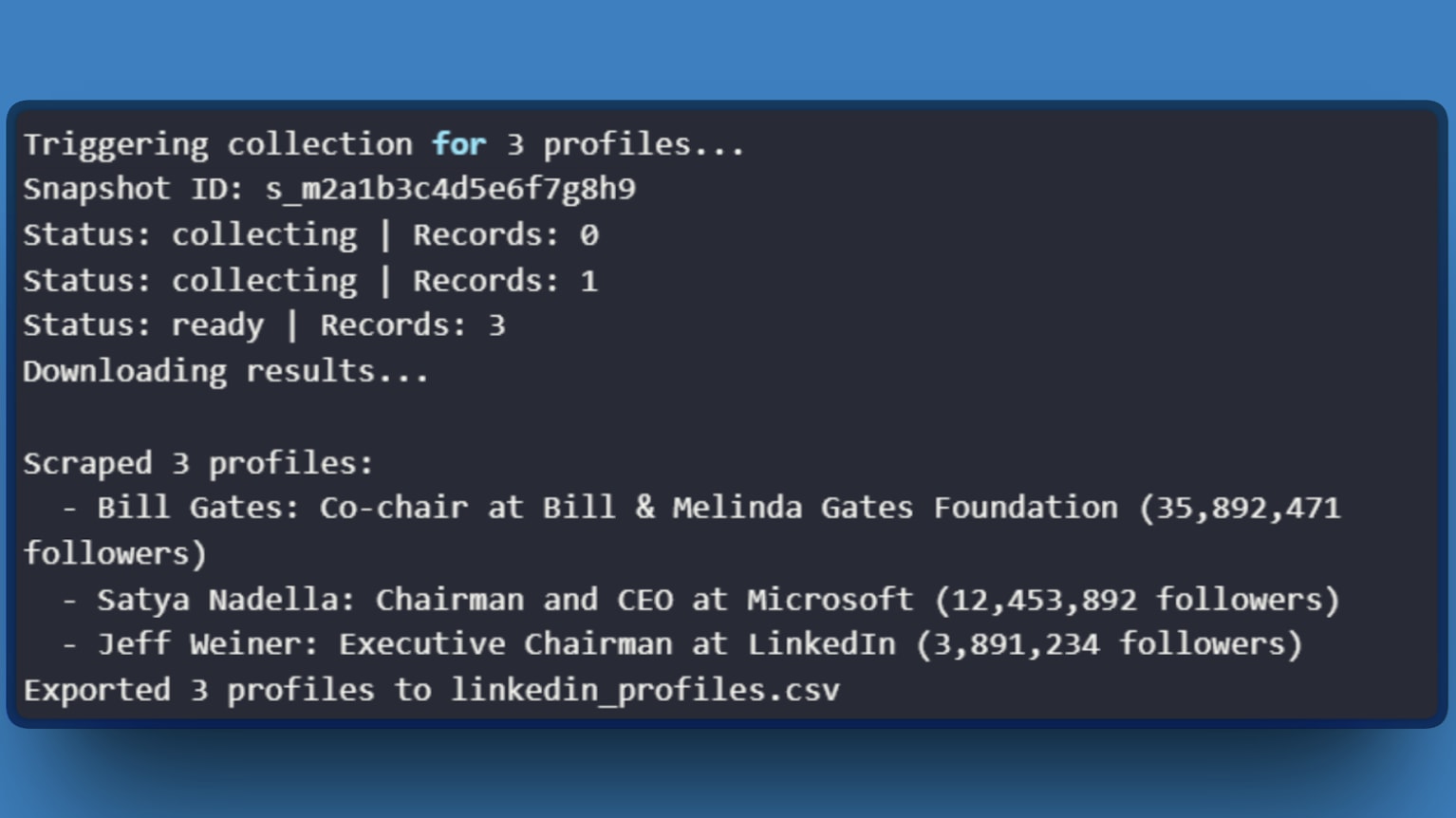
To run the complete pipeline:
python linkedin_scraper.py
Expected output:
With the technical setup covered, the next question is whether this approach makes financial sense.
Cost Analysis: API vs. DIY
Here's the math that convinced me to stop maintaining my own infrastructure.
DIY costs (monthly)
| Item | Cost |
|---|---|
| Residential proxies (quality provider) | $300 to $500 |
| CAPTCHA solving service | $50 to $100 |
| Cloud compute for scrapers | $50 to $100 |
| Engineering time (15+ hrs at $100/hr) | $1,500+ |
| Total | $1,900 to $2,200 |
Bright Data API costs (10K profiles/month)
| Plan | Cost per 1K Records | Total |
|---|---|---|
| Pay-as-you-go | $2.70 | $270 |
| Growth (monthly commit) | $2.30 | $230 |
The API costs $230 to $270 for 10,000 profiles. Even without accounting for engineering time, the infrastructure savings alone make the API cheaper at scale.
The hidden cost with DIY is unpredictability. LinkedIn updates their anti-bot systems without warning. One change can break your scraper for days while you debug. The API abstracts this away. Bright Data maintains the scrapers, updates the parsing logic, and handles infrastructure.
The numbers made the decision easy, but the real value showed up in the details I discovered while building my pipeline.
What I Learned the Hard Way
Batch size matters more than you'd expect.
I initially sent 500 URLs per request, thinking bigger batches meant fewer API calls. Collections timed out constantly. Dropping to 100 URLs per batch cut my failure rate from 15% to under 2%. The API handles large jobs, but smaller batches recover faster from transient errors.
Incomplete data isn't a bug.
LinkedIn restricts certain fields for non-connected users. The API returns what's publicly visible. Accept partial records or filter by required fields before processing.
The synchronous endpoint exists for a reason.
For small requests under 20 URLs, use the /scrape endpoint instead of /trigger. It returns results directly in the response with a 60-second timeout. I wasted weeks building polling logic before discovering this.
Rate limit errors aren't always about volume.
The retry logic in the code handles transient 429 errors. If errors persist, check your account limits in the Bright Data dashboard. Free trials have lower quotas than paid plans, and I hit this wall during testing before upgrading.
These lessons took a long time to learn, but hopefully they save you the same trouble.
Conclusion
The architecture that works uses Bright Data's LinkedIn Profiles Scraper for extraction, letting your code focus on what happens after the data arrives: transformation, analysis, and integration with downstream systems. The API handles the adversarial complexity. You handle the business logic.
Start with the web UI to validate data quality, then move to the API for production workloads. The free trial provides enough credits to test against your specific requirements.
Further reading
Further Reading
Discover more articles on similar topics across our network
Comments
Loading comments…