TL;DR:
Next.js canary is the preview branch — the place where Vercel ships experimental fixes, performance optimizations, and new features before they’re officially released. It’s basically their public staging environment where power users stress-test features and generate early feedback…but that also makes keeping up with it a nightmare. Naïve approaches get out of hand real quick with multiple incremental releases per day — but the right automation using n8n + Model Context Protocol servers help.
Scroll down to the end for a FAQ section if you have questions 👇.
The Problem
You have three painful choices:
- Manually check GitHub releases daily and attempt to parse technical changelogs yourself
- Miss critical updates entirely and get blindsided when canary features break your build or introduce deprecations
- Waste engineering time in Slack threads asking “what changed in canary.5?” and that’s *if* someone actually looked at the release notes.
You’d think scheduled scraping with GitHub search params would work…
> https://github.com/vercel/next.js/releases?q=prerelease%3Atrue+created%3A%3E2025-09-01&expanded=true
…but not really.
Check out GitHub’s robots.txt file. You are explicitly disallowed from scraping any URL containing ?q=, as well as issues/commit history and the Atom feed. That means your dream of automating a “watch the canary” script with simple HTML fetching is dead on the vine — at least if you care about playing by the rules (and you should, for legal reasons).
But I’m here to tell you that you can have your cake and eat it too. You can stay compliant and still automate it.
The Solution: What You’ll Learn
In this post, I’ll show you how I built a small workflow in n8n that:
- Uses Bright Data MCP to extract the rendered content of the public
/releasespage (which is allowed), - Filters out all canary builds + any release we’ve already seen
- Feeds the filtered results into an n8n workflow that summarizes each release into quick, skimmable “What’s New” reports,
- Adds these releases to a “seen” database for future reference
- …and sends them as digests to me on Discord as a DM.
It’s a simple, self-updating way to stay ahead of the Next.js canary curve , and a great weekend project if you like automation that feels like magic.
Let’s get to it!
Technologies Used:
The system combines four key components:
- n8n for workflow automation.
- Bright Data Web MCP for structured web scraping. For a primer on what Model Context Protocol (MCP) is — see here. For an advanced MCP use-case — see here.
- Local LLMs via Ollama (I’m using
gpt-oss:20b) to generate the best practices guide (use OpenAI/Anthropic if you’d prefer that, or are not running locally — the setup isn’t much different) - Discord bots which are a great way to automate interactions, and programmatically message real-time updates. If you want to get notfied via Slack or email instead, n8n has you covered there, too.
Here’s the full n8n workflow:

Prerequisites
Before running this workflow, make sure you have the following in place:
- n8n installed: Install n8n globally via npm (
npm install n8n -g). You must have a Node.js version between 20.19 and 24.x, inclusive.
Some sort of database running (I’m using PostgreSQL in Docker, but you can just as easily add Supabase or MongoDB): To store releases we’ve already seen, so we only process completely new releases. You can use any schema you like, but here’s the minimal one I’m using (tag, processed_at for the timestamp, and digest for the summary):
CREATE TABLE processed_releases (tag TEXT PRIMARY KEY, processed_at TIMESTAMP DEFAULT NOW(), digest TEXT);
- Bright Data Account: Sign up here. The free tier gives you 5,000 requests/month for the MCP. Then grab your API token. New users get a test API key via welcome email, but you can always generate one from Dashboard -> Settings -> User management.
- A Discord bot authenticated and set up: This is really outside the scope of my tutorial, but essentially: create a new application at the Discord Developer Portal, add a Bot, copy your Bot Token, and invite it to your server via the OAuth2 URL Generator (select
botscope andSend Messages/Direct Messagespermissions). You’ll use that Bot Token later in n8n as a Discord Bot credential. You'll also need your Discord User ID (right-click your profile in Discord with Developer Mode enabled → Copy User ID) for DM routing.
- Run n8n: Now you can start the n8n server locally at
http://localhost:5678withn8n start
Step 1: Ingesting Releases + Filtering by Version
TL;DR: Add a n8n AI Agent node that can use MCP-provided tools to scrape the /releases page, then use the LLM to filter out anything that we’ve already seen OR that doesn’t match a specified Next.js version.
What we’re doing in this stage:
First, set up an AI agent with n8n’s AI Agent node. We’ll feed the URL for Next.js GitHub releases page into this agent, which uses an LLM and tools — from Bright Data’s MCP — for robust scraping. Oh, and since we can’t really trust LLMs to always provide proper JSON, we’ll use a Code node**** (lets us write + execute arbitrary JS/Python code)**** to clean its output.
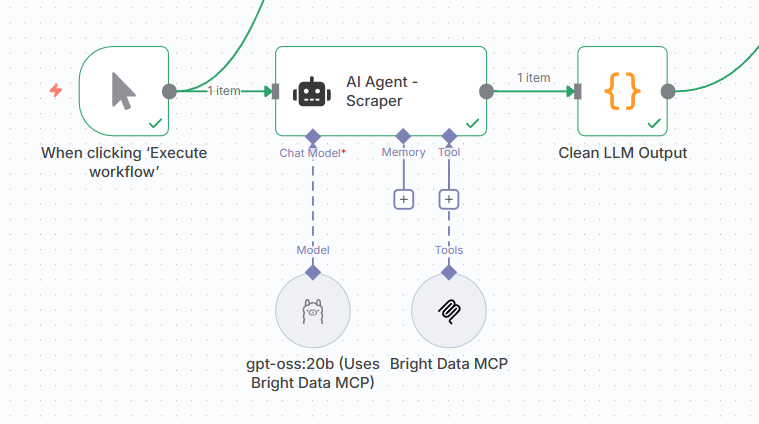
Step-by-Step Setup
1. Add an AI Agent
So right click the canvas + add a node (or press the Plus button on the UI) and add an AI Agent node, then pick the Ollama Chat Model**** for its Model subnode (add a new credential using only the default Ollama URL — http://localhost:11434 or http://127.0.0.1:11434, whichever works — as the Base URL), and select your model of choice from the list.
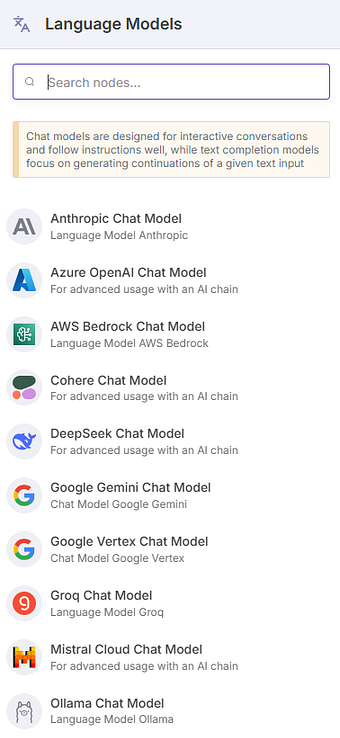
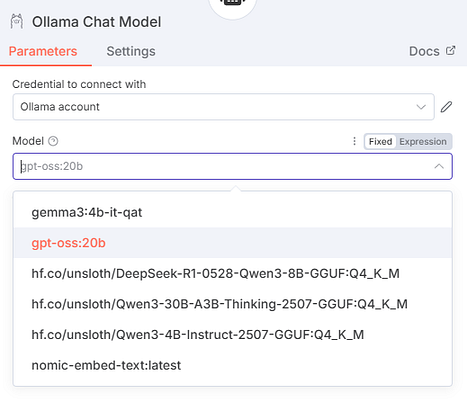
As you can see, you could just as easily use OpenAI/Anthropic/Gemini etc. (you can find a full list of langchain models n8n supports in their docs) chat models here instead of the Ollama one. The setup is just as easy.
2. Give the Agent access to Bright Data MCP’s Scraping Tools
Next, for the Tools subnode, choose the MCP Client Tool**** from the list. This will let us use tools from an external MCP server, and make them available to our AI Agent. Then, we’ll have to add the remote Bright Data MCP server, and select which tools we want.
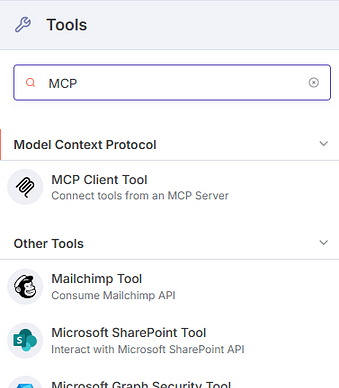

We’ll connect using Server Sent Events (SSE), so use this endpoint: https://mcp.brightdata.com/sse?token=MY_API_TOKEN
Substitute that with your own Bright Data API token. This MCP server doesn’t need extra auth beyond the token being included in the token param.
The Bright Data MCP has 60+ tools available with a opt-in paid ‘Pro’ mode, but all we need is this tool in the free tier:
scrape_as_markdown: Extracts any page as markdown.
If you’re sure you need the Pro mode tools, append
&pro=1to your endpoint URL.
This MCP client gives our agent access to industrial-grade scraping capabilities that automatically handle proxy use/rotation, JavaScript rendering, bot detection, and CAPTCHAs — crucial for scraping GitHub’s increasingly sophisticated anti-bot measures.
3. Prompt the Agent for Scraping
Finally, let’s set up parameters for this AI agent (double click on the main AI agent node).
User Prompt:
Use Bright Data MCP (the "scrape_as_markdown" tool) to extract the fully rendered content from:
https://github.com/vercel/next.js/releases

Your task:
1. Identify all release sections that contain tags matching /^next@16\.0\.0-canary\.\d+$/ or higher (i.e., Next.js 16 canary releases only).
2. Extract for each:
   - tag (e.g., "next@16.0.0-canary.5")
   - release date (e.g., "Oct 11, 2025")
   - full markdown body (only info about the release, excluding unrelated releases or other page elements)
3. Return JSON with this structure:
{
  "releases": [
    {
      "tag": "next@16.0.0-canary.1",
      "date": "Oct 11, 2025",
      "body": "Full markdown content of that release"
    }
  ]
}

Constraints:
- Only include canary releases (no stable or beta tags).
- Ensure all text formatting and links from the markdown are preserved.
- Do not create files or include non-JSON text.
The prompt outlines these tasks for our AI Agent:
- Use the Bright Data MCP’s
scrape_as_markdowntool to grab the fully rendered GitHub releases page (important:scrape_as_markdownhandles JavaScript rendering, so that’s great for us — lazy loaded content loads properly) - Filter for only canary releases matching the
next@16.0.0-canary.*pattern. Next.js v16+ is the latest and greatest — and all I’m interested in right now. - Structure the output as JSON, including the release tag, date, full release notes.
The system prompt is rather simple here, we only give it a Reasoning parameter (this is a gpt-oss specific quirk, can skip entirely for other models):
System Prompt:
Reasoning:low
4. Cleaning the JSON
Just in case, we’ll chain a code node to our LLM output to make sure we do have proper JSON.
let raw = $input.first().json.output;

// If it's an object already (rare case), skip string parsing
if (typeof raw === 'object') {
  raw = JSON.stringify(raw);
}

// Clean up Markdown fences, language tags, and stray whitespace
raw = raw
  .replace(/```(?:json)?/gi, '')   // remove ```json or ```
  .replace(/```/g, '')             // remove leftover ```
  .trim();

// Try parsing as JSON
let data;
try {
  data = JSON.parse(raw);
} catch (err) {
  throw new Error("Failed to parse MCP output JSON (after cleaning): " + err.message + "\nRaw text:\n" + raw);
}

// Ensure structure
if (!data.releases || !Array.isArray(data.releases)) {
  throw new Error("Parsed output does not contain a valid 'releases' array.");
}

// Return releases as individual items
return data.releases.map(r => ({ json: r }));
Pretty self explanatory, we parse it out into a JSON array of objects that have tag, date, and body.
Output of this phase:
[
{
"tag": "next@16.0.0-canary.2",
"date": "11 Oct 23:45",
"body": "Pre-release\n\n### Misc Changes\n\n* Update Rspack production test manifest: [#84729](https://github.com/vercel/next.js/pull/84729)\n* Update Rspack development test manifest: [#84730](https://github.com/vercel/next.js/pull/84730)\n* fix: release next-rspack ci: [#84673](https://github.com/vercel/next.js/pull/84673)\n\n### Credits\n\nHuge thanks to [@vercel-release-bot](https://github.com/vercel-release-bot) and [@SyMind](https://github.com/SyMind) for helping!\n\n### Contributors\n\n* [](https://github.com/SyMind)\n* [](https://github.com/vercel-release-bot)\n\nSyMind and vercel-release-bot"
},
{
"tag": "next@16.0.0-canary.1",
"date": "10 Oct 23:43",
"body": "Pre-release\n\n### Core Changes\n\n* Version gate migration docs link: [#84740](https://github.com/vercel/next.js/pull/84740)\n* [Cache Components] Allow hiding logs after abort: [#84579](https://github.com/vercel/next.js/pull/84579)\n* Log `Compiled proxy in ...`: [#84746](https://github.com/vercel/next.js/pull/84746)\n\n### Misc Changes\n\n* [next-upgrade] misc: update comment: [#84727](https://github.com/vercel/next.js/pull/84727)\n* Turbopack: use vector instead of hash map: [#84696](https://github.com/vercel/next.js/pull/84696)\n* Revert \"docs: nav_title for long unbroken words ([#84233](https://github.com/vercel/next.js/pull/84233))\": [#84346](https://github.com/vercel/next.js/pull/84346)\n* [turbopack] tweak the doc on the inner graph optimization: [#84752](https://github.com/vercel/next.js/pull/84752)\n* [turbopack] Fix a few references to caching configuration as it is no longer canary guarded: [#84761](https://github.com/vercel/next.js/pull/84761)\n* Add 16.0.0-beta.0 to next/third-parties peerDeps: [#84741](https://github.com/vercel/next.js/pull/84741)\n* [eslint-plugin] Remove `eslint-v8` testing: [#84721](https://github.com/vercel/next.js/pull/84721)\n\n### Credits\n\nHuge thanks to [@devjiwonchoi](https://github.com/devjiwonchoi), [@mischnic](https://github.com/mischnic), [@icyJoseph](https://github.com/icyJoseph), [@gnoff](https://github.com/gnoff), and [@lukesandberg](https://github.com/lukesandberg) for helping!\n\n### Contributors\n\n* [](https://github.com/lukesandberg)\n* [](https://github.com/gnoff)\n* [](https://github.com/mischnic)\n* [](https://github.com/icyJoseph)\n* [](https://github.com/devjiwonchoi)\n\nlukesandberg, gnoff, and 3 other contributors"
},
{
"tag": "next@16.0.0-canary.0",
"date": "10 Oct 05:02",
"body": "Pre-release\n\n### Core Changes\n\n* docs: Add more details to `useLightningcss` docs: [#84581](https://github.com/vercel/next.js/pull/84581)\n\n### Misc Changes\n\n* Rspack: Fix lockfile test on rspack: [#84707](https://github.com/vercel/next.js/pull/84707)\n* [turbopack] Emit a warning when there are too many matches from a FileSourceReference: [#84701](https://github.com/vercel/next.js/pull/84701)\n* Update beta tag: [#84725](https://github.com/vercel/next.js/pull/84725)\n* [next-codemod] fix: Set codemod version to the first introduced version: [#84726](https://github.com/vercel/next.js/pull/84726)\n\n### Credits\n\nHuge thanks to [@bgw](https://github.com/bgw), [@lukesandberg](https://github.com/lukesandberg), [@ijjk](https://github.com/ijjk), and [@devjiwonchoi](https://github.com/devjiwonchoi) for helping!\n\n### Contributors\n\n* [](https://github.com/bgw)\n* [](https://github.com/lukesandberg)\n* [](https://github.com/ijjk)\n* [](https://github.com/devjiwonchoi)\n\nbgw, lukesandberg, and 2 other contributors"
}
]
Looking good! Let’s move on.
Step 2: Filter out releases we’ve seen before
TL;DR: Use a n8n Postgres node to quickly query a database for releases we’ve already seen, and use that data to filter our Step 1 output with a n8n Code node. You’ll need a database for this.
What we’re doing in this stage:
We can’t blindly scrape and report on releases we’ve already seen — that’s just meaningless clutter. So, we’ll store release tags we’ve already seen in a database (I’m using n8n’s PostgreSQL node**** here, but n8n has built-in nodes for pretty much every popular database — it doesn’t even have to be relational).
We’ll handle the storing later — right now, all we have to do is filter out the releases we’ve scraped before proceeding any further.
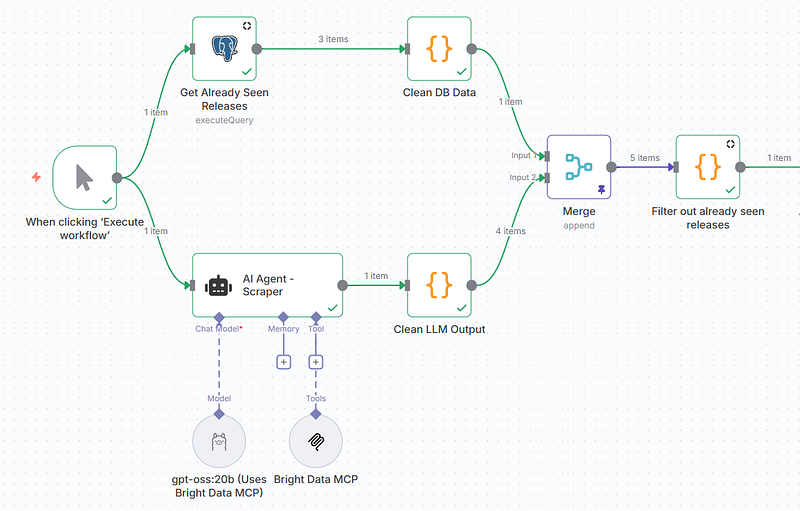
1. Add a Postgres Node
Start by adding a Postgres node. Pick the “Execute a SQL Query” action.

2. Add a Database Connection
Double click the node you just added, and click the Edit button beside Credential to add a Postgres credential for n8n. Replace with your own values:
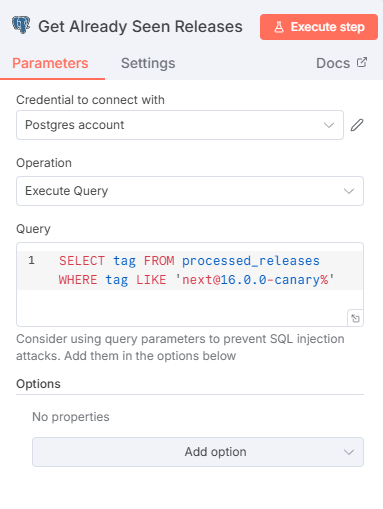
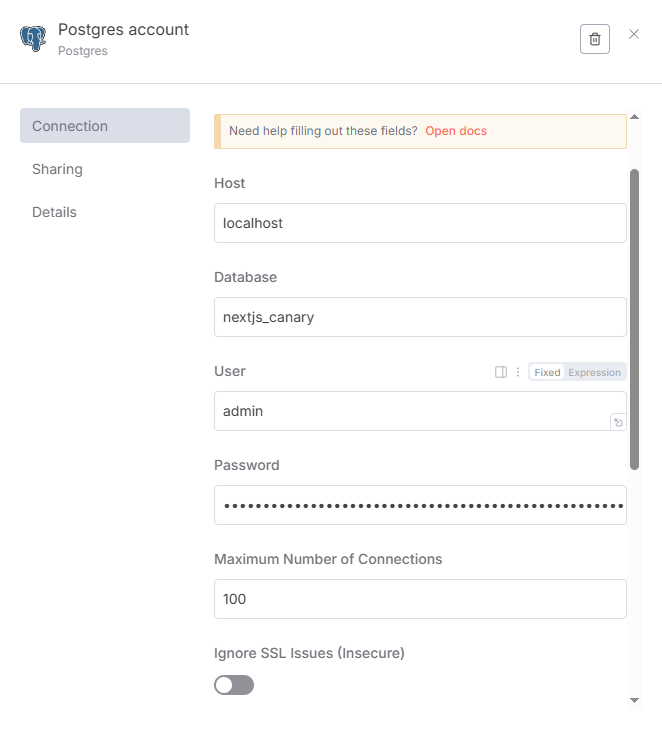
3. Select already seen releases from the DB
Here’s the SQL Query we’re going to run.
SELECT tag FROM processed_releases WHERE tag LIKE 'next@16.0.0-canary%'
This'll give us an output like this. These are all the releases we've already seen, and are in the DB (Of course, this means you'll get an empty output on your first run).
[
  {
    "tag": "some tag"
  },
  {
    "tag": "some other tag"
  },
  {
    "tag": "yet another tag"
  }
]
4. Cleanup
But we can clean this up further by adding another code node.
const tags = items.map(item => item.json.tag);
return [{ json: { tags } }];
Much better.
[
  {
    "tags": [
      "some tag",
      "some other tag",
      "yet another tag"
    ]
  }
]
5. Merging Seen Releases + LLM output into one array
Next, we’ll use a n8n Merge node to merge the two JSON — this one (seen tags) and the LLM output from before. We need this because next, we’re about to use another Code node to filter out already-seen releases, but n8n Code nodes can’t handle more than one input.
For reference, this is where we’re at:
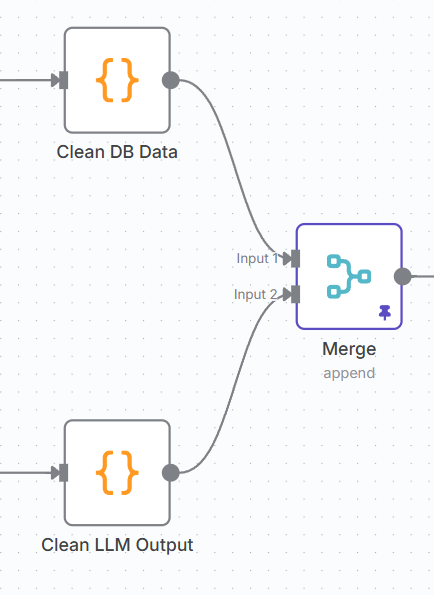
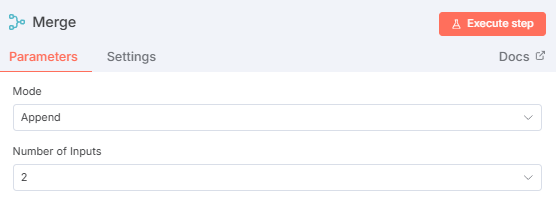
No setup needed here, just the default Append with 2 inputs will do.
6. Fliter out releases we’ve already seen (Finally!)
Now we add the code node for filtering.
// First input: previously seen releases
const seenReleases = $input.first().json.tags;
// e.g. ["next@16.0.0-canary.2", "next@16.0.0-canary.1"]

// All remaining inputs: new releases
const allInputs = $input.all();
const releases = allInputs.slice(1).flatMap(i => i.json);
// e.g. [{ tag: "next@16.0.0-canary.3" }, { tag: "next@16.0.0-canary.4" }, ...]

const seenTags = Array.isArray(seenReleases) && seenReleases.length > 0
  ? seenReleases.map(tag => tag)
  : [];

const filtered = releases.filter(r => !seenTags.includes(r.tag));

// If nothing new, return a dummy item to feed the If node
if (filtered.length === 0) {
  return [{ json: { newRelease: false } }];
}

// Otherwise, return the actual new releases with a flag
return filtered.map(r => ({ json: { ...r, newRelease: true } }));
Output at the end of this stage will be the same as that of Step 1, minus NextJS canary releases we’ve seen in past runs (obviously, we’ll get everything on first run as there’s nothing in the ‘seen tags’ database yet.)
💡 Note that each release object here will have a
newReleaseboolean field which we’ll use in the next step.
Step 3: Digest generation + Sending Discord DMs
TL;DR: Use a n8n if node to define two paths: a) If we have new releases we haven’t seen yet, use an AI agent node to generate a summary/digest from raw release notes, then DM us on Discord about it. b) Else, just DM to say there were no new releases.
What we’re doing in this stage:
n8n has a built-in If node that lets us branch logic based on conditions. In the previous step, we’ve already checked if the filtered releases array has any items, so based on that output:
- If yes: generate quickly skimmable summaries/digests and send them to ourselves on Discord
- If no: send a “nothing new” message on Discord
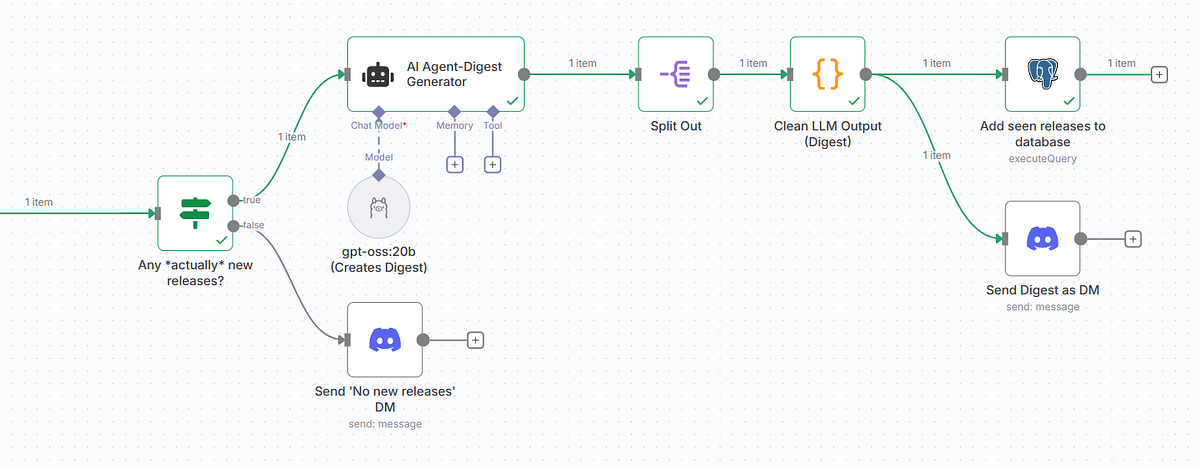
This keeps our workflow clean and prevents unnecessary API calls to the LLM when there’s nothing to process.
Step-by-Step Setup
1. Add an IF Node
After “Filter New Releases”, add an If node:
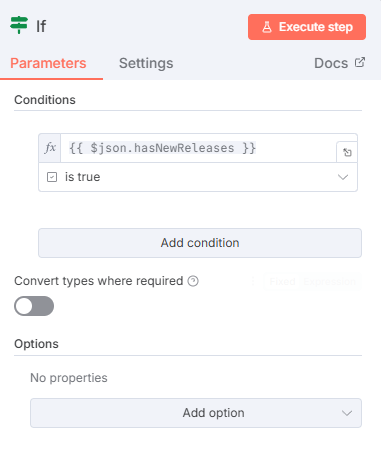
With this {{ $json.hasNewReleases }} is true condition, we check if the filtered releases array has at least one item.
- True: Continue to digest generation via AI Agent (default path)
- False: Send “no new releases” message via Discord node
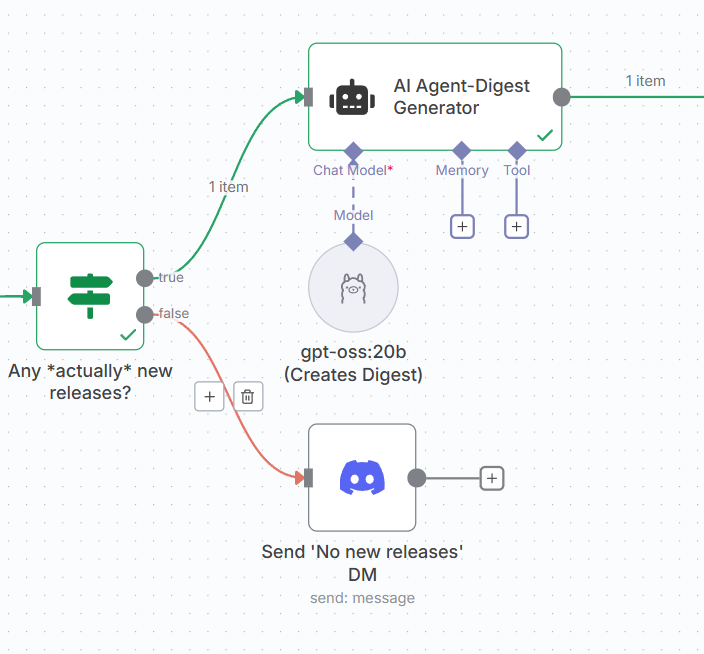
Let’s tackle the TRUE path first.
2. TRUE Path: Digest Generation per Release
On the TRUE output of the If node, connect an AI Agent node.
We’ll prompt this with the following:
User Prompt
## Generate a Plain-English Digest{{ $json.tag }} - {{ $json.date }}Create a short digest (1–2 sentences) for this release :{{ $json.body }}- Describe what changed or was fixed (features, bug fixes, or performance improvements).- Keep summaries concise, factual, and developer-oriented.The digest should read naturally, like a short changelog blurb for a newsletter or dev feed. It should link to relevant PRs for each change/fix.## Categorize ChangesGroup the extracted information under these categories where applicable, creating a "Breakdown":- Features / Enhancements- Fixes / Performance- Breaking Changes / Behavior Updates# Output format (strictly follow)Return ONLY valid JSON with this structure:{ "tag": "{{ $json.tag }}", "date": "{{ $json.date }}", "digest": "<plain English summary with PR links>", "breakdown": { "features": "<list or sentence>", "fixes": "<list or sentence>", "breaking": "<list or sentence>" }}# Example output (strictly follow){ "tag": "next@16.0.0-canary.0", "date": "October 10, 2025", "digest": "The first Next.js 16 canary introduces documentation improvements for Lightning CSS usage [#432555](https://github.com/vercel/next.js/pull/432555), fixes Rspack-related tooling issues [#45345](https://github.com/vercel/next.js/pull/45345), and adds a Turbopack warning system for detecting excessive file source matches [#435666](https://github.com/vercel/next.js/pull/435666).", "breakdown": { "features": "Lightning CSS documentation improvements, Turbopack file source reference warning system", "fixes": "Rspack lockfile test corrections, next-codemod version setting fix", "breaking": "None noted" }}
System Prompt
Reasoning:lowYou are a technical writer who transforms raw changelog data into concise, plain English digests for developers.
Again, we’ll chain a code node for cleanup to LLM outputs. Only this time, we want this to run once per digest generated, so we’ll first attach this to a n8n Split Out node first to get 3 JSON items from one nested JSON array. Just pick the output field here.
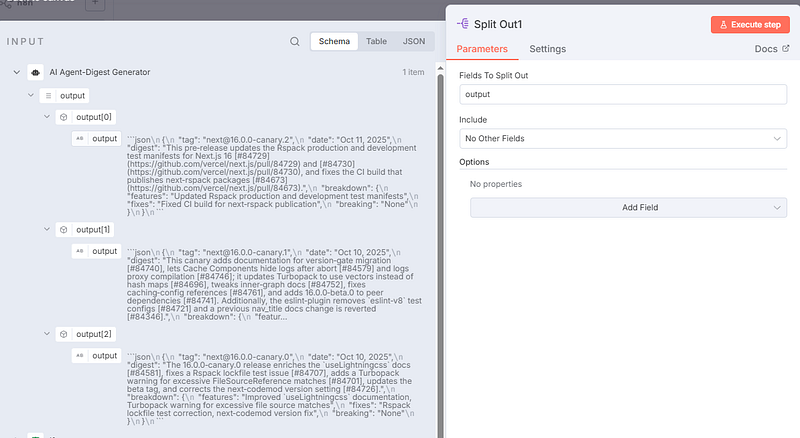
And then we’ll add the cleanup code node.
const raw = $json.output// Assume by default this is something flawed like:// ```json// { "tag": "next@16.0.0-canary.2", ... }// ```// Step 0: If it's not i.e. it's an object already (rare case), skip string parsingif (typeof raw === 'object') { raw = JSON.stringify(raw);}// Step 1: Remove Markdown-style code fences and trimlet cleaned = raw .replace(/```json|```/g, '') // remove code block markers .trim(); // remove extra newlines/spaces// Step 2: Parse the JSON safelylet parsed;try { parsed = JSON.parse(cleaned);} catch (err) { throw new Error(`Failed to parse JSON: ${err.message}`);}// Step 3: Return the parsed object as n8n itemsreturn { json: parsed };
Almost done! We only need two things now.
- Add the tags we’ve just processed to our ‘seen releases’ database, so we can filter using them on the next run
- Send the digests we generated as DMs on Discord
For the first part, another Postgres node for query execution will do just fine:
INSERT INTO processed_releases (tag, digest) VALUES ('{{ $json.tag }}', '{{ $json.digest }}')ON CONFLICT (tag) DO NOTHING;
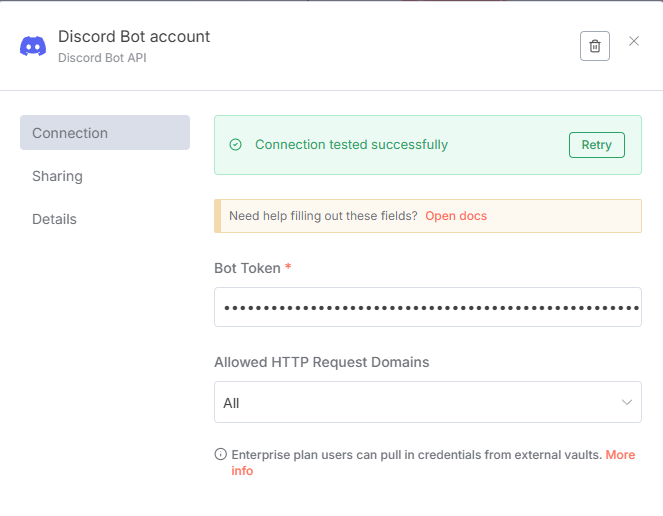
And for the second, n8n’s built-in Discord node will serve us perfectly. Make sure you add a Discord credential first (I’m using a simple Bot Token rather than OAuth, but this is up to you really. Building Discord bots is outside the scope of this tutorial).
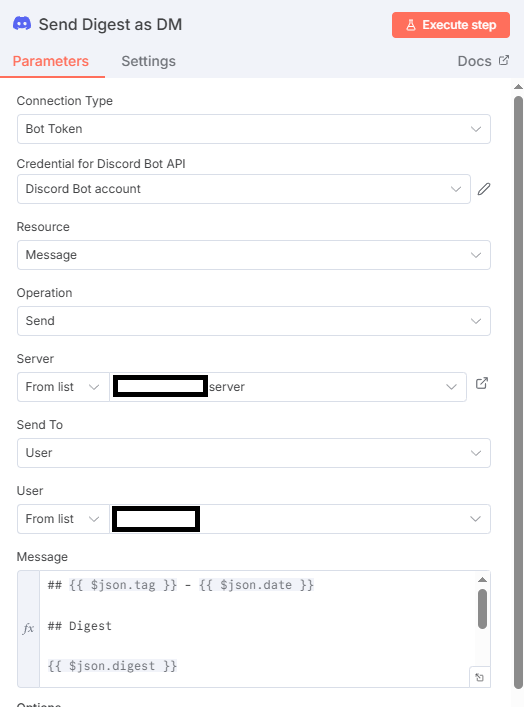
The message this bot will send you on Discord will use templating, obviously. Drag and drop fields from the left — you have access to tag, date, digest, and the 3 fields in breakdown — to craft your message. Here’s the message I used:
## {{ $json.tag }} - {{ $json.date }}
###  Digest
{{ $json.digest }}
### Breakdown
- Features: {{ $json.breakdown.features }}
- Fixes: {{ $json.breakdown.fixes }}
- Breaking Changes: {{ $json.breakdown.breaking }}
We’re all done!
3. FALSE Path: “No new releases” DM
Another Discord node, exact same settings, except the message will now simply read “No new canary releases.” or similar. Easy peasy.
We’re all done. Give it a whirl!
Output of this stage:
From here, it’s fully automated. Every new Next.js canary gets scraped, summarized, stored, and delivered to you via Discord DM by your bot — no manual intervention needed.
Here’s the DM I received while writing this, in fact 😅. Seems to be a minor release.
## next@16.0.0-canary.3 - Oct 12, 2025
### Digest
This one upgrades React to commit 9724e3e6‑20251008 [#84642], removes unused eslint‑disable directives [#84797], preserves existing config when enabling the React Compiler [#84663], and fixes a terminal corruption bug in the types‑and‑precompiled task [#84799].
### Breakdown
- Features: React bump, React Compiler config preservation
- Fixes: Unnecessary eslint‑disable removal, terminal corruption bug fix
- Breaking Changes: None
Why This Approach Works
Two key infrastructure pieces made this workflow practical:
- Bright Data MCP Integration: 5,000 free monthly requests with built-in CAPTCHA solving and anti-bot defenses mean you can automate web scraping reliably at scale — no proxy hacks, no rate-limit headaches. The Web MCP also saves you from needing additional browser automation tools, which keeps your LLM context cleaner and prevents models from losing track of too many tools.
- N8n Orchestration: Modern development teams need automation beyond simple scripts. N8n’s visual workflow builder chains together web scraping, LLM processing, data storage, and notifications without custom orchestration code. More importantly, it provides scheduling capabilities for true automation — set it and forget it.
Next Steps
Once you have the core workflow running, here are natural extensions:
- Automate on a Schedule: Use n8n’s cron triggers to run this workflow once a day. Rather than polling constantly, you can also watch GitHub releases or package registries and trigger only when new canaries drop — though this is a bit more difficult. I’d just stick to scheduling this run once per day yourself.
- Multi-Channel Notifications: You could always add Slack, Teams, Gmail or n8n’s other messaging nodes to broadcast digests across your team channels automatically.
- Extend to Other Tech Stacks: Adapt the scraper to track other canary releases (e.g., React, Remix, major frameworks) and generate a unified tech digest covering your entire stack — or even other registries.
- Store Historical Data: Your digests are in a Postgres database, so you could add full-text search (or, store them in a vector DB for semantic search) so your team can reference “what changed in canary.3 vs canary.5” months later.
Frequently Asked Questions
Q: What happens if GitHub rate limits my requests? A: With Bright Data’s MCP, this shouldn’t happen — you get auto-proxy rotation to avoid rate limits. For heavy usage, space out workflow runs or upgrade to Bright Data’s paid tier.
Q: Can I use this with other registries? A: Absolutely. The pattern is registry-agnostic. Swap the GitHub releases URL for any package registry (npm, PyPI, crates.io, etc.) and adjust the scraper prompt accordingly.
Q: How often should I run this workflow? A: Set up n8n’s cron trigger to automate based on your needs. For Next.js canary specifically, I’d just do this once per day.
Q: My local LLM is running out of memory. What should I do? A: Try a smaller Ollama model (7B instead of 20B — requires ~8GB VRAM), but output quality will suffer. Honestly, if hardware is a concern, moving off the local LLM approach to OpenAI/Anthropic makes more sense.
Q: Can I customize the digest output format? A: Yes. Modify the Digest AI agent prompt to output different formats (JSON, YAML, plain text). You can always use a Code node to adapt it to whatever you need, too.
Q: Can I integrate this with my IDE or dev tools? A: Yes. I personally do this! Using this workflow to store latest release info in my Supabase DB + then using the Supabase MCP in Cursor to reference them while coding = chef kiss 👌. Would recommend.
The Bigger Picture
So obviously, you shouldn’t use the Next.js canary branch in production, but staying aware of what’s landing in canary releases means staying ahead of breaking changes, performance improvements, and experimental features that might shape your own product roadmap.
With this n8n workflow, you now have a reusable pattern for extracting, processing, and synthesizing technical information that changes rapidly, at scale. Feed the output as context to your AI-assisted IDE, your internal wiki, or your developer knowledge base. Go nuts, have fun!
Comments
Loading comments…