A Common Dev Pain Point (And My Excuse to Learn Bun)
I hate it when I find an API I want to use, go to their documentation site, and find a beautiful page with endpoints, request/response examples, detailed explanations, and… no OpenAPI spec. No SDK, either.
I understand creating a Swagger/OpenAPI schema involves far more effort than a typical docs page for an API, so I can’t be too upset. But this does limit my options — I’d either have to hand-write fetch calls for every endpoint (tedious, error-prone), or politely ask the API maintainer for an OpenAPI spec (they are not obligated to spend dev cycles on some rando’s request.)
This is the case with at least 75% of all APIs here, for example. Even well-funded APIs sometimes have great docs but no machine-readable spec.
So I built a CLI tool with full proxy support (with Bun — this experiment is mostly because I wanted to learn how to create tooling with it) that generates TypeScript clients from either OpenAPI specs or raw documentation sites.
You use it like:
# 1. Just point it at the docs page
> dtoc https://docs.some-api.com
# Or, if you just want to run it in dev without building an executable...
> bun run index.ts https://docs.some-api.com

# 2. If the API does have a Swagger/OpenAPI JSON spec, use that instead
> dtoc https://some-other-api.com/doc.json
…and get back a complete TypeScript API client that you can use like so:
// In CommonJS you could omit the .js here, but not in ESM
import { ApiClient } from './generated/catfact_ninja/client.js';
const client = new ApiClient();
// Get a random cat fact
const fact = await client.getFactRandom();
console.log(fact.fact);
// Get a list of breeds
const breeds = await client.getBreeds();
And yes, it can read .env files from the same working directory, and compiles to a standalone ~100MB binary you can distribute.
Full source code here: https://github.com/sixthextinction/bun-docs-to-client
Throughout this article, code snippets link to specific files/lines. Some examples are simplified for clarity — check the links for complete implementations.
The Architecture
For any documentation site, we have two paths we can go down. Let’s visualize this before diving into code. So, two distinct pipelines depending on what you feed it:
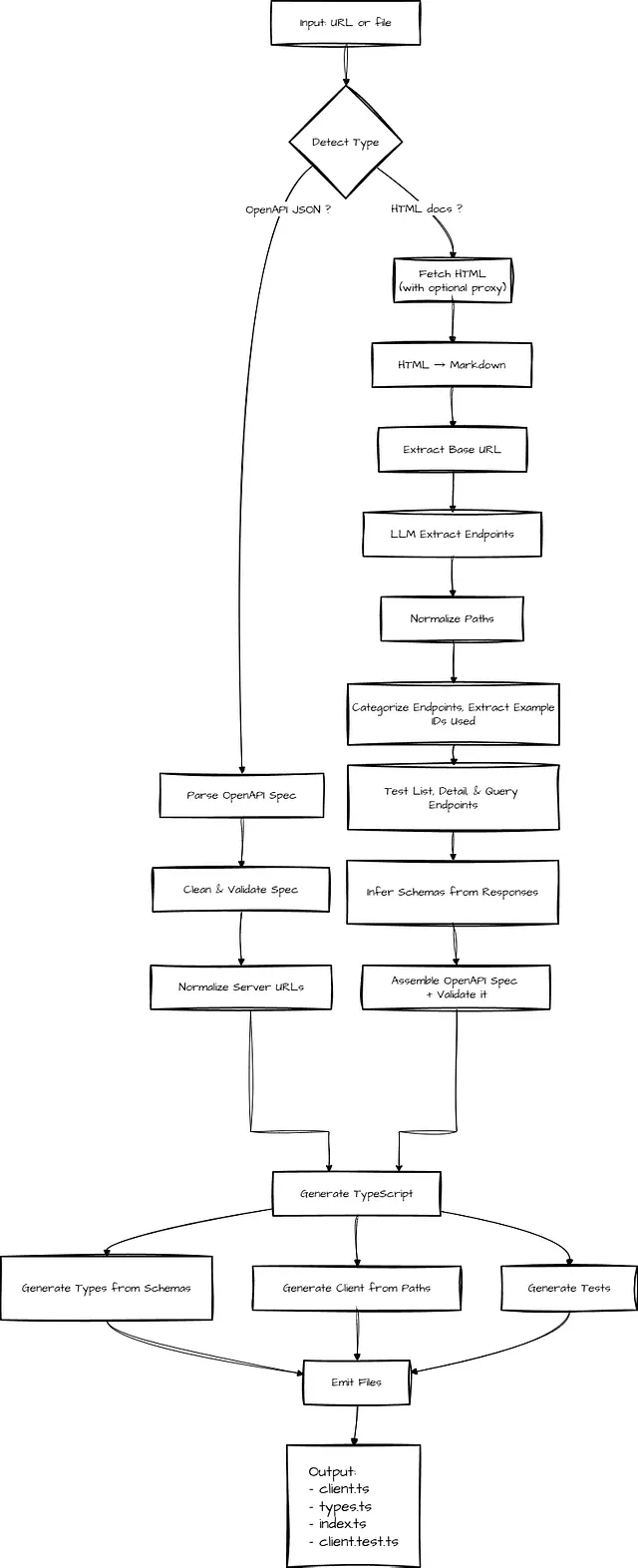
1. If you have a Swagger/OpenAPI spec (deterministic compile pipeline)
Our happy path is when a proper OpenAPI spec is available. The workflow becomes much more mechanical — and reliable.
- Fetch the OpenAPI JSON (pass in the URL to it, or a local file if you have it saved)
- Clean non-standard root properties
- Validate and dereference the spec using
swagger-parser - Normalize server URLs (absolute, relative, or inferred)
- Generate TypeScript interfaces from
components.schemas(part of the Swagger/OpenAPI JSON) - Generate a typed
ApiClientclass frompaths(also part of the spec) - Emit the client, types, tests, and index files
There’s no inference or heuristics at play. The spec becomes the single source of truth. Spec in, deterministic code out. This is our ideal case.
2. If you only have a messy docs site (LLM + runtime synthesis pipeline)
With this route, I’m looking for something that scaffolds me 80% of the way there. A best-effort version. It won’t one-shot every API, and that’s okay. I can do the rest.
When no OpenAPI spec exists, we have to synthesize one from the documentation page itself — and then make real requests to the API to validate it for us.
Our workflow has to become exploratory:
- Fetch the documentation HTML, convert HTML → Markdown (using turndown or similar)
- Use an LLM (preferably, local) to ONLY extract mentioned API endpoints from the markdown
- Infer the base URL from example requests
- Categorize endpoints (list, detail, query), then probe them by sending real HTTP requests — inferring the request structure for that endpoint from actual API response
- Extract IDs from list responses (e.g. if the docs page mentions
/people/1) and use them to probe detail routes like/people/{id}so schemas are inferred from real, working endpoints instead of guesses. - Assemble a minimal but valid OpenAPI spec from the above, validate it using
swagger-parser - Generate a typed
ApiClientclass and TypeScript interfaces - Emit the client, types, tests, and index files
The LLM’s job is narrow — it is instructed to only identify endpoints mentioned in the documentation (and we filter out the ones we know for sure won’t be endpoints — like image assets, CSS/JS files, OAuth flows, social links, status pages, or obviously non-API routes).
The LLM doesn’t need to be perfect, or fully generate the OpenAPI spec file itself. It just needs to extract mentioned endpoints. Our actual HTTP testing validates everything later and generates accurate schemas from real data.
By the time code generation runs, we’re back in the same deterministic world as the happy path — operating on a validated OpenAPI spec.
To get started: install Bun, then run bun install to install dependencies (We have two: @apidevtools/swagger-parser, and turndown).
Entry point is index.ts, as you’d expect.
import { normalizeUrl, isUrl, extractSiteName, detectContentType } from './src/fetch.js';
import { parseOpenAPI } from './src/parse.js';
import { docsToOpenAPI } from './src/docs-to-openapi.js';
import { generateClient } from './src/generate.js';
import { emitFiles } from './src/emit.js';

async function main() {
  const input = process.argv[2];

  if (!input) {
    console.error('Usage: bunx docs-to-client `<url-or-file>`');
    console.error('Example: bunx docs-to-client https://api.example.com/docs');
    console.error('Example: bunx docs-to-client ./specs/openapi.json');
    process.exit(1);
  }

  try {
    let spec: any;
    let specPath: string = input;

    if (isUrl(input)) {
      // Detect if it's HTML docs or OpenAPI JSON
      const contentType = await detectContentType(input);

      if (contentType === 'html') {
        // HTML docs path
        console.log(`1. Fetching HTML docs from ${input}...`);
        spec = await docsToOpenAPI(input);
      } else {
        // Existing OpenAPI JSON path
        console.log(`1. Fetching OpenAPI spec from ${input}...`);
        specPath = normalizeUrl(input);
        spec = await parseOpenAPI(specPath);
      }
    } else {
      // File path - check extension
      if (input.endsWith('.json')) {
        specPath = input;
        spec = await parseOpenAPI(specPath);
      } else {
        // Assume HTML docs file
        console.log(`1. Reading HTML docs from ${input}...`);
        spec = await docsToOpenAPI(input);
      }
    }

    const siteName = extractSiteName(input);

    console.log(`2.✅ Parsed OpenAPI ${spec.openapi || spec.swagger} spec`);
    console.log(`3. Generating client code...`);

    const clientCode = await generateClient(spec, input);

    console.log(`4. Writing files...`);
    await emitFiles(clientCode, siteName);

    console.log(`5. Done! Client generated in ./generated/${siteName}/`);
  } catch (error) {
    console.error('❌ Error:', error instanceof Error ? error.message : String(error));
    process.exit(1);
  }
}

main();
This uses the following modules:
- src/fetch.ts — URL fetching, proxy support, caching
- src/docs-to-openapi.ts — HTML→Markdown→LLM extraction→HTTP testing
- src/parse.ts — OpenAPI spec parsing and validation
- src/generate.ts — TypeScript client code generation
- src/emit.ts — Writing generated files to disk
Implementation: The Happy Path (OpenAPI Spec)
Let’s start with the simpler, deterministic path — when you already have an OpenAPI spec.
1. Fetching and Parsing the Spec
The first step is to (obviously) get the Swagger/OpenAPI JSON, and parse it. We accept either URLs or local file paths:
// Simplified
export async function fetchOpenAPI(input: string): Promise`<any>` {
  if (!isUrl(input)) {
    const file = Bun.file(input);
    if (!await file.exists()) throw new Error(`File not found: ${input}`);
    return await file.json();
  }

  const response = await fetch(input, { headers: { 'Accept': 'application/json' } });
  if (!response.ok) throw new Error(`Failed to fetch: ${response.status} ${response.statusText}`);

  const spec = await response.json();
  const specsDir = join(process.cwd(), 'specs');
  await mkdir(specsDir, { recursive: true });
  await Bun.write(join(specsDir, urlToFilename(input)), JSON.stringify(spec, null, 2));
  return spec;
}
Read the full implementation in src/fetch.ts (Lines 111 to 146) https://github.com/sixthextinction/bun-docs-to-client/blob/main/src/fetch.ts#L111-L146
2. Cleaning and Validating the Spec
OpenAPI specs sometimes have non-standard root properties that break parsers. We clean them like so:
// Simplified
const OPENAPI_ROOT_PROPERTIES = new Set([
  'openapi', 'swagger', 'info', 'servers', 'paths', 'components',
  'security', 'tags', 'externalDocs'
]);

function cleanSpec(spec: any): any {
  const cleaned: any = {};
  for (const [key, value] of Object.entries(spec)) {
    if (OPENAPI_ROOT_PROPERTIES.has(key)) cleaned[key] = value;
  }
  return cleaned;
}

const parsed = await SwaggerParser.validate(cleaned);
Read the full implementation in src/parse.ts (Lines 4–31): https://github.com/sixthextinction/bun-docs-to-client/blob/main/src/parse.ts#L4-L31
3. Generating TypeScript Code
With a validated spec, code generation is straightforward. We iterate through components.schemas to generate TypeScript interfaces, and paths to generate client methods.
// Simplified
function generateTypes(spec: any): string {
  const schemas = spec.components?.schemas || {};
  const typeDefs: string[] = [];

  for (const [name, schema] of Object.entries(schemas)) {
    if (schema.type === 'object') {
      const props = schema.properties || {};
      const required = schema.required || [];
      const propDefs = Object.entries(props).map(([propName, propSchema]: [string, any]) => {
        const optional = !required.includes(propName) ? '?' : '';
        const type = mapSchemaType(propSchema);
        return `  ${propName}${optional}: ${type};`;
      });
      typeDefs.push(`export interface ${name} {\\n${propDefs.join('\\n')}\\n}`);
    }
  }
  return typeDefs.join('\\n\\n');
}

function generateClientClass(spec: any, baseUrl: string): string {
  const paths = spec.paths || {};
  const methods: string[] = [];
  for (const [path, pathItem] of Object.entries(paths)) {
    for (const [method, operation] of Object.entries(pathItem)) {
      if (['get', 'post', 'put', 'patch', 'delete'].includes(method.toLowerCase())) {
        const methodName = generateMethodName(path, method, operation.operationId);
        const methodCode = generateMethod(methodName, method.toUpperCase(), path, operation);
        methods.push(methodCode);
      }
    }
  }
  return `export class ApiClient {
  private baseUrl: string;
  constructor(baseUrl: string = '${baseUrl}') { this.baseUrl = baseUrl.replace(/\\\/$/, ''); }
${methods.join('\\n\\n')}
}`;
}
The generated methods handle path parameters, query parameters, and request bodies automatically based on the OpenAPI spec.
Read the full code generation logic in src/generate.ts (Lines 24–98): https://github.com/sixthextinction/bun-docs-to-client/blob/main/src/generate.ts#L24-L98
This is the clean, deterministic path. Spec in, typed client out.
Now let’s look at what happens when we don’t have a spec.
Implementation: The Hard Path (HTML Docs → OpenAPI JSON)
When no OpenAPI spec exists, we have to get creative. Here’s a bird’s eye view of how we do this.
export async function docsToOpenAPI(input: string): Promise`<any>` {
  console.log('Converting HTML docs to OpenAPI spec...');

  // 1. Fetch HTML (with proxy if configured)
  const proxyOptions = getProxyOptions();
  const html = await fetch(input, proxyOptions as any).then(r => r.text());

  // 2. Convert to markdown
  const turndownService = new TurndownService();
  const markdown = turndownService.turndown(html);

  // 3. Extract endpoints using LLM
  const endpoints = await extractEndpointsWithLLM(markdown, input);
  console.log(`   Found ${endpoints.length} endpoints`);

  // 4. Extract base URL
  const baseUrl = extractBaseUrl(markdown, input);
  console.log(`   Base URL: ${baseUrl}`);

  // 5. Test API & build OpenAPI spec
  const openApiSpec = await exploreAndBuildSpec(endpoints, baseUrl);

  // 6. Save OpenAPI spec JSON to ./specs/
  const specsDir = join(process.cwd(), 'specs');
  await mkdir(specsDir, { recursive: true });
  const filename = urlToFilename(input);
  const cachePath = join(specsDir, filename);
  await Bun.write(cachePath, JSON.stringify(openApiSpec, null, 2));
  console.log(`Cached spec to ./specs/${filename}`);

  // 7. Validate & return
  return await SwaggerParser.validate(openApiSpec);
}
Let’s go over these steps one-by-one.
Step 1: Fetch HTML with Proxy Support
First, we fetch the documentation HTML. Proxy support is optional, and built-in. That’ll come in handy for sites behind Cloudflare or with rate limiting:
And getProxyOptions() uses proxy credentials in an .env file (Bun reads .env files out-of-the-box) to create a proxy config, returning fetch options. I’m using Bright Data’s residential proxies for this. You’ll have to sign up here to get those credentials. Or, just use your provider of choice.
Bright Data - All in One Platform for Proxies and Web Scraping
export function getProxyOptions(): Record`<string, any>` {
  // Don't want to use a proxy? Simply don't set these in your .env file
  const customerId = process.env.BRIGHT_DATA_CUSTOMER_ID;
  const zone = process.env.BRIGHT_DATA_ZONE;
  const password = process.env.BRIGHT_DATA_PASSWORD;

  if (customerId && zone && password) {
    if (!proxyStatusLogged) {
      console.log('Proxy config found! Using proxy to fetch docs site.');
      proxyStatusLogged = true;
    }
    const proxy = `http://brd-customer-${customerId}-zone-${zone}:${password}@brd.superproxy.io:33335`;
    return {
      proxy,
      tls: {
        rejectUnauthorized: false, // Required for Bright Data proxy
      },
    };
  }

  if (!proxyStatusLogged) {
    console.log('No proxy config found, using direct connection');
    proxyStatusLogged = true;
  }

  return {};
}
Step 2: Convert HTML to Markdown
Next, we’ll convert the HTML page into clean markdown using Turndown. Markdown is way easier for LLMs to parse than HTML soup.
const turndownService = new TurndownService();
const markdown = turndownService.turndown(html);
Step 3: LLM-Powered Endpoint Extraction
I’m using Qwen3–4B-Instruct-2507 running locally via Ollama. A very small and hardy ~4 billion parameter model, only ~2GB 4-bit quantized, and exceptionally performant even at 4x reduction vs FP16.
The prompt includes concrete few-shot examples and explicit exclusions.
You are an API documentation parser. Extract all API endpoints from the following markdown documentation.

Base URL: ${baseUrl}

Documentation:
${markdown}

Extract all API endpoints mentioned in the documentation. For each endpoint, identify:
1. The path (normalize path parameters like /people/1/ to /people/{id}/)
2. HTTP method (GET, POST, PUT, DELETE, etc.)
3. Query parameters (if any)
4. Path parameters (if any, like {id}, {category}, etc.)
5. Brief description if available

Return ONLY a JSON array of endpoints in this exact format:
[
  {
    "path": "/jokes/random",
    "method": "GET",
    "queryParams": ["category"],
    "pathParams": [],
    "description": "Get a random joke"
  },
  {
    "path": "/people/{id}",
    "method": "GET",
    "queryParams": [],
    "pathParams": ["id"],
    "description": "Get a specific person"
  }
]
Only include actual API endpoints. Exclude:
- Image URLs (/img/, .png, .jpg, etc.)
- Static assets (/css/, /js/, etc.)
- OAuth endpoints (/oauth/, /connect/)
- External links (different domains)
- Social media links (/twitter/, /github/, etc.)
- Very long paths that look like base64 data

Return ONLY the JSON array, no other text.
try {
    const ollamaUrl = process.env.OLLAMA_URL || 'http://localhost:11434';
    const model = process.env.OLLAMA_MODEL || 'hf.co/unsloth/Qwen3-4B-Instruct-2507-GGUF:Q4_K_M';

    const response = await fetch(`${ollamaUrl}/api/chat`, {
      method: 'POST',
      headers: { 'Content-Type': 'application/json' },
      body: JSON.stringify({
        model,
        messages: [{ role: 'user', content: prompt }],
        stream: false,
        format: 'json', // Ollama's structured output mode
        options: { temperature: 0.1 }, // Low for deterministic output
      }),
    });

    const data = await response.json();
    const content = data.message?.content || data.response || '';

    // Save LLM response to debug file for troubleshooting
    const debugPath = join(process.cwd(), 'debug', `${siteName}_${Date.now()}.md`);
    await Bun.write(debugPath, content);

    // Parse JSON (might be wrapped in markdown code blocks)
    let jsonStr = content.trim()
      .replace(/^```json\\n?/i, '')
      .replace(/\\n?```$/i, '');

    const jsonMatch = jsonStr.match(/\\[[\\s\\S]\*\\]/);
    if (jsonMatch) jsonStr = jsonMatch[0];

    const endpoints = JSON.parse(jsonStr);

    // Validate and normalize
    return endpoints
      .filter(e => e.path && e.method)
      .map(e => ({
        ...e,
        path: normalizePath(e.path), // /people/123 → /people/{id}
        method: e.method.toUpperCase(),
      }));

  } catch (error) {
    console.warn('LLM extraction failed, falling back to regex...');
    return extractEndpoints(markdown, inputUrl); // Regex fallback
  }
}
Key details:
- Temperature at 0.1 — we want as deterministic an output as possible
- Ollama’s format:’json’ option (consider passing a Zod schema to enforce it)
- We save the LLM response to a debug file for troubleshooting
- On failure, we fall back to regex extraction
The LLM response is not to be trusted — it gets parsed, validated, and we strip markdown code blocks if present.
Read the full LLM extraction in src/docs-to-openapi.ts (lines 22–151): https://github.com/sixthextinction/bun-docs-to-client/blob/main/src/docs-to-openapi.ts#L22-L151
Step 4: Extract Base URL & Normalize Paths
Before we go further, we need to figure out the API’s base URL. We try multiple strategies:
- Find URLs in code examples that look like API endpoints,
- Use first valid URL,
- Infer from input URL.
It’s also essential to normalize paths to OpenAPI format. The reason is obvious — multiple getId() functions are useless to us. What we want are functions like getPeopleById(), getItemById(), etc.
// Complete implementation - handles multiple ID formats
function normalizePath(path: string): string {
  // Replace numeric IDs with {id}
  // /people/123/ → /people/{id}/
  // /people/123 → /people/{id}
  let normalized = path.replace(/\/\\d+\//g, '/{id}/').replace(/\/\\d+$/g, '/{id}');

  // Replace :id with {id} (Express/Fastify style)
  // /people/:id/ → /people/{id}/
  normalized = normalized.replace(/\/:(\\w+)\//g, '/{$1}/').replace(/\/:(\\w+)$/g, '/{$1}');

  // Ensure trailing slash consistency
  normalized = normalized.replace(/\/$/, '') || '/';

  return normalized;
}
Read the full implementation in src/docs-to-openapi.ts (lines 194–204): https://github.com/sixthextinction/bun-docs-to-client/blob/main/src/docs-to-openapi.ts#L194-L204
Step 5: Test-Driven Schema Generation
This is the most critical — and hence, biggest — part. The function exploreAndBuildSpec() takes endpoints from the LLM output and tests them with real HTTP requests.
We categorize endpoints like so:
- list (e.g.
/people,/jokes), - detail (e.g.
/people/{id}), - query (e.g.
/search?q={query}).
We test list endpoints first — they give us schemas and sample IDs for detail endpoints.
async function testEndpoint(baseUrl: string, endpoint: Endpoint): Promise`<ApiResponse>` {
  const response = await fetch(`${baseUrl}${endpoint.path}`, {
    method: endpoint.method,
    headers: { 'Accept': 'application/json' }
  });
  const data = await response.json().catch(() => ({}));
  return { status: response.status, data, headers: {...} };
}

for (const endpoint of listEndpoints) {
  const response = await testEndpoint(baseUrl, endpoint);
  if (response.status === 200) {
    const schema = inferSchema(response.data, inferSchemaName(endpoint.path));
    const ids = extractIds(response.data);
    // Test matching detail endpoints with ids.slice(0, 2)...
  }
}
inferSchema() is recursive and handles all JSON types (primitives, arrays, nested objects, null):
function inferSchema(data: any, name: string): any {
  if (!data || typeof data !== 'object') return { type: typeof data };
  if (Array.isArray(data)) {
    return { type: 'array', items: data.length ? inferSchema(data[0], name) : { type: 'object' } };
  }
  const schema = { type: 'object', properties: {} };
  for (const [key, value] of Object.entries(data)) {
    if (value === null) schema.properties[key] = { type: 'string', nullable: true };
    else if (typeof value === 'string') schema.properties[key] = { type: 'string' };
    else if (typeof value === 'number') schema.properties[key] = { type: Number.isInteger(value) ? 'integer' : 'number' };
    else if (typeof value === 'boolean') schema.properties[key] = { type: 'boolean' };
    else if (Array.isArray(value)) schema.properties[key] = { type: 'array', items: value[0] ? inferSchema(value[0], name) : { type: 'string' } };
    else if (typeof value === 'object') schema.properties[key] = inferSchema(value, name);
  }
  return schema;
}
extractIds() pulls IDs from list responses — handles item.id, item.url (regex), and nested data.results for pagination:
function extractIds(data: any): string[] {
  const ids: string[] = [];
  if (Array.isArray(data)) {
    for (const item of data.slice(0, 5)) {
      if (item?.id) ids.push(String(item.id));
      if (item?.url) {
        const match = item.url.match(/\/(\\d+)\/?$/);
        if (match) ids.push(match[1]);
      }
    }
  } else if (data?.results && Array.isArray(data.results)) {
    return extractIds(data.results);
  }
  return ids;
}
With those obtained, we can now test detail endpoints, matching them to their parent list (e.g. /people/{id} matches /people), test with ids.slice(0, 2), and building the OpenAPI path definition:
for (const detailEndpoint of detailEndpoints) {
  const detailBasePath = detailEndpoint.path.replace('/{id}', '').replace('/{id}/', '');
  if (detailBasePath === endpoint.path || detailEndpoint.path.startsWith(endpoint.path + '/')) {
    for (const id of ids.slice(0, 2)) {
      const testPath = detailEndpoint.path.replace('{id}', id);
      const detailResponse = await testEndpoint(baseUrl, { ...detailEndpoint, path: testPath });
      if (detailResponse.status === 200) {
        // Infer schema, build paths[detailEndpoint.path] with $ref to schema...
        break;
      }
    }
  }
}
If a detail endpoint doesn’t have a matching list, we trial-and-error with common id’s like 1.
For query endpoints, we try to fetch real categories from a categories endpoint first (e.g. /categories) or use sensible defaults:
let testPath = endpoint.path;
if (endpoint.path.includes('{category}')) {
  const categoriesEndpoint = listEndpoints.find(e => e.path.includes('categor'));
  if (categoriesEndpoint) {
    const catResponse = await testEndpoint(baseUrl, categoriesEndpoint);
    if (catResponse.status === 200 && Array.isArray(catResponse.data)) {
      testPath = endpoint.path.replace('{category}', catResponse.data[0]);
    }
  } else {
    testPath = endpoint.path.replace('{category}', 'dev');
  }
}
if (endpoint.path.includes('{query}')) testPath = endpoint.path.replace('{query}', 'test');
const response = await testEndpoint(baseUrl, { ...endpoint, path: testPath });
Our approach means the generated TypeScript types are accurate because they’re based on real API responses instead of guesses. The code handles edge cases like extracting IDs from nested results arrays and falling back to common IDs when no IDs are found in list responses.
Read the full endpoint testing in src/docs-to-openapi.ts (lines 291–463): https://github.com/sixthextinction/bun-docs-to-client/blob/main/src/docs-to-openapi.ts#L291-L463
Step 6 & 7: Assemble, Cache, Validate
const spec = {
  openapi: '3.0.0',
  info: { title: 'API Client', version: '1.0.0', description: 'Generated from HTML documentation' },
  servers: [{ url: baseUrl }],
  paths: {
    '/people': {
      get: {
        summary: 'Get People',
        responses: { '200': { content: { 'application/json': { schema: { type: 'array', items: { $ref: '#/components/schemas/Person' } } } } }
      }
    },
    '/people/{id}': {
      get: {
        summary: 'Get Person by ID',
        parameters: [{ name: 'id', in: 'path', required: true, schema: { type: 'string' } }],
        responses: { '200': { content: { 'application/json': { schema: { $ref: '#/components/schemas/Person' } } } }
      }
    }
  },
  components: { schemas: { Person: { type: 'object', properties: { id: { type: 'integer' }, name: { type: 'string' }, ... } } } }
};
We cache the generated OpenAPI schema to ./specs/ and validate with swagger-parser. Once we have a confirmed working spec, we’re back in the happy path — code generation is now identical for both paths.
Read the full implementation in src/docs-to-openapi.ts (lines 268–295): https://github.com/sixthextinction/bun-docs-to-client/blob/main/src/docs-to-openapi.ts#L268-L295
That’s everything! Now, we can run it like this, as mentioned before:
# Generate client from an API's HTML docs (not perfect, but a good starting point)
bun run index.ts https://api.chucknorris.io/

# Or from an existing OpenAPI spec (perfect)
bun run index.ts https://cataas.com/doc.json

# Or from a local OpenAPI spec file (also perfect)
bun run index.ts ./specs/my-api.json
Or, even better for the end user, package it into a fully standalone executable file that won’t need any package installs — or even Bun installed — on the user’s PC.
Building a Standalone Executable with Bun
This is where Bun really shines. The entire CLI compiles into a single executable:
Cross-platform Builds:
# Windows
bun build --compile --target=bun-windows-x64 ./index.ts --outfile ./bin/dtoc.exe
# Linux
bun build --compile --target=bun-linux-x64 ./index.ts --outfile ./bin/dtoc
# macOS (Intel)
bun build --compile --target=bun-darwin-x64 ./index.ts --outfile ./bin/dtoc
# macOS (Apple Silicon)
bun build --compile --target=bun-darwin-arm64 ./index.ts --outfile ./bin/dtoc
What this does:
- compile: Bundles your code + Bun runtime into a single binary
- target: Platform (
windows-x64,linux-x64,darwin-arm64, etc.) - outfile: Where to write the executable
The result is a ~100–150MB standalone executable that runs on any machine (no Bun required), reads .env files (great for proxy credentials), includes all dependencies, has zero startup time, and can be distributed via GitHub releases or npm.
That’s it. Nothing else needed. This was my main learning goal — Bun makes CLI creation + distribution trivial.
Read the build configuration in package.json: https://github.com/sixthextinction/bun-docs-to-client/blob/main/package.json
Real-World Example
Let’s see this in action with an API that has no OpenAPI spec.
Usage:
bun run index.ts https://api.chucknorris.io
# or
./bin/dtoc https://api.chucknorris.io
Output:
Proxy config found! Using proxy to fetch docs site.
1. Fetching HTML docs from https://api.chucknorris.io...
   Converting HTML docs to OpenAPI spec...
   Found 3 endpoints
   Base URL: https://api.chucknorris.io
2. Parsed OpenAPI 3.0.0 spec
3. Generating client code...
4. Writing files...
5. Done! Client generated in ./generated/api_chucknorris_io/
Generated client usage:
import { ApiClient } from './generated/api_chucknorris_io/client.js';
import type { Random } from './generated/api_chucknorris_io/types.js';

const client = new ApiClient();

// Random joke (optional category as string)
const joke = await client.getRandom('dev') as Random;
console.log(joke.value);
// Real output I got:
// "Chuck Norris's log statements are always at the FATAL level."

// Or without category
const randomJoke = await client.getRandom();
console.log(randomJoke.value);

// List categories
const categories = await client.getCategories();
console.log(categories); // Fully typed! This will be string[]
Where To Go From Here
The OpenAPI path is production-ready. Point it at a spec, get a typed client. The other path — HTML→ OpenAPI — does exactly what I designed it to do: scaffold you 80% of the way there in seconds instead of hours.
That said, here’s what I’d add if I took this from weekend hack to prod:
- Multi-page documentation. Right now it’s single-page only. Adding a crawler that follows internal links would handle sites like Stripe’s multi-page API reference. The architecture already supports it BTW, just feed
docsToOpenAPI()a combined markdown file. - POST/PUT/PATCH body inference. Write endpoints get generated but never tested with real request bodies. Without actual examples, they default to
Record<string, any>. I'd either parse request body examples from docs with the LLM, or let users provide sample bodies via config. - Auth schemes. Right now, only public APIs work. Adding support for API keys, Bearer tokens, and OAuth via environment variables would make this work with private APIs too. Maybe the client could read
API_KEYfrom.envand inject it into headers automatically. 🤔 - Runtime validation with Zod. Types are inferred but not validated at runtime. If an API changes its response structure, you’ll only catch it when things break mysteriously. Wiring in Zod would validate responses on the fly and catch API changes immediately (and let me pass a serialized Zod schema for the LLM output, too.)
- Rate limiting and retry logic. Some APIs return 429 during exploration when we test 5–10 endpoints rapidly. Proxies won’t fix this. Adding configurable delays (
--delay 500) or exponential backoff would make the tool more robust against rate limits.
But for a weekend project I’m calling this a win. 😅 It solves the exact problem I set out to fix: turning undocumented APIs into typed clients without manual drudgery.
If you extend it, I’d love to see what you build. Again, the code is available on GitHub. Feel free to fork it, break it, or extend it. PRs welcome!
Closing Thoughts
This started as an excuse to learn Bun. I ended up with a tool I actually use.
- Actually solves a real pain point I’ve had for ages (no OpenAPI spec? No problem!)
- Compiles to a single executable I can share — the user wouldn’t even need dependencies or Bun installed on their PC.
- Uses a local LLM (no API costs, no privacy concerns)
- Generates accurate types from real HTTP responses
What surprised me most: How easy Bun made the entire process. From TypeScript support to built-in fetch with proxy to .env file reading with zero dependencies to single-file executables, it felt like building CLIs the way it should be.
If you’re looking for a project to learn Bun, I highly recommend starting off by building a CLI tool. The developer experience is genuinely better than Node.js.
Hi 👋 I’m constantly tinkering with dev tools, running weird-ass experiments, and otherwise building/deep-diving stuff that probably shouldn’t work but does — and writing about it. I put out a new post every Monday/Tuesday. If you’re into offbeat experiments and dev tools that actually don’t suck, give me a follow.
If you did something cool with this tool, I’d love to see it. Reach out on LinkedIn, or put it in the comments below.
Comments
Loading comments…